Choose between the API, webhooks and a public API
Three ways to connect another system to Laramin: call the signed-in API, receive signed webhooks, or read a module's public API. See which fits your job, which credential each needs, and where each is documented.
- Applies to
- Core 12.7 and later
- Who can do this
- Developer, Platform owner
On this page
In short
Call the API when your system needs to ask Laramin something, as a person. Receive webhooks when your system needs to know the moment something changes. Read a public API when a website or app shows published content to anyone. Many integrations use two: a webhook to hear that something changed, then an API call to read it.
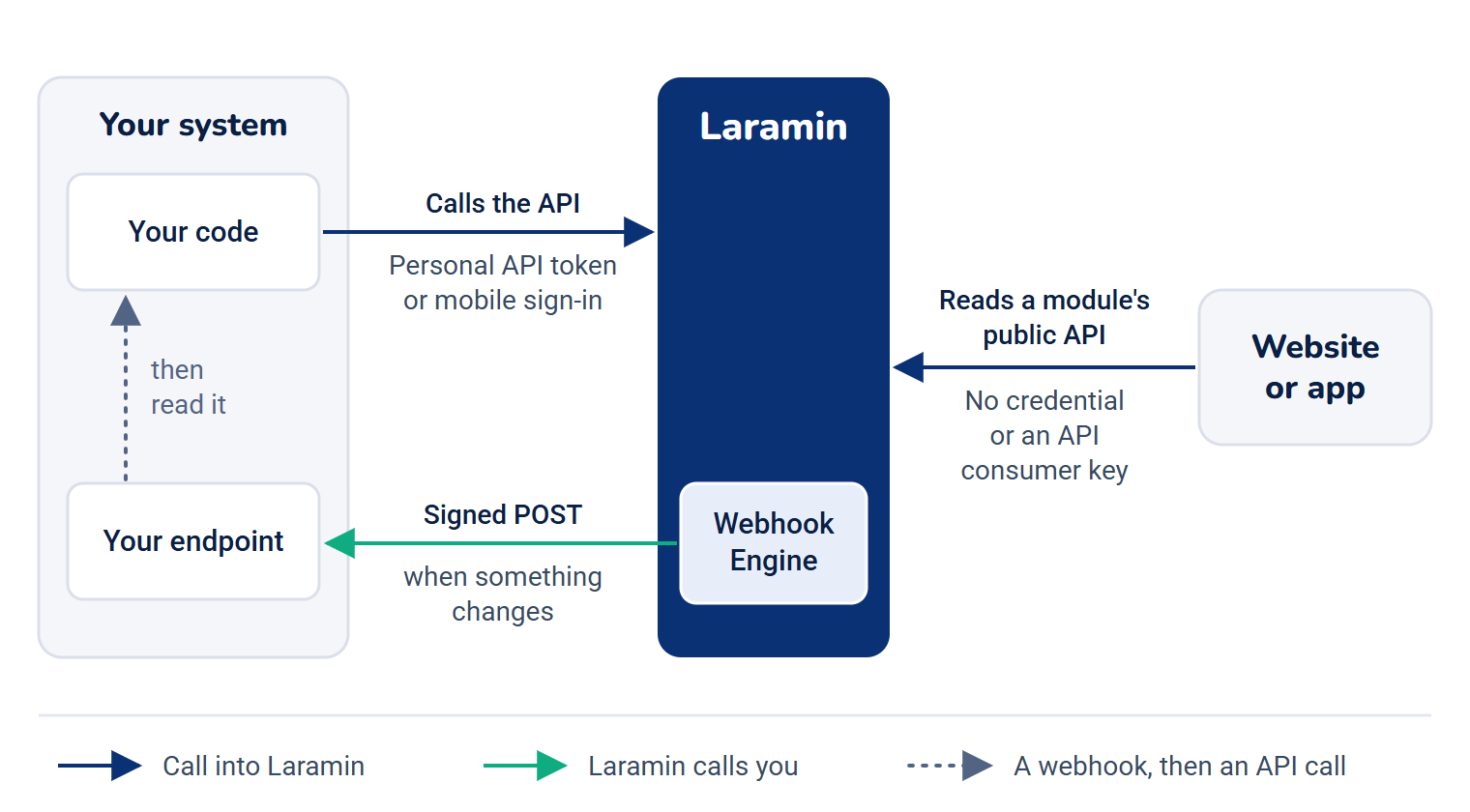
How the three compare
| The API | Webhooks | A module's public API | |
|---|---|---|---|
| Direction | Your system calls Laramin | Laramin calls your system | Your website or app calls Laramin |
| Acts as | The person whose token you send | Nobody: it's a notice | Anyone, or a registered application |
| Credential | A personal API token or a mobile sign-in | A signing secret you check on each message | None, or an API consumer key |
| Good for | Reading a person's data, acting on their behalf in an app | Keeping another system in step, starting a workflow | Websites, apps and build tools showing published content |
| Set up in | Account menu › API Tokens | Webhook Engine | The module, plus Developer Tools › API Consumers for keys |
| Documented in | Core API endpoints and each module's reference | Webhook payloads, headers and events | The module's reference |
When to use each
The API
Use it when something must happen as a particular person, with their permissions: a mobile app, a script that reads someone's notifications, a report that pulls a module's data. Create a token for a dedicated account whose roles allow only what the integration needs. See Authenticate API requests.
Don't poll the API to find out whether something changed. That wastes your rate limit and still finds changes late. Use a webhook.
Webhooks
With the Webhook Engine add-on, your Laramin sends an HTTP POST to your endpoint when users, blog articles or Headless CMS content change, signed so you can check it's genuine. Your endpoint answers within 10 seconds, and failures are retried.
A webhook says what changed, not always everything about it. Headless CMS events, for example, carry ids and versions only: fetch the content from the delivery API.
A module's public API
Modules that publish content to a website have a public API that needs no sign-in:
- Headless CMS delivery API, with a consumer key for restricted spaces
- Blog public API
- SEO's settings, sitemap, redirects and feeds
- Core's public settings and reference lists, such as countries and currencies: see Core API endpoints
These are safe to call from a visitor's browser, as long as your website's address is on your Laramin's list of allowed origins. Give a server, app or build tool its own key, so you can tell callers apart and stop one at a time. See Register an API consumer and issue its key.
What Laramin doesn't offer
- OAuth apps for third parties. You can't let people "Sign in with Laramin" to your service, or register an OAuth client from a screen. Integrations use personal API tokens.
- Write access from a personal API token. Personal tokens are read-only. Changes are made on screen, or by a mobile app signed in as its user.
- A bulk export API. To move a lot of data at once, use Export a list to CSV.
Incoming messages from providers
Some modules receive messages from outside services, such as delivery receipts from an SMS or WhatsApp provider. Those addresses belong to the module and are set up in the provider's console, not called by your own systems. They stay open during maintenance mode.
Next steps
Thanks. That helps us decide what to write next.
Thanks for telling us what was missing.
You already answered for this article today. Thanks.
We got a lot of answers from your network just now. Try again in a few minutes.
We couldn't send that. Check your connection and try again.
Links in this article
Printed from help.bsscn.com. The online article may have changed since.