Authenticate API requests
Pick the right credential for your caller (a personal API token, a mobile sign-in, a web sign-in, the platform API key or an API consumer key), send it, and understand scopes, account requirements, expiry and the workspace and team headers.
- Applies to
- Core 12.7 and later
- Who can do this
- Developer
On this page
Every request to your Laramin's API carries at most one credential, in the Authorization header as a bearer token. The examples use https://crm.example.com and made-up tokens: use your own Laramin's address, and keep real tokens out of your code.
Choose a credential
| You're building | Use | Works on |
|---|---|---|
| A script, report or server-to-server integration that acts as one person | A personal API token | /api/v1/mobile/…, including module endpoints there, and the few other addresses that take a signed-in token |
| A mobile app whose users sign in | The access token from the mobile sign-in | The same addresses as a personal API token |
| A browser front end that signs people in with a password | The token from the web sign-in | /api/v1/web/… only |
| An app that must read settings or configuration before anyone signs in | The platform API key, or an API consumer key | Endpoints that don't need a signed-in user |
| A website reading public data | Nothing | /api/v1/public/… |
Tokens from the two sign-in systems aren't interchangeable. A personal API token or a mobile access token is refused on /api/v1/web/… with 401, and a web token is refused on /api/v1/mobile/… the same way. Module endpoints follow the surface they sit in: Monetization's catalogue, for example, takes a personal API token at /api/ but not at /api/.
Use a personal API token
A personal API token acts as the person who created it, with their permissions, and can only read.
-
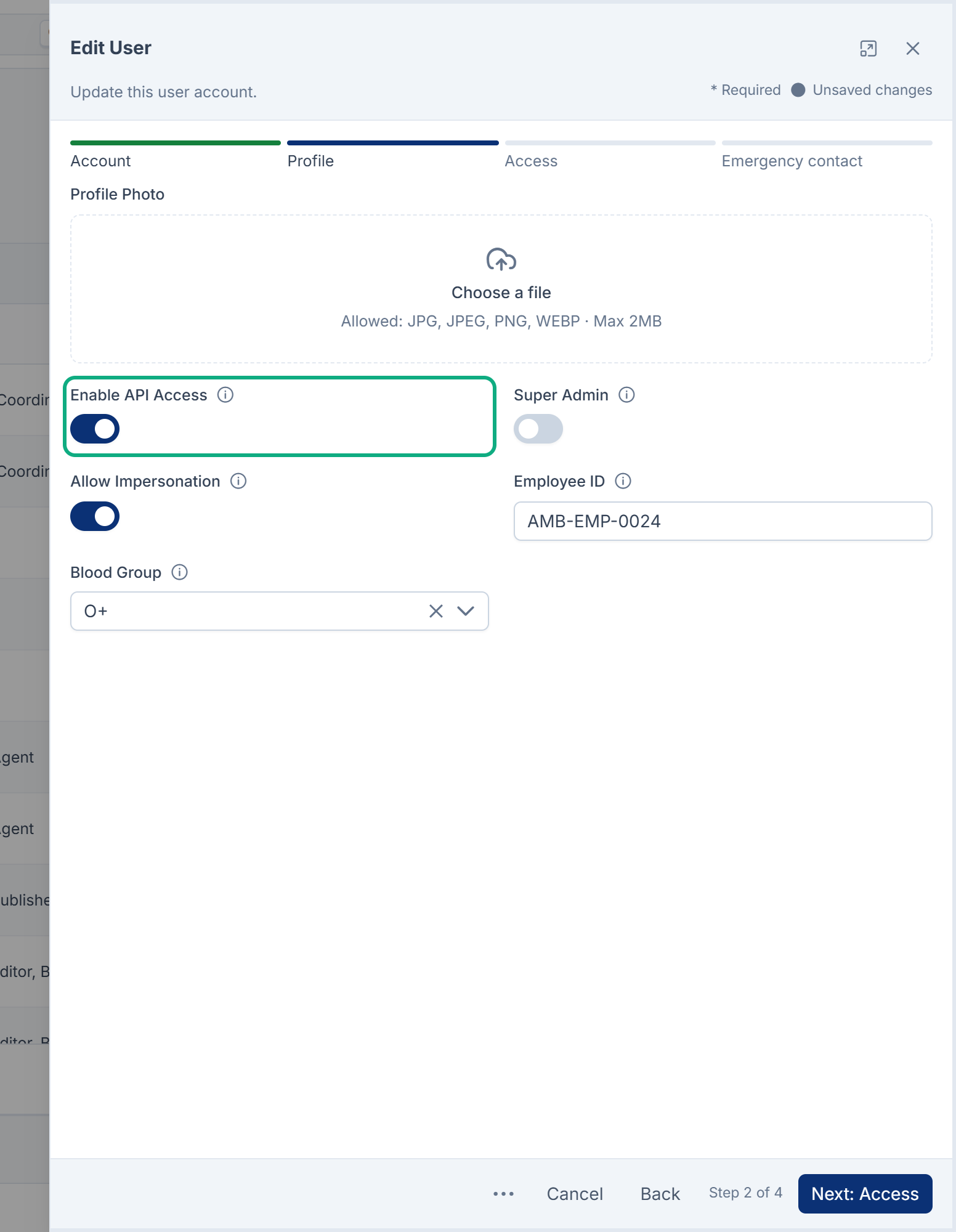
Make sure the account has Enable API Access turned on, is active, and has a verified email address. An administrator turns on API access on the user's Profile step. See Edit a user.
-
Signed in as that person, create a token from Account menu › API Tokens. See Create and manage personal API tokens.
-
Store the token as a secret, for example in an environment variable.
-
Send it as a bearer token:
BashCouldn't copy. Select the code and press Ctrl+C (⌘+C on a Mac).
curl https://crm.example.com/api/v1/mobile/profile \
  -H "Accept: application/json" \
  -H "Authorization: Bearer $LARAMIN_TOKEN"
Replace the highlighted values with your own.
JavaScriptCouldn't copy. Select the code and press Ctrl+C (⌘+C on a Mac).
const res = await fetch('https://crm.example.com/api/v1/mobile/profile', {
  headers: {
    Accept: 'application/json',
    Authorization: `Bearer ${process.env.LARAMIN_TOKEN}`,
  },
});
const body = await res.json();
if (!body.success) throw new Error(`${res.status} ${body.error.code}: ${body.message}`);
console.log(body.data.user.name);
Careful: Don't send POST /api/ with a personal API token. It revokes the token you sent, exactly as Revoke does.
What a personal API token can do
New tokens carry the read scope. They can call anything that reads, but every endpoint that changes data asks for write access and refuses a read-only token with 403 and INSUFFICIENT_. In Core, that's updating the profile, avatar and password, recording consent and marking notifications read. There's no way to create a token with write access from API Tokens.
In Core 12.8, a personal API token can read the signed-in person's profile, notifications, consent choices, workspaces and what they may do, and Custom Fields' field definitions. Modules add more, such as Monetization's catalogue and Activity Log's entries. See Core API endpoints.
Scopes
| Scope | Given to | Allows |
|---|---|---|
read | Every personal API token | Reading only |
mobile | Mobile sign-ins | Reading and changing, as the signed-in person |
write | No screen: API Tokens only issues read tokens | Reading and changing |
help | Help Center sign-ins only | GET /api/v1/help/me and nothing else |
A scope never adds permissions: the request is still limited to what the person may do.
Sign in from a front end or app
-
Mobile app:
POST /api/returns a short-lived access token and a refresh token. See Sign people in from a mobile app.v1/ mobile/ login -
Browser front end:
POST /api/withv1/ web/ login emailandpasswordreturnsdata.token, a token for the web surface. In 12.7 and 12.8 you can't use that token: every/api/v1/web/…endpoint that needs a signed-in person answers it with401UNAUTHENTICATED, and so doesPOST /api/. The web sign-in also issues it without asking for a two-factor code, and without checking Enable API Access or whether the account is active. Use a personal API token instead, which you can revoke from the screen and which follows the account's API access.v1/ web/ logout From Core 12.8.7,
POST /api/andv1/ web/ login POST /api/follow your Laramin's IP rules, as the Sign-In screen and the mobile sign-in do. The sign-in is checked before the password, against the account's own rules, then its roles', then the global ones. Sign-up is checked against the global rules before the account is created. A refused address getsv1/ web/ register 403UNAUTHORIZEDwith "Access denied from your network address. Please contact your administrator.", and no token. In 12.8.6 and earlier, both issued a token from any address.
Send the platform API key or an API consumer key
Some endpoints are used before anyone signs in, such as Core Mobile's start-up settings. They need proof that the request comes from your own app or integration: the platform API key, or the key of an API consumer registered in your Laramin.
Couldn't copy. Select the code and press Ctrl+C (⌘+C on a Mac).
curl https://crm.example.com/api/v1/mobile/module/coremobile/app-config \
  -H "Accept: application/json" \
  -H "X-Api-Key: $LARAMIN_APP_KEY"
Send the key as X-Api-Key or as Authorization: Bearer. Either key opens every endpoint that doesn't need a signed-in user, but neither signs anyone in: an endpoint that needs a person still answers 401. A consumer key also tells modules which application is calling, so Headless CMS, for example, can apply that application's grants.
With a consumer key you can also send X-Consumer with the consumer's Key as a check. If it names a different consumer, the request is refused with 403.
These need no credential at all: GET /api/version, the mobile sign-in (with its two-factor step), token refresh, sign-up and password-reset endpoints, and everything under /api/v1/public/.
To issue a consumer key, or find where the platform API key is set, see Register an API consumer and issue its key.
Careful: A key built into a mobile app or a website can be read by anyone who has a copy. Use these keys only for endpoints whose answers aren't secret, and never put a personal API token in an app or a web page.
When a request is refused
| Answer | Why |
|---|---|
401 UNAUTHENTICATED | No credential, or one your Laramin doesn't recognise. Also a token that has expired or been revoked: "Your API token has expired. Please sign in again." |
403 UNAUTHORIZED | "API access is disabled for your account." Enable API Access is off for the token's person. Or the person lacks the permission the endpoint needs. Or your IP rules refuse the address the request comes from: "Access denied from your network address. Please contact your administrator." See How IP access control works. |
403 ACCOUNT_ | The account has been deactivated. |
403 EMAIL_UNVERIFIED | The account's email address isn't verified. |
403 INSUFFICIENT_ | A read-only token was sent to an endpoint that changes data. |
403 WORKSPACE_, TEAM_UNAVAILABLE | X-Workspace-Ref or X-Team names a workspace or team the person can't enter. See below. |
403 PASSWORD_, TWO_ | Mobile sign-in tokens only: the person must choose a new password, or set up two-factor authentication, first. See Sign people in from a mobile app. |
Turning off Enable API Access or deactivating the account stops the person's personal API tokens and mobile tokens at their next request. Resetting the person's password, an administrator setting it, or the person changing it on the web revokes all of those tokens, so an integration using a personal API token needs a new one.
Choose the workspace and team
A signed-in request acts in the person's usual workspace and team, chosen as on screen. To act somewhere else, name it on the request:
| Header | Value |
|---|---|
X-Workspace-Ref | The workspace's reference, or all to read across every workspace the person may read. To find a reference, open Users Accounts › Workspaces, select Columns and turn on Reference. |
X-Team | The team's numeric id, inside that workspace. |
A workspace the person can't enter is refused with 403 WORKSPACE_, and a team with 403 TEAM_UNAVAILABLE. It's never swapped silently for another one. An empty X-Workspace-Ref is refused too: leave the header out to get the usual workspace. See Workspaces, teams and experiences explained.
Good practice
- Create one token per integration, named after it, so you can revoke one without stopping the others.
- Give it an expiry. Your Laramin may also allow tokens that never expire, but a token that expires limits the damage if it leaks.
- Use an account whose roles allow only what the integration needs.
- If a token or key leaks, revoke or rotate it at once.
Thanks. That helps us decide what to write next.
Thanks for telling us what was missing.
You already answered for this article today. Thanks.
We got a lot of answers from your network just now. Try again in a few minutes.
We couldn't send that. Check your connection and try again.
Links in this article
Printed from help.bsscn.com. The online article may have changed since.