How the Laramin API works
Laramin's REST API has three surfaces, web, mobile and public, under /api/v1. Learn the base addresses, which credential each surface takes, the JSON envelope every answer uses, the request headers it reads, and where to find the API documentation for your own Laramin.
- Applies to
- Core 12.7 and later
- Who can do this
- Developer
On this page
In short
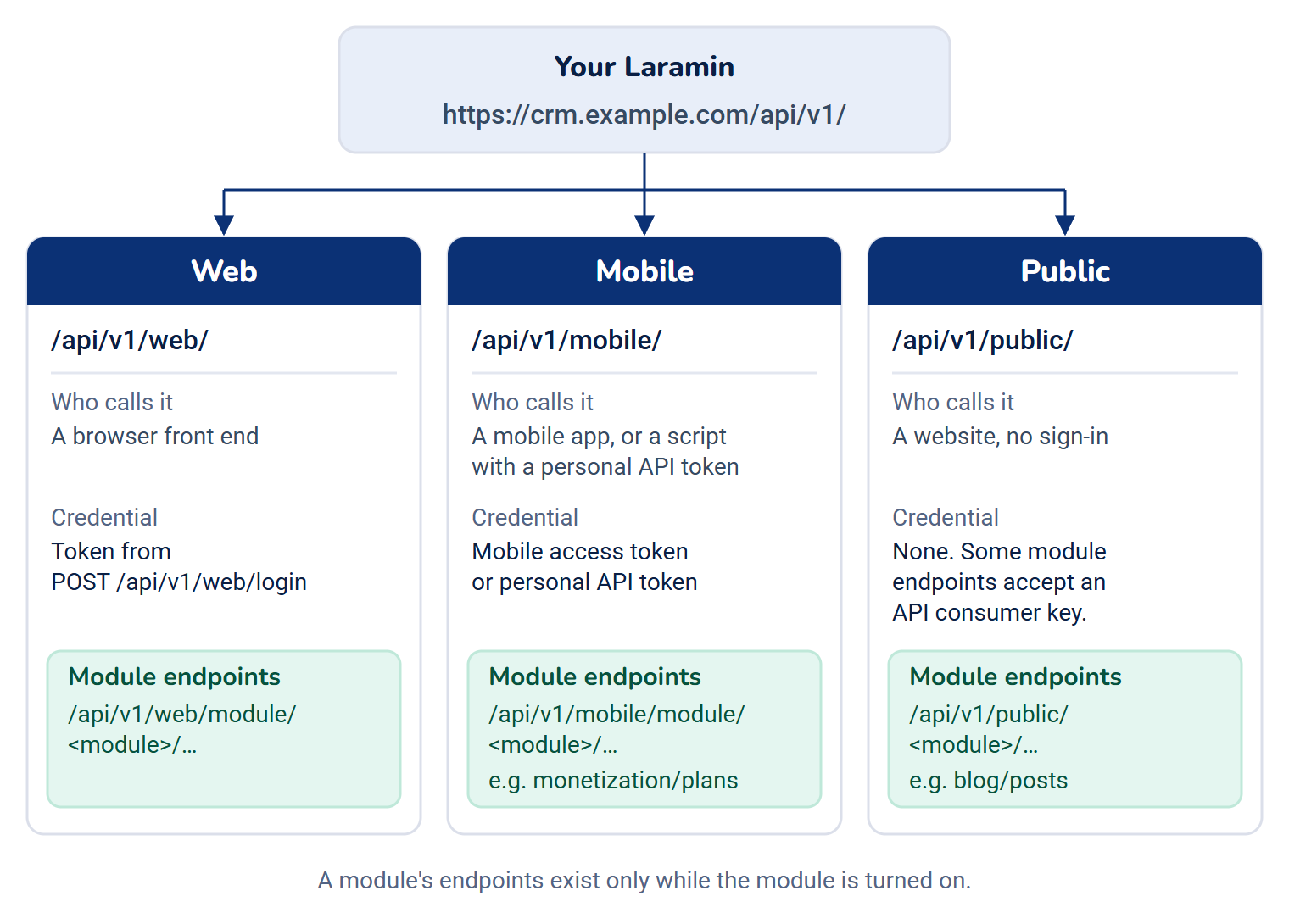
Every Laramin has its own API, at its own address, such as https://crm.example.com. It's split into three surfaces by who's calling: web for a browser front end, mobile for an app whose users sign in, and public for a website that reads data without signing in. Every answer, success or error, is JSON in the same envelope.
How it works
Base addresses
| Surface | Base path | Who calls it | Credential |
|---|---|---|---|
| Web | /api/v1/web/ | A front end that signs people in with a password | A token from POST /api/. In 12.7 and 12.8 it isn't accepted. See Authenticate API requests. |
| Mobile | /api/v1/mobile/ | A mobile app, and scripts using a personal API token | The access token from the mobile sign-in, or a personal API token |
| Public | /api/v1/public/ | A website, from the server or straight from the visitor's browser | None. Some module endpoints accept an API consumer key. |
Modules add their own endpoints inside these surfaces: /api/, /api/ and /api/. For example, Monetization's plans are at /api/ and Blog's articles at /api/. A module's endpoints exist only while the module is turned on.
The web and mobile surfaces use different sign-in systems, so their tokens aren't interchangeable. A token from POST /api/ works only on /api/v1/web/…. A mobile access token or a personal API token works only on /api/v1/mobile/… and the few other addresses that take the same tokens. See Authenticate API requests.
Versions
All endpoints are version 1. Ask any Laramin which versions it serves, without signing in:
Couldn't copy. Select the code and press Ctrl+C (⌘+C on a Mac).
curl https://crm.example.com/api/versionReplace the highlighted values with your own.
Couldn't copy. Select the code and press Ctrl+C (⌘+C on a Mac).
{
"success": true,
"message": "API version information.",
"data": {
"current": "v1",
"supported": ["v1"],
"deprecated": {},
"minimum_client_versions": { "ios": "1.0.0", "android": "1.0.0", "web": "1.0.0" },
"documentation_url": "/docs/api"
},
"meta": { "request_id": "6f1d0c2e-…", "locale": "en" }
}documentation_ comes from the server's API_DOCS_URL setting. Its default, /docs/api, isn't an address Laramin serves: it answers 404. The documentation is at /admin/, described below.
When an endpoint is retired, it first answers with Deprecation and Sunset headers that give the date it stops working. A breaking change goes into a new version, beside v1, not into v1.
On the web and mobile surfaces, an app can say which version of itself is calling with two headers, X-App-Platform (ios, android or web) and X-Client-Version (such as 2.4.0). If that version is older than the minimum your Laramin requires, the request is refused with 426 and UPGRADE_REQUIRED, so the app can ask its user to update. Leave both headers out and the check is skipped.
The response envelope
Every answer has the same shape. A success:
Couldn't copy. Select the code and press Ctrl+C (⌘+C on a Mac).
{
  "success": true,
  "message": "Profile retrieved successfully.",
  "data": { "user": { "id": 42, "name": "Example User", "email": "user@example.com" } },
  "meta": { "request_id": "6f1d0c2e-…", "locale": "en" }
}datais the payload: an object for one record, a list for many, ornullwhen there's nothing to return.metaalways hasrequest_idandlocale. Lists add paging details tometaand alinksobject. See Paging, filtering, sorting and caching.messageis for people and may be translated. Don't branch on it.
An error:
Couldn't copy. Select the code and press Ctrl+C (⌘+C on a Mac).
{
  "success": false,
  "message": "Validation failed.",
  "error": { "code": "VALIDATION_ERROR", "type": "validation" },
  "errors": { "email": ["The email field is required."] },
  "meta": { "request_id": "6f1d0c2e-…", "locale": "en" }
}
Branch on the HTTP status and error.code. errors appears only when there are per-field problems or extra details. See API errors and error codes.
A few endpoints don't use the envelope because they aren't JSON, such as SEO's feeds. Their reference pages say so.
Headers your Laramin reads
| Header | What it does |
|---|---|
Authorization: Bearer <token> | The token or key for the request. |
X-Api-Key | Another way to send the platform API key or an API consumer key. |
Accept: application/json | Always send it. It makes sure errors come back as JSON. |
X-Locale, then Accept-Language | The language for messages and translated fields, if your Laramin has it. The answer's Content-Language header and meta.locale say which language was used. |
X-Request-Id | Your own id for the request, such as a trace id. It's sent back in the X-Request-Id header and meta.request_id. Without it, your Laramin makes one up. Quote it when you report a problem. |
X-App-Platform, X-Client-Version | The app version check described above. |
X-Device-Id, X-, X-Device-Model, X-OS-Version, X-App-Version | Optional details about the device, kept with the request in your Laramin's logs. X-Device-Id also lets requests made before sign-in be counted per device for the rate limits. |
X-Workspace-Ref, X-Team | With a signed-in token: which workspace, and which team in it, the request acts in. See Authenticate API requests. |
Each answer also carries X-Response-Time, how long your Laramin took.
The API documentation for your Laramin
Your Laramin generates interactive OpenAPI documentation for its own endpoints, including those of the modules it has. Super admins find it under Developer Tools › API Documentation. Anyone else with Enable API Access can open it too, at /admin/, but the menu entry is only in the super admin sidebar. Someone without API access is refused, whatever their role.
The documentation is generated from files on the server. If it says a specification hasn't been exported, whoever runs the server runs php artisan scramble:export-.
What the API doesn't do
- There's no API for everything you can do on screen. Core's own endpoints cover signing in, the signed-in user's account, notifications and consent, and public reference data. Most business data is reached through module endpoints. See Core API endpoints.
- You can't register your own OAuth application. Laramin's OAuth server issues tokens for its own mobile sign-in and for the Help Center, and there's no screen for adding a client. The
/oauth/clientsand/oauth/addresses answer anyone signed in to Laramin in the browser, but they come from Laravel Passport, the OAuth library underneath, and aren't part of Laramin's supported API.personal- access- tokens - Laramin doesn't call you over the API. To hear about changes as they happen, use webhooks. See Choose between the API, webhooks and a public API.
Next steps
Thanks. That helps us decide what to write next.
Thanks for telling us what was missing.
You already answered for this article today. Thanks.
We got a lot of answers from your network just now. Try again in a few minutes.
We couldn't send that. Check your connection and try again.
Links in this article
Printed from help.bsscn.com. The online article may have changed since.