How Webhook Engine works
Webhook Engine tells other systems when something happens in your Laramin, such as a new user or a published article. It sends a signed message to each address you set up, retries when it fails, and logs every attempt.
- Applies to
- Webhook Engine 2.2 and later
- Who can do this
- Platform owner, Administrator, Developer
On this page
In short
A webhook is a message your Laramin sends to another system the moment something happens, so that system doesn't have to keep asking. Webhook Engine sends these messages. You tell it where to send them (a destination) and which events each destination wants. For every matching event, it sends one POST request with a JSON body, signs it so the receiver can check it came from your Laramin, and records what happened in the delivery log.
Webhook Engine only sends. It doesn't receive webhooks from other services. Payment providers and SMS providers that call your Laramin are set up in their own add-ons.
How it works
The parts
| Part | What it is | Where you manage it |
|---|---|---|
| Destination | An address that receives deliveries, with the events it wants, optional filters and extra headers, a rate limit and a signing secret. | Webhook Engine › Destinations |
| Event | Something that happened, such as user.created or hcms.. Each destination subscribes to one or more. | Subscribed Events on the destination form |
| Delivery | One attempt to send one event to one destination. Each attempt is a row in the log. | Webhook Engine › Delivery Logs |
| Test Console | Sends one payload of your choice to a destination straight away, and shows the full request and response. | The destination's Test Console link |
Which events you can choose
The event list is built from the add-ons you have turned on:
| From | Events |
|---|---|
| Webhook Engine itself | user.created, user.updated, user.deleted |
| Blog, when it's on | post.created, post.updated, post.deleted, category.created, category.updated, category.deleted |
| Headless CMS, when it's on | Seven events, such as hcms. and hcms.. See How the Headless CMS works. |
If you turn an add-on off, its events leave the list, but destinations already subscribed to them keep the subscription. The form marks such an event no longer offered, so you can see it and remove it on purpose. The full list, with what each event sends, is in Webhook payloads, headers and events.
What happens when an event occurs
- Your Laramin finds every destination whose Status is Active and that subscribes to the event.
- It checks the destination's Event Filters. If a rule doesn't match, nothing is sent to that destination.
- It queues one delivery per destination, spaced out to respect the destination's Rate Limit (per minute).
- A background worker sends the delivery: a
POSTto the Endpoint URL, with the JSON payload, the signature headers and your Custom Headers. It waits up to 10 seconds for an answer. - Any
2xxanswer counts as success. Anything else, or no answer within 10 seconds, counts as a failure. - A failed delivery is tried again after 5 seconds, 15 seconds, 1 minute and 5 minutes: up to 5 attempts in all. Each attempt is logged.
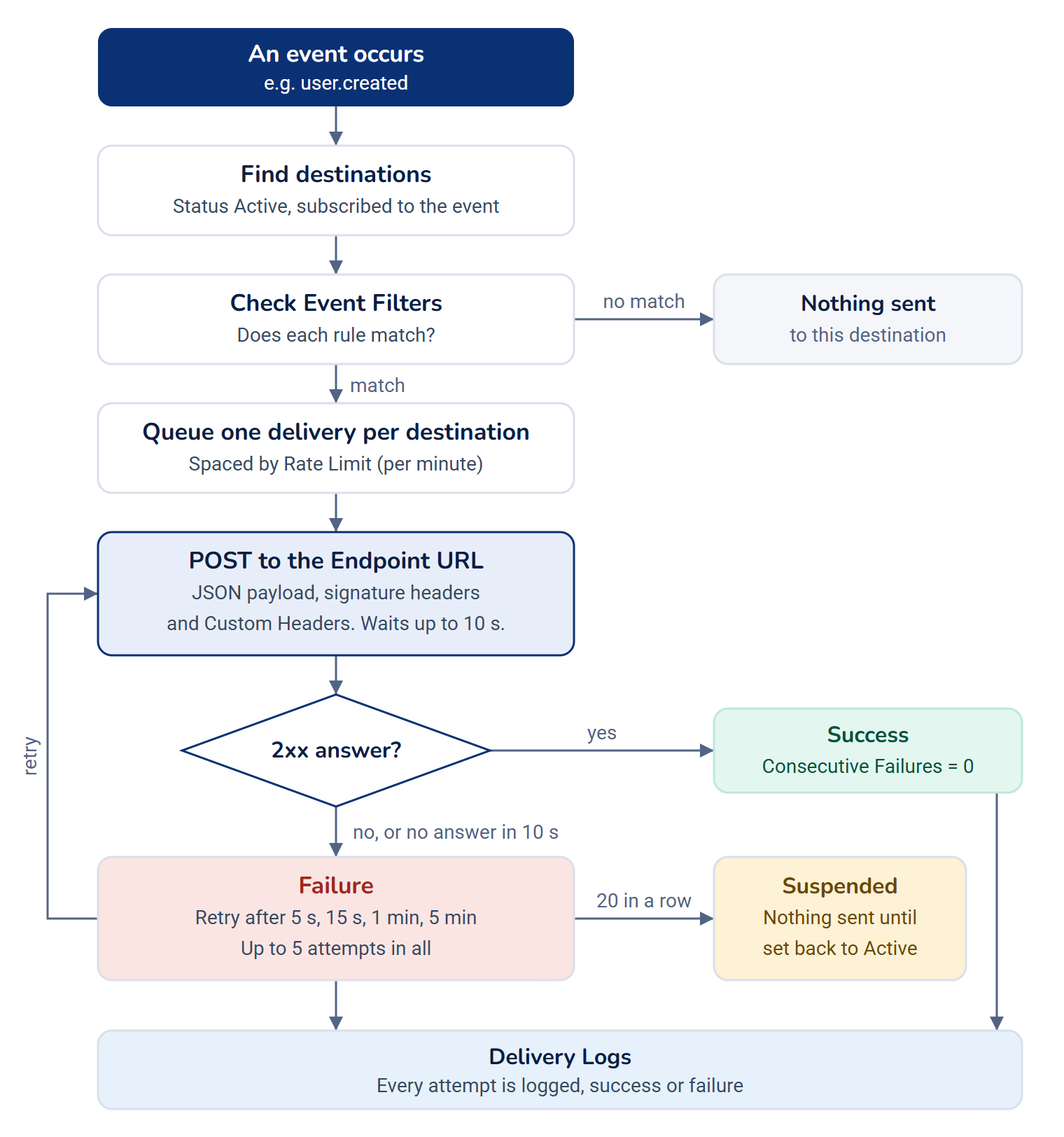
Deliveries are background jobs, so your Laramin's queue worker must be running. If it isn't, deliveries wait and nothing is sent. See An add-on is stuck or failed for how to check the queue.
Signing
Each destination gets its own signing secret when it's created. Every delivery carries an X- header: a code made from the payload and that secret. The receiving system makes the same code with its copy of the secret. If the two match, the message is genuine and wasn't changed on the way.
With Sign the timestamp on, the signature also covers the time the delivery was sent. The receiver can then refuse old messages, so someone who captured a delivery can't send it again later. New destinations have it on.
No screen shows a destination's signing secret, so whoever builds the receiver can't copy it from the app. See Verify webhook signatures and handle retries.
When a destination keeps failing
Each failed attempt adds one to the destination's Consecutive Failures. A successful delivery sets it back to 0. At 20 failures in a row, your Laramin sets the destination's Status to Suspended and stops sending to it, so a broken receiver doesn't pile up failed requests. Nothing is sent to a suspended destination until you set it back to Active. See Deliveries fail or a destination is suspended.
What a payload contains
For user.*, post.* and category.* events, the payload carries the record's stored fields as they were after the change. Passwords and two-factor secrets are always left out, but names, email addresses and other personal details are included. Send them only to systems you trust, over https://.
Headless CMS events carry ids, keys and versions, never content.
How it relates to
- Permissions. Each screen and action has its own permission. See Webhook Engine settings and permissions, and give them with a role: Give someone a role.
- Workspaces. Destinations and the delivery log are shared by your whole Laramin, not kept per workspace.
- Turning Webhook Engine off. Nothing is sent while it's off. Destinations and logs are kept and work again when you turn it back on. See Disable or delete an add-on.
Next steps
Thanks. That helps us decide what to write next.
Thanks for telling us what was missing.
You already answered for this article today. Thanks.
We got a lot of answers from your network just now. Try again in a few minutes.
We couldn't send that. Check your connection and try again.
Links in this article
Printed from help.bsscn.com. The online article may have changed since.