Webhook Engine settings and permissions
Every field on the destination form, the columns of the Destinations and Delivery Logs lists, the fixed delivery limits, and the permissions that control each screen and action.
- Applies to
- Webhook Engine 2.2 and later
- Who can do this
- Platform owner, Administrator
- Where
- Webhook Engine › Destinations
On this page
Webhook Engine has no settings panel of its own. Everything is set per destination, and a few limits are fixed.
The destination form
Webhook Engine › Destinations, then New Webhook Destinations or a row's Edit. See Add a webhook destination.
| Field | What it does | Rules and default |
|---|---|---|
| Name | How the destination appears in lists and the delivery log. | Required. Up to 255 characters. |
| Endpoint URL | The address each delivery is sent to with POST. | Required. A full address. Use https://. |
| Subscribed Events | The events that trigger a delivery. | Required, at least one. |
| Status | Active destinations receive deliveries. Inactive and Suspended ones receive nothing. Suspended is set for you after 20 failures in a row. | Required. Active for a new destination. |
| Rate Limit (per minute) | Deliveries are spaced to stay within this rate. | Required. From 1 to 1,000. 60 for a new destination. Values above 60 behave like 60. |
| Custom Headers | Extra headers sent with every delivery and test, as Header and Value pairs. | Header up to 255 characters, value up to 1,000. Webhook Engine's own headers win a name clash. Stored encrypted, but copied into each delivery's log entry. |
| Event Filters | Rules a record must match for a delivery to be sent, as Field, Operator (Equals or Not equals) and Value. Every rule must match. | Optional. Field and value up to 255 characters. No rules means every event is sent. |
| Sign the timestamp | On (Timestamp signed): the signature covers the timestamp and the payload, and deliveries carry X-. Off (Payload only): the signature covers the payload only. | On for a new destination. Destinations that existed before 2.2.0 were set to off. |
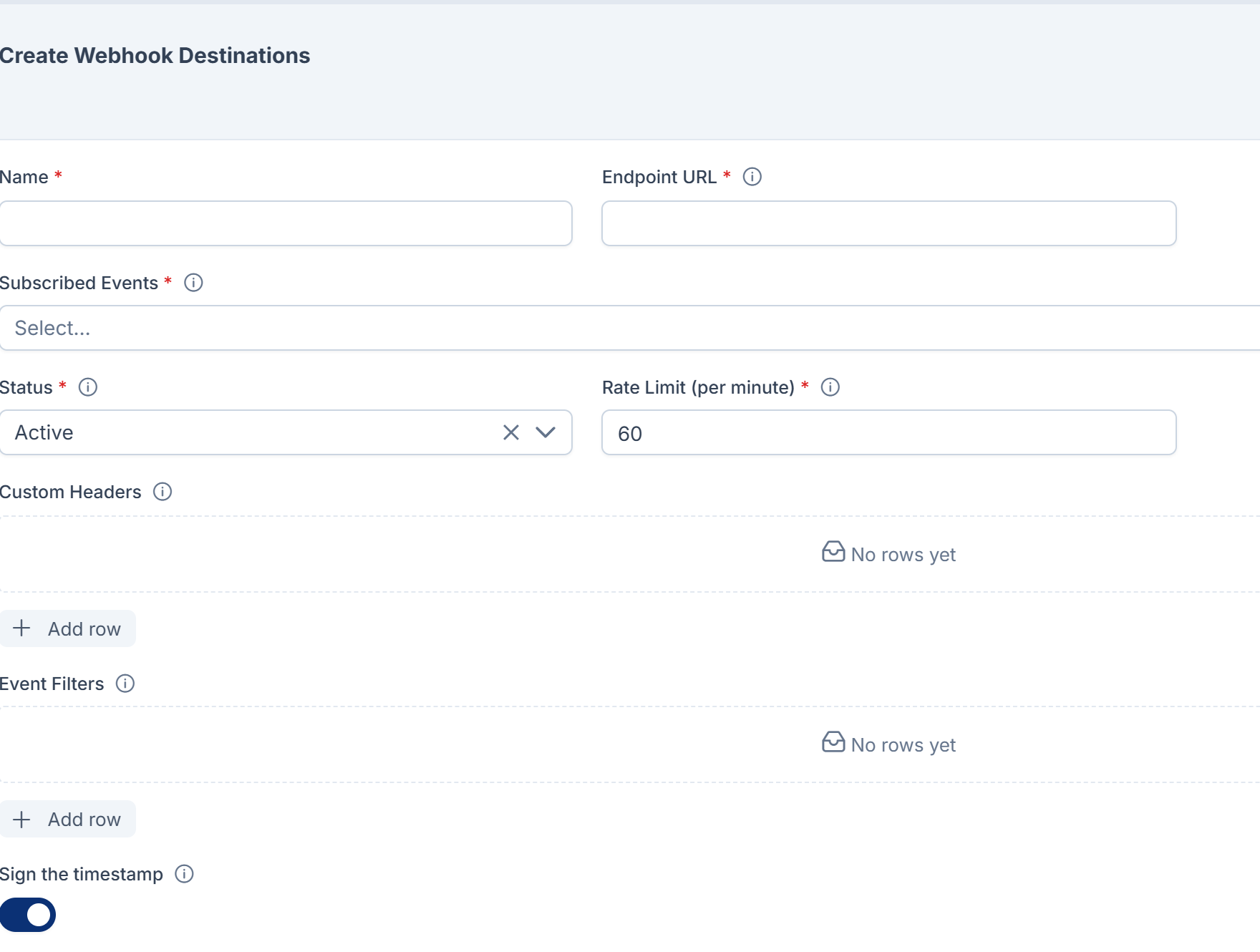
Custom headers and event filters are only shown on the form, not on the destination's detail page.
The Destinations list
| Column | What it shows |
|---|---|
| Name, Endpoint URL, Subscribed Events, Status, Rate Limit (per minute) | As set on the form. |
| Consecutive Failures | Failed attempts in a row since the last success. At 20, the destination is suspended. |
| Secret Rotated | When the signing secret was last rotated. Hidden until you add it with the columns menu. |
| Created At, Updated At | Hidden until you add them. |
Each row has a Test Console link and, in its actions menu, Edit, Delete and Rotate Secret. Opening a row shows its detail page with Identity, Delivery and Diagnostics panels.
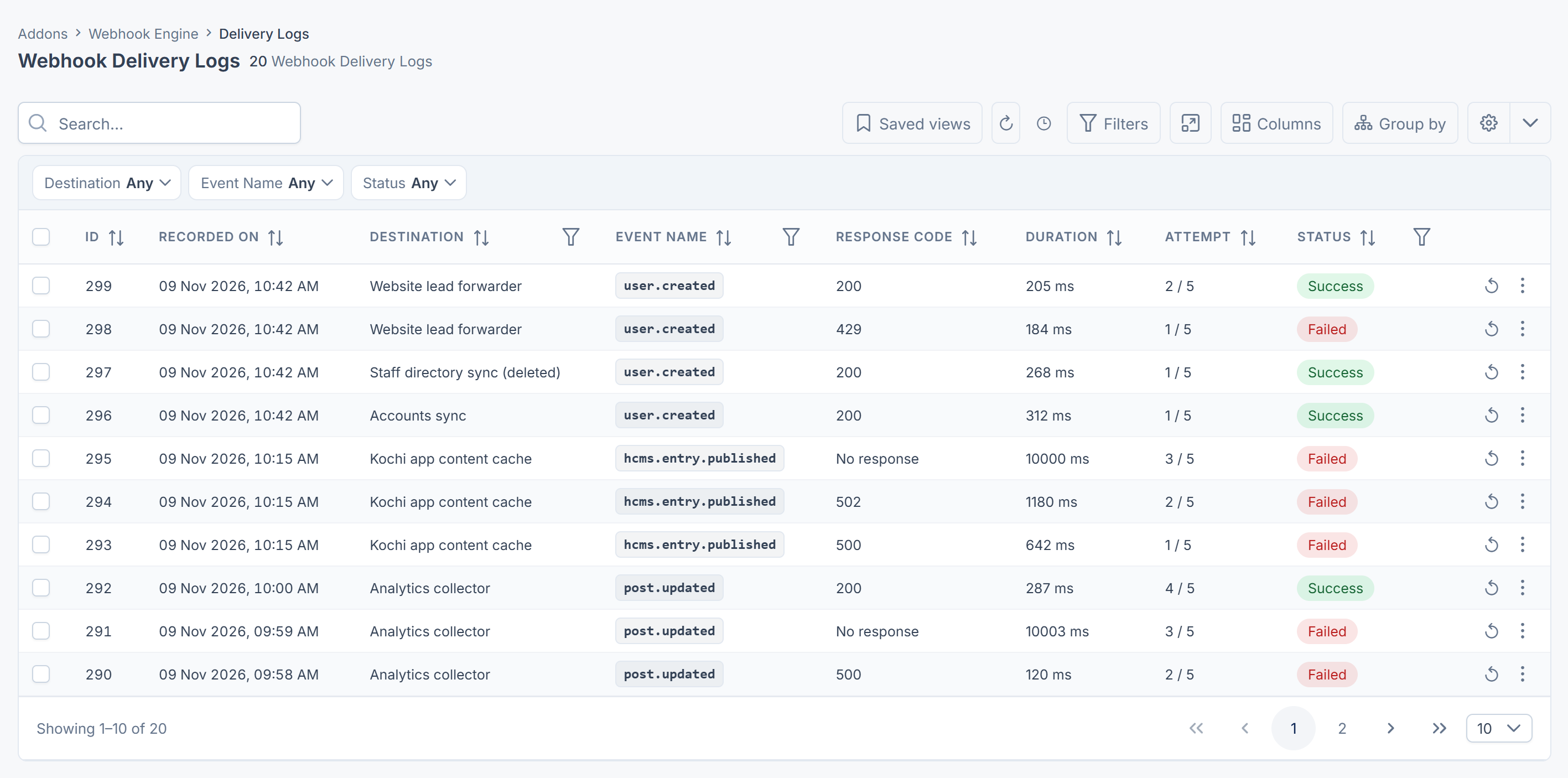
The Delivery Logs list
Webhook Engine › Delivery Logs, newest first. See Check deliveries and send one again.
| Column | What it shows |
|---|---|
| Recorded On | When the attempt finished. |
| Destination | The destination's name. A deleted destination shows as name (deleted). |
| Event Name | The event, such as user.created. |
| Response Code | The receiver's HTTP status, or No response. |
| Duration | How long the attempt took, in milliseconds. |
| Attempt | Which attempt this was, such as 2 / 5. |
| Status | Success or Failed. |
You can filter by Destination, Event Name and Status. A log entry's page adds the Endpoint URL, Payload, Request Headers, Response Headers, Response Body and Error Message.
Fixed limits
These can't be changed on screen.
| Limit | Value |
|---|---|
| Time to wait for an answer | 10 seconds |
| Attempts per delivery | 5 |
| Wait before each retry | 5 seconds, 15 seconds, 1 minute, 5 minutes |
| Failures in a row before a destination is suspended | 20 |
| Success | Any 2xx response code |
| Signing | HMAC-SHA256, with a 32-character secret created for each destination |
| Delivery log | Kept until the destination is deleted forever. Nothing removes old entries automatically. |
Permissions
In the role editor, the permissions are under Webhook Destinations and Webhook Logs.

| Permission | Label | Allows |
|---|---|---|
feature. | List Destination | Opening Webhook Engine › Destinations. |
feature. | View Destination | Opening a destination's detail page. |
feature. | Create Destination | Adding destinations. |
feature. | Edit Destination | Changing destinations, including their address, events, headers and status. |
feature. | Delete Destination | Moving destinations to the trash. |
feature. | Restore Destination | Bringing destinations back from the trash. |
feature. | Remove Destination | Deleting destinations forever, with their delivery logs. |
feature. | Send Test Payload | Using the Test Console. |
feature. | Rotate Signing Secret | Rotate Secret. |
feature. | List Log | Opening Webhook Engine › Delivery Logs. |
feature. | View Log | Opening a log entry, including its payload and request headers. |
feature. | Redeliver Webhook Delivery | Redeliver. |
feature. | Export Delivery Logs | Exporting the delivery log to CSV. |
Careful: Edit Destination lets someone change where deliveries go, and View Log shows payloads with personal details and the custom headers that were sent. Give them only to people you'd trust with that data.
To give these permissions, see Give someone a role.
Thanks. That helps us decide what to write next.
Thanks for telling us what was missing.
You already answered for this article today. Thanks.
We got a lot of answers from your network just now. Try again in a few minutes.
We couldn't send that. Check your connection and try again.
Links in this article
Printed from help.bsscn.com. The online article may have changed since.