How the SEO add-on works
SEO keeps the search and sharing details for your public website: site-wide defaults, a title and description for each page, redirects, a sitemap and feeds. Your website reads them from your Laramin. Here's how the pieces fit.
- Applies to
- SEO 1.1 and later
- Who can do this
- Platform owner, Administrator, Developer
On this page
In short
The SEO add-on holds what search engines and social apps need to know about your public website: a title and description for each page, the picture shown when a page is shared, whether a page may appear in search results, which old addresses now point somewhere new, and a list of all your public pages (the sitemap).
SEO doesn't show any public pages itself. It keeps these details and publishes them, and your public website reads them from your Laramin and puts them into its pages. If your website isn't built to read them, nothing changes in search results. Ask whoever built your website whether it does.
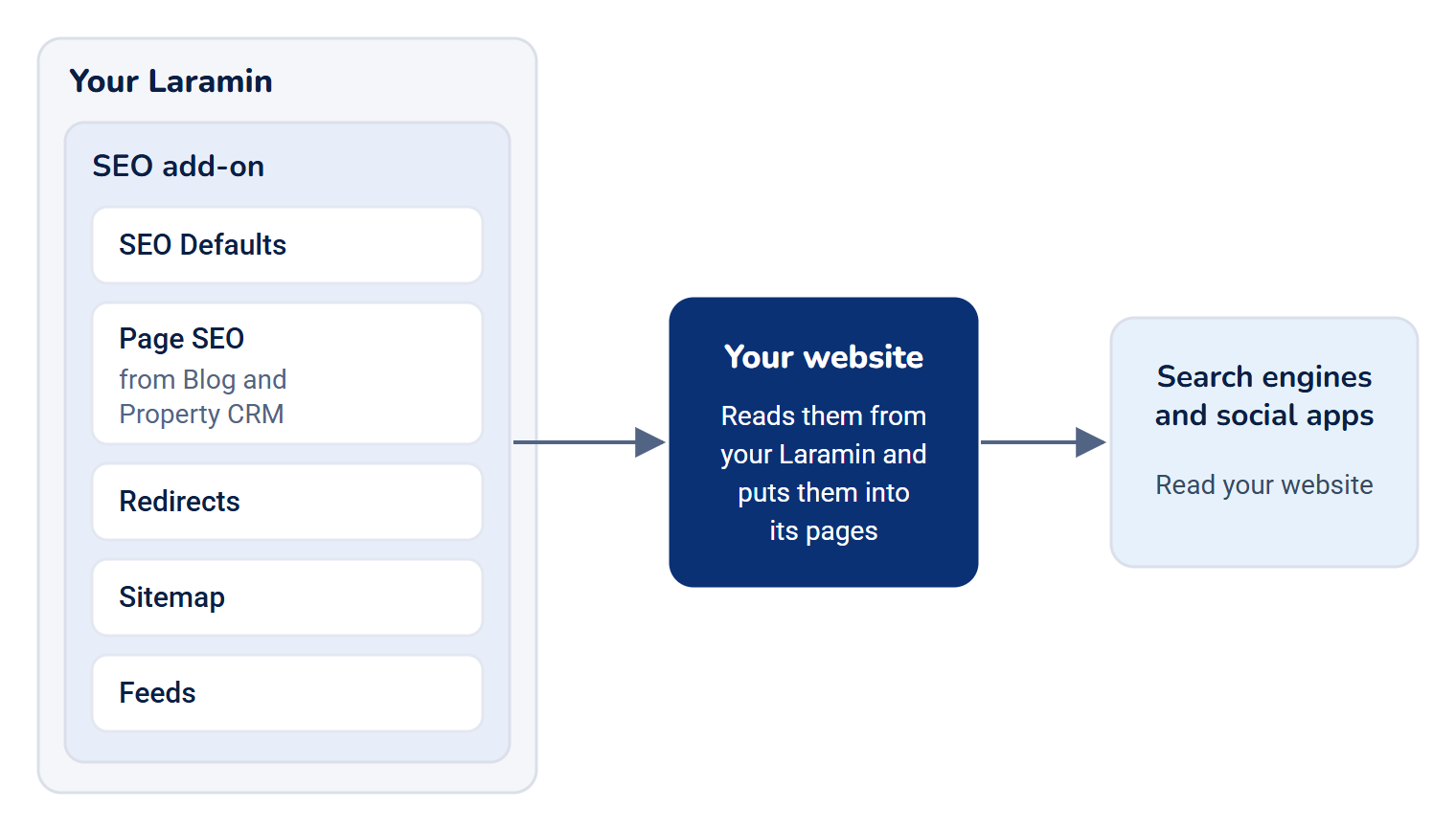
How it works
The parts
| Part | What it is | Where you manage it |
|---|---|---|
| SEO Defaults | Site-wide values: your site's name and address, a title pattern, a default description and share image, indexing defaults, and search console codes. They fill the gaps when a page has nothing of its own. | SEO › SEO Settings |
| Page SEO | A title, description, share preview and indexing choice for one page, such as a blog article or a property. | The SEO section on that page's form |
| Redirects | Rules that send visitors from an old address to a new one. | SEO › Redirects |
| Sitemap | The list of your public pages that search engines read. Add-ons add their pages to it. | Built for you. Its settings are on the Sitemap tab of SEO Settings. |
| Feeds | RSS and Atom feeds that readers can subscribe to. | Built for you. Its settings are on the Feeds tab. |
Which pages have SEO details
Add-ons that publish pages on your website ask SEO for its fields and put them on their own forms:
| Add-on | Pages | Where the fields appear | In the sitemap | Feed |
|---|---|---|---|---|
| Blog | Articles | An SEO section at the end of the article form | Yes, once per language | Yes |
| Property CRM | Properties | An SEO step, the last step of the property form. See Add a property. | Yes | No |
You only see these fields with Edit SEO metadata (feature.). Without it, the section or step isn't there at all, and saving the page leaves its SEO details as they were. So writers and agents can save their pages, and someone else can look after search.
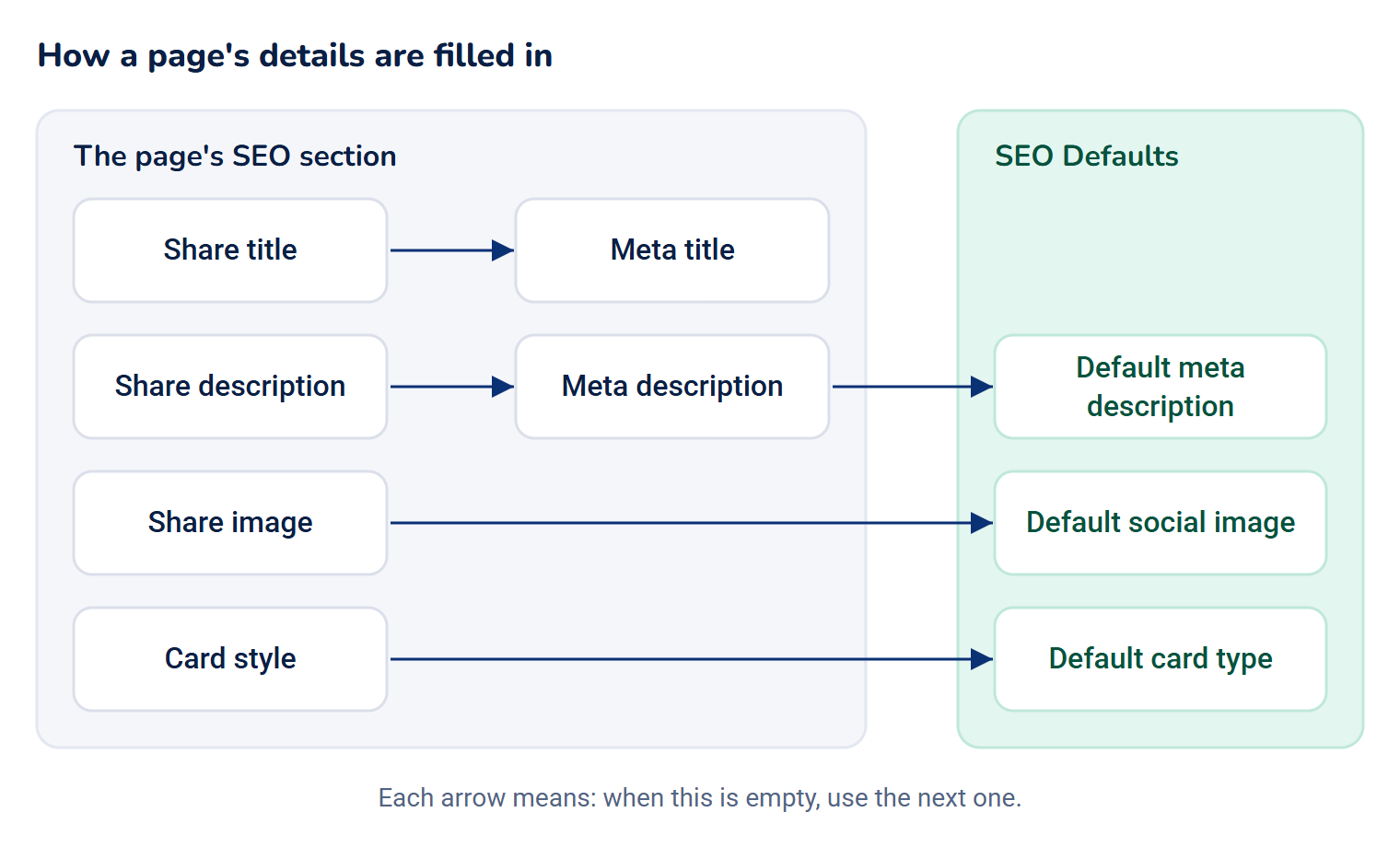
How a page's details are filled in
When your website asks for a page's details, Laramin starts from what was saved on the page and fills each gap from the site-wide defaults:
| Detail | Taken from | When that's empty |
|---|---|---|
| Title in search results | Meta title, put into your Title template, for example %title% - %site% | The page's own title, as your website shows it |
| Description in search results | Meta description | Default meta description |
| Title when shared | Share title | Meta title |
| Description when shared | Share description | Meta description |
| Picture when shared | Share image | Default social image |
| Card style when shared on X | Card style | Default card type |
| Whether search engines may index the page and follow its links | Search indexing and Link following | Default indexing and Default link following, for pages never saved with SEO details |
The title template is used only when both Title template and Site name are filled in.
Redirects
When a page moves, a redirect sends people and search engines from the old address to the new one, so old links and search rankings keep working. You can add redirects yourself. Blog adds one for you when someone changes a published article's address with Change the address (see Change a published article's address). Your website reads the list of active redirects from your Laramin and does the redirecting. See Add a redirect.
What happens when things are turned off or deleted
- SEO turned off: the SEO sections disappear from the forms, and your website gets no SEO details, redirects, sitemap or feeds from your Laramin. Your pages keep working. The saved details are kept and come back when you turn SEO on again.
- A page deleted: its SEO details are kept while it's in the trash, in case you restore it. Deleting it forever removes them too.
- An add-on turned off: its pages' SEO details are kept. They're removed only when the add-on is deleted.
How it relates to
- Your website's own settings. The Public website panel in Core has its own Search description and Canonical URL for Laramin's plain default page. They don't change the details SEO publishes. See Choose what your website's home page shows.
- Permissions. Each screen has its own permission. See SEO settings and permissions, and give them with a role: Give someone a role.
- Workspaces. SEO settings and redirects are shared by your whole Laramin, not kept per workspace.
For your website's developer
Your website reads everything from these public addresses on your Laramin. They need no sign-in or API key, and are rate-limited and cached.
| Address | Returns |
|---|---|
/api/ | The site-wide defaults, search console codes, the site's structured data and the list of feeds |
/api/ | One page's resolved details and structured data, or the redirect for that address. You can also ask by type and id. Add locale for another language. |
/api/ | The sitemap's sections. Each section is at /api/, in pages. |
/api/ | Up to 5,000 active redirects. Add since with a date to get only those changed since then. |
/api/ | A feed as RSS 2.0, or Atom with ?format=atom |
Blog and Property CRM also add a seo block to each article and property in their own public data.
Next steps
Thanks. That helps us decide what to write next.
Thanks for telling us what was missing.
You already answered for this article today. Thanks.
We got a lot of answers from your network just now. Try again in a few minutes.
We couldn't send that. Check your connection and try again.
Links in this article
Printed from help.bsscn.com. The online article may have changed since.