How your sitemap and feeds are built
SEO gathers your public pages from Blog and Property CRM into one sitemap that search engines read, and builds RSS and Atom feeds. See what's listed, what's left out, and how long changes take to show.
- Applies to
- SEO 1.1 and later
- Who can do this
- Platform owner, Administrator, Developer
On this page
In short
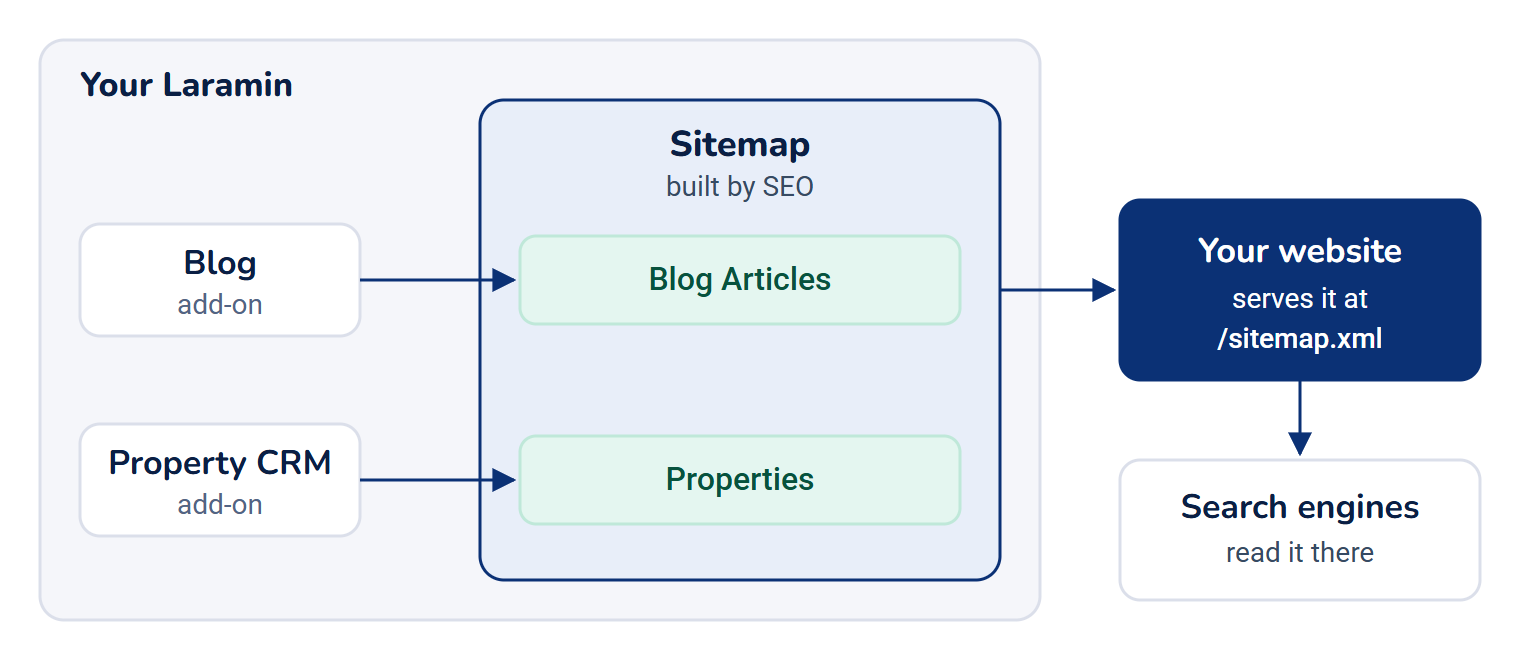
A sitemap is the list of every public page on your website, which search engines read to find your pages. SEO builds it from the add-ons that publish pages, in one section per add-on, and your website serves it to search engines. SEO also builds feeds that readers can subscribe to. You don't add pages by hand: they appear as they're published.
How it works
Sitemap sections
| Section | Comes from | What's listed |
|---|---|---|
| Blog Articles | Blog | Every public article, once for each language your Laramin has turned on. Private, password-protected and members-only articles are left out. |
| Properties | Property CRM | Every property shown on your website. |
A section with no pages isn't listed. With neither add-on, the sitemap is empty.
Each entry has the page's full address, when it last changed, how often it's expected to change, and its priority within your site. Blog and Property CRM set the last two themselves: Weekly, with priority 0.7, or 0.9 for a featured property. A blog article's entry also links to the same article in your other languages, so search engines can offer each reader their own.
Page addresses
- Property addresses start with Site base URL from the SEO Defaults panel.
- Blog article addresses start with Public site URL in Blog's own settings (see Set up your blog).
If the address is empty, your Laramin's own address is used, which is usually not your website's. Fill both in.
What's left out
- A property whose Search indexing is Not indexed, or whose Sitemap is Excluded.
- Pages the add-on doesn't show publicly, such as draft articles or hidden properties.
In SEO 1.2.0 with Blog 2.4.1, a blog article's Not indexed and Excluded choices don't remove it from the sitemap.
Size and caching
- A large section is split into pages of URLs per sitemap page addresses, 5,000 by default.
- A built section is reused for Sitemap cache (minutes), 60 by default, then built again. Set it to
0to build it fresh every time. - Property CRM clears its section whenever a property changes, so property changes show at once. A blog article you publish can take up to the cache time to appear. When a blog article's address is changed, every section is cleared.
Feeds
Blog offers a feed of its newest public articles, one entry per article. It's an RSS 2.0 feed, or Atom on request. Items per feed sets how many articles it carries, 20 by default. Your website lists the feeds it offers from the site-wide data. Property CRM has no feed.
How it relates to
- Page settings. To keep one page out, see Set a page's search and share details.
- Languages. Blog lists an article in every language your Laramin has turned on, whether or not your website publishes all of them.
- Your website. Search engines need the sitemap at your website's address, usually
/sitemap.xml. Your website reads it from your Laramin and serves it there. Submit that address in Google Search Console and Bing Webmaster Tools. For the addresses your website reads from, see How the SEO add-on works.
Thanks. That helps us decide what to write next.
Thanks for telling us what was missing.
You already answered for this article today. Thanks.
We got a lot of answers from your network just now. Try again in a few minutes.
We couldn't send that. Check your connection and try again.
Links in this article
Printed from help.bsscn.com. The online article may have changed since.