Set up CAPTCHA
Protect the sign-in, registration and password-reset forms with Laramin's built-in image CAPTCHA, or with Google reCAPTCHA, Cloudflare Turnstile or hCaptcha.
- Applies to
- Core 12.0 and later
- Who can do this
- Administrator, Platform owner
- Permission
feature.core. captcha.edit - Where
- Configurations › General Settings › CAPTCHA Settings
On this page
Before you start
- You need
feature.. It's part of the standard Administrator role.core. captcha.edit - To use a third-party provider, create a site in your provider's account first, and have its site key and secret key ready.
Steps
-
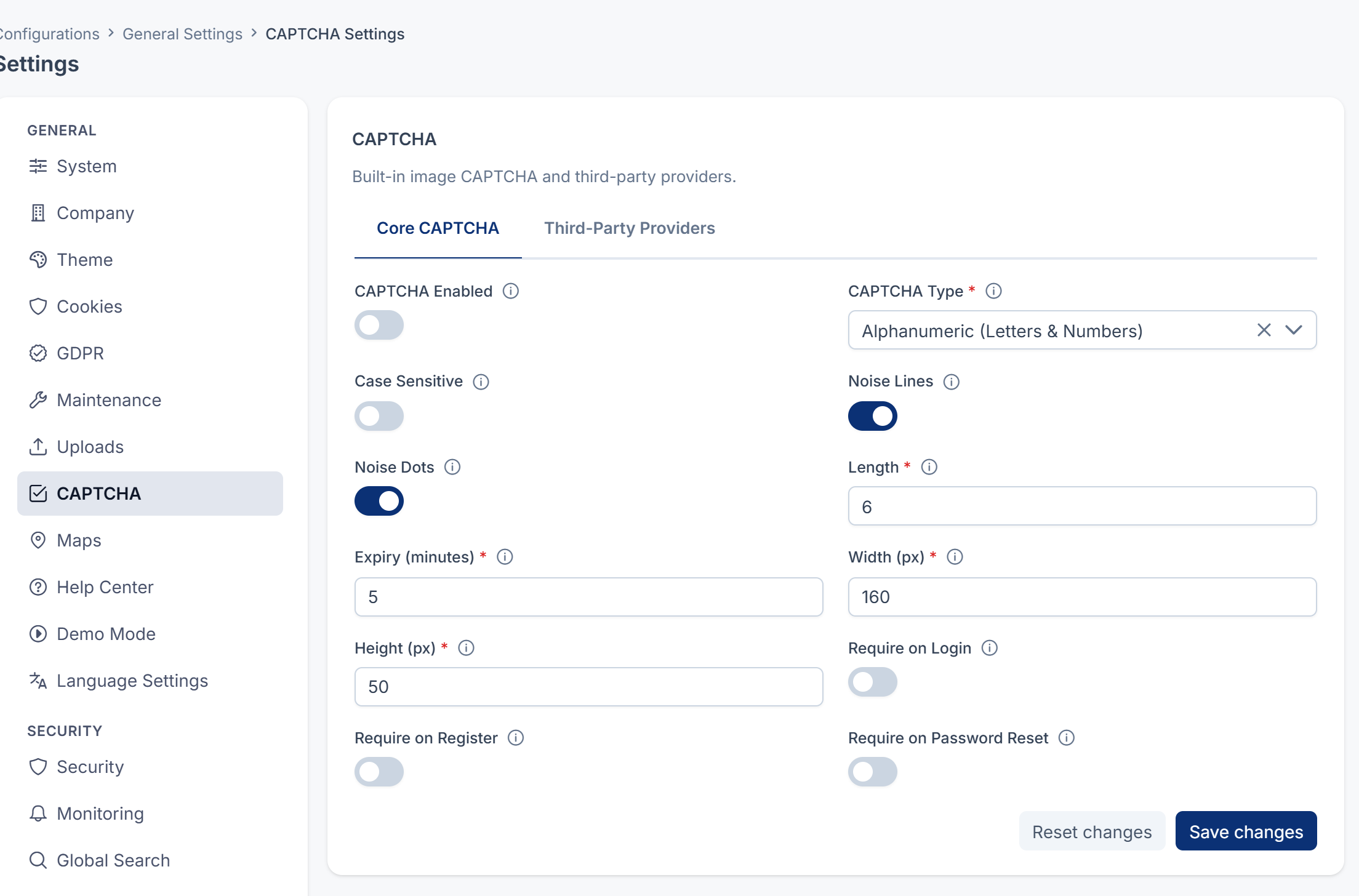
In the sidebar, open Configurations › General Settings › CAPTCHA Settings.
-
On the Core CAPTCHA tab, turn on CAPTCHA Enabled. It's off by default.
-
Choose the forms that show a CAPTCHA: Require on Login, Require on Register and Require on Password Reset. Each one is off by default.
-
Optionally, adjust the built-in image CAPTCHA:
- CAPTCHA Type: Alphanumeric (Letters & Numbers) (the default), Alphabetic Only or Numeric Only.
- Case Sensitive: whether the answer must match upper and lower case. Off by default.
- Noise Lines and Noise Dots: add lines and dots that make the image harder for bots to read. Both are on by default.
- Length: 4–8 characters. The default is 6.
- Expiry (minutes): 1–30. The default is 5.
- Width (px): 100–300, default 160. Height (px): 30–100, default 50.
-
To use a third-party provider, open the Third-Party Providers tab.
-
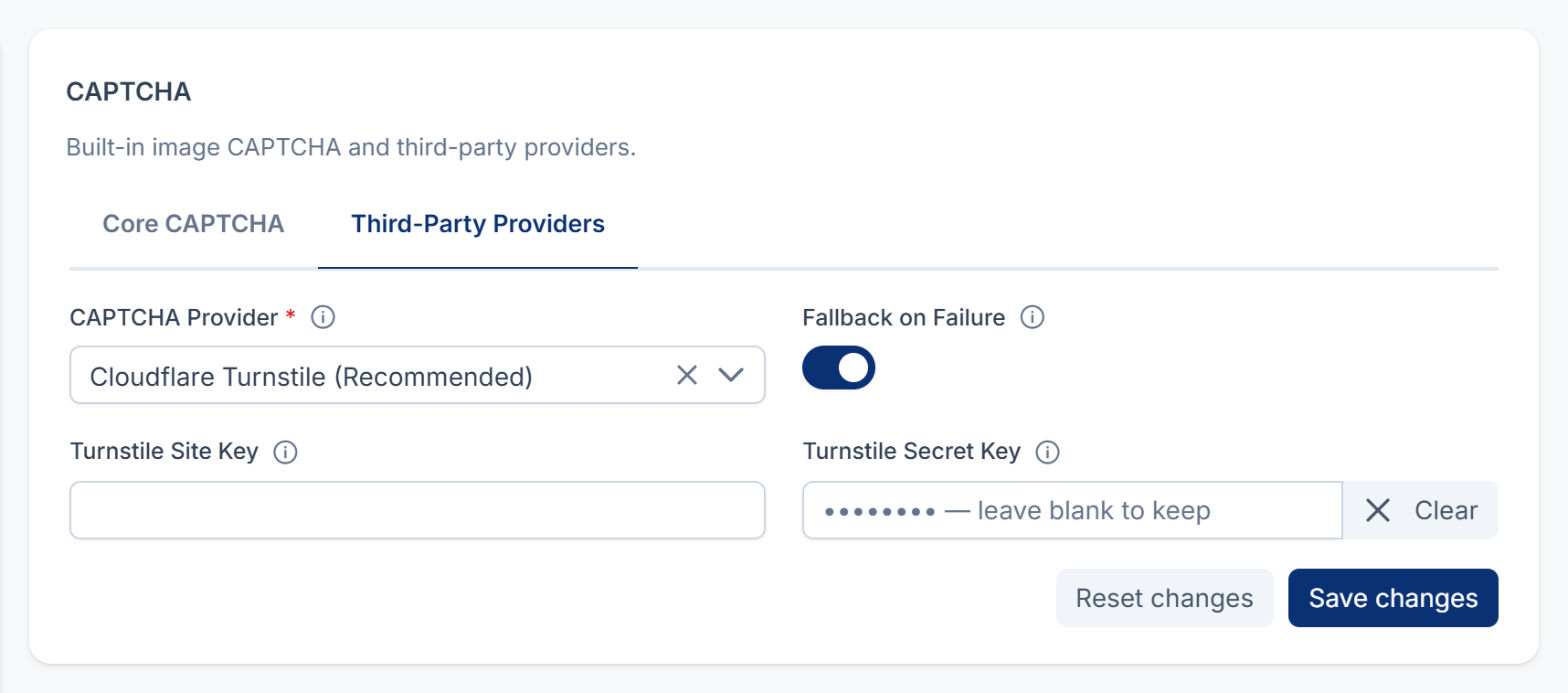
In CAPTCHA Provider, choose Google reCAPTCHA v2 Checkbox, Google reCAPTCHA v3 Invisible, Cloudflare Turnstile (Recommended) or hCaptcha. None (Use Core CAPTCHA) keeps the built-in image.
-
Enter the site key and secret key fields that appear for your provider, for example Turnstile Site Key and Turnstile Secret Key.
-
Leave Fallback on Failure on if you want Laramin to fall back to the built-in CAPTCHA when the provider's box can't load in someone's browser, when no site key is saved, or when the provider can't be reached. The form then shows the built-in picture, and people type its code. It's on by default.
With it off and no site key saved for your provider, the forms can't be sent. Instead of a CAPTCHA, they show: This form's security check (CAPTCHA) isn't set up yet, so it can't be sent. Please contact your administrator.
With it off, someone whose browser can't load the provider's box can't send the form either. In place of the box, they see: The security check couldn't load. Refresh the page or contact your administrator.
-
Select Save changes.
Careful: Test the CAPTCHA in a private browser window before you sign out. If a provider key is wrong and Fallback on Failure is off, people may not be able to get past the sign-in form.
With Fallback on Failure on, the built-in CAPTCHA stands in for the provider whenever the provider's box can't be used, so a form is never harder to get past than the built-in CAPTCHA. If only the provider's check should count, turn it off, and make sure the provider's box loads for everyone who signs in.
On Core 12.8.2 and earlier, the built-in code shown after a fallback was always refused, so people couldn't get past the form. Update Core to 12.8.3.
On Core 12.8.3 and earlier, with Fallback on Failure off and no site key saved, the forms showed the built-in picture anyway, and the code people typed from it was always refused. From Core 12.8.4, they say the CAPTCHA isn't set up instead.
On Core 12.8.4 and earlier, with Fallback on Failure off, a provider's box that couldn't load left an empty space on the form, with no message. From Core 12.8.5, the form says the security check couldn't load.
What happens next
The forms you chose show a CAPTCHA. Secret keys are never shown again after you save. The field stays empty, and if you leave it empty the next time you save, Laramin keeps the stored key.
If you'd rather show a CAPTCHA only after a few failed sign-ins, leave Require on Login off. Instead, turn on Enable brute-force protection and set CAPTCHA after N failed attempts in Security settings. That also needs CAPTCHA Enabled on.
Thanks. That helps us decide what to write next.
Thanks for telling us what was missing.
You already answered for this article today. Thanks.
We got a lot of answers from your network just now. Try again in a few minutes.
We couldn't send that. Check your connection and try again.
Links in this article
Printed from help.bsscn.com. The online article may have changed since.