How social sign-in works
Social Login adds buttons such as Continue with Google to your Laramin's sign-in screen. Learn which providers you can offer, when a button appears, and when a social sign-in uses an existing account, creates a new one or is refused.
- Applies to
- Social Login 2.0 and later
- Who can do this
- Platform owner, Administrator, Team member
On this page
In short
With Social Login, people can sign in to your Laramin with an account they already have somewhere else, such as Google, Apple or GitHub, instead of a password. You choose which providers to offer and connect each one to an app you register with that provider. Their buttons then appear on the Sign-In screen.
A social sign-in still ends in a Laramin account. What someone can see and do depends on that account's roles, exactly as with a password. See Sign in for the first time.
How it works
What people see
The buttons sit below the sign-in form, under OR:
- With one provider, the button says Continue with and the provider's name, for example Continue with Google.
- With two or more, each button shows the provider's logo and name.
- With more than three, the first three show, and a link such as 2 more ways to sign in shows the rest.
A provider's button appears only when the provider is Active and every required credential is filled in. Its Readiness on the provider list then shows Ready. A provider that's half set up never shows a button that can't work.
Selecting a button takes the person to the provider to sign in and agree to share their name and email address, then back to your Laramin.
Which providers you can offer
Social Login 2.0.2 includes 14 providers:
| Provider | Vouches for the email address |
|---|---|
| Google, Apple, GitHub, GitLab, Bitbucket, Slack, Slack (OpenID Connect), LinkedIn, LinkedIn (OpenID Connect), Twitch, Twitter (OAuth 1.0a) | Yes |
| Facebook, X, Twitter (OAuth 2) | No |
A provider that vouches for the email address only shares addresses its user has confirmed. That matters for linking to accounts you already have, below. Google, Facebook and LinkedIn are on the list from the start, switched off. You add the others. See Set up a sign-in provider.
Who gets in
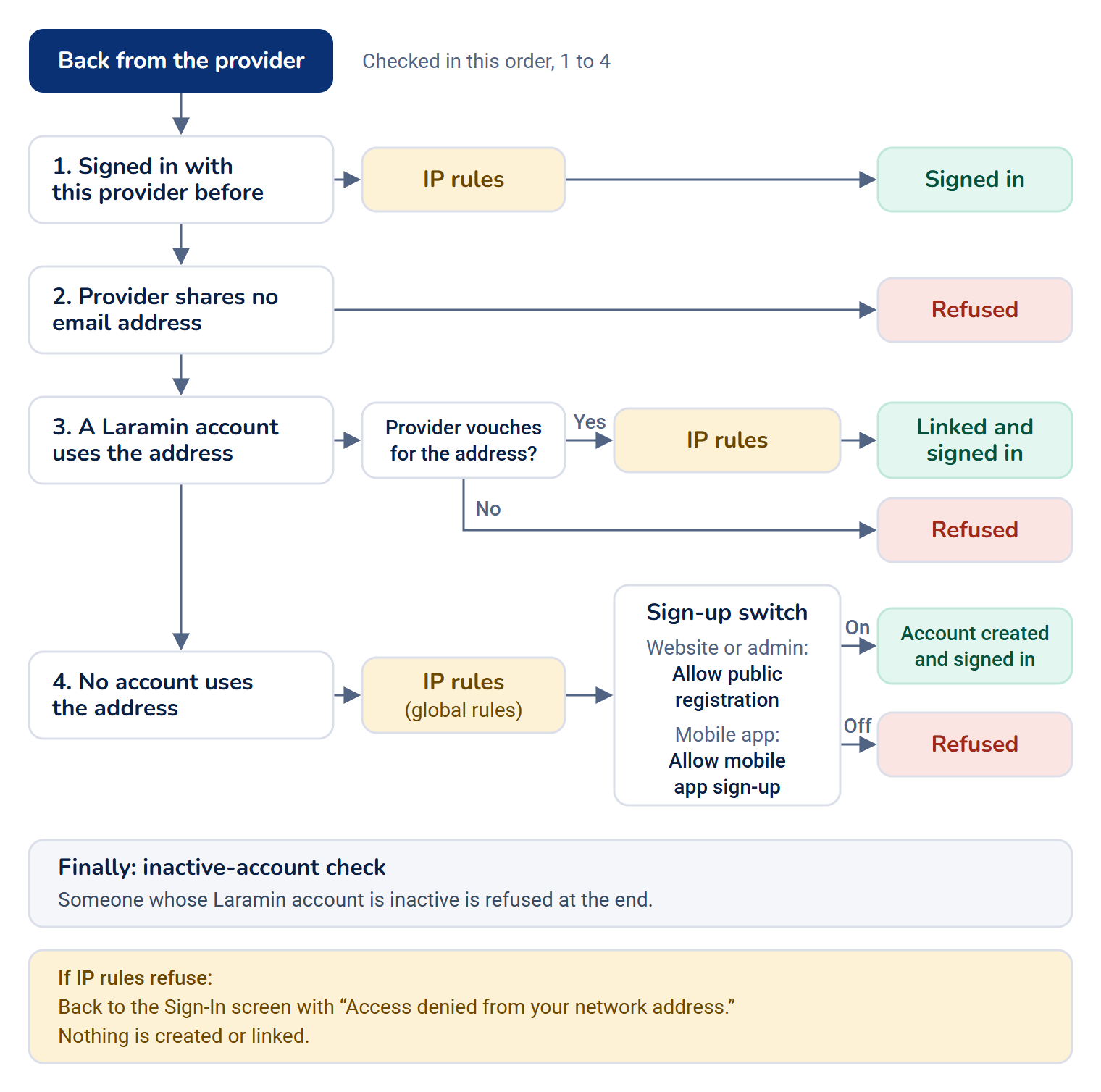
When someone comes back from the provider, your Laramin decides in this order:
-
They've signed in with this provider before. Their Laramin account is already linked to it, so they're signed in.
-
The provider shares no email address. They're refused: "That provider did not share an email address, so we could not sign you in." X and Twitter share an address only when your app there has permission to ask for it.
-
A Laramin account already uses that address.
- If the provider vouches for the address, the provider is linked to that account and they're signed in.
- If it doesn't, they're refused: "An account already uses this email address. Sign in with your existing method, then link Facebook from your profile." This stops someone who registers your email address at such a provider from signing in as you. Despite the message, there's no way to link a provider from your profile, so someone refused here can only sign in with their existing method.
-
No account uses that address. A first social sign-in is a sign-up, so it follows your sign-up settings in Configurations › Security › Security Settings:
- From the website or admin, Allow public registration must be on.
- From your mobile app, Allow mobile app sign-up must be on.
Both are off to start with. While the matching one is off, they're refused: "Sign-up is closed on this site, so a new account can't be created with Google." See Security settings.
When it's on, a new account is created with the name and email address from the provider and a random password. Its email address counts as verified only if the provider vouches for it. An account created from the mobile app can use the app straight away; one created on the website can't until an administrator gives it API access.
Your IP rules decide whether the person may sign in from their network address, exactly as after a password, and before anything is linked or created. For an account that exists, the account's own rules decide, then its roles' rules, then the global ones. For a first sign-in that would create an account, the global rules decide, before the account is made. If they refuse, the person is sent back to the Sign-In screen with "Access denied from your network address. Please contact your administrator.", and no account is created or linked. See How IP access control works.
Someone whose Laramin account is inactive is refused at the end, with "User account not found/ inactive. Contact your administrator!."
Careful: A new account made by social sign-up has no roles. Until an administrator gives it some, it signs in to nothing it can open. See Nothing to open after sign-in.
Two-factor authentication
A social sign-in replaces the password step, not the two-factor one. Someone who has set up two-factor authentication comes back from the provider to Two-Factor Authentication and enters the code from their authenticator app, or a recovery code, exactly as after their password. They're signed in only once the code is accepted. On a device they've trusted, they aren't asked, as after a password. See Set up two-factor authentication.
If Require two-factor authentication is on in Security settings, someone who hasn't set it up yet is signed in and taken straight to Profile › Security to set it up, as after a password.
The mobile app asks for the code too. See Social sign-in from a mobile app.
Careful: On earlier versions: Social Login 2.1.0 and earlier signed people in on the website and admin without asking for their two-factor code. Update Social Login to 2.1.1.
What a social sign-in skips
A social sign-in replaces the password step, so it doesn't use your Laramin's password rules or sign-in CAPTCHA. It does follow your IP rules, above.
Careful: On earlier versions: Social Login 2.1.1 and earlier didn't check your IP rules, so someone on a blocked network address could sign in with a provider on the website or admin, and the mobile app got a session there too. Update Social Login to 2.1.2. Social Login 2.1.2 checked them only after a first sign-in had created the account, so a refused first sign-in still left a new account behind. Update to 2.1.3.
The person stays signed in on that browser, as if they'd ticked Remember me.
Each social sign-in is recorded in the activity log as, for example, "Asha Rao Logged in via google." One that asked for a two-factor code is recorded as "Asha Rao Logged in (2FA).", as after a password. See Review sign-ins and open sessions.
Mobile apps
A mobile app built for your Laramin can offer the same providers: by opening the provider's page in the phone's browser, or, for Google and Apple, with the provider's own sign-in on the phone. The app never holds your providers' secrets. See Social sign-in from a mobile app.
What to do next
Thanks. That helps us decide what to write next.
Thanks for telling us what was missing.
You already answered for this article today. Thanks.
We got a lot of answers from your network just now. Try again in a few minutes.
We couldn't send that. Check your connection and try again.
Links in this article
Printed from help.bsscn.com. The online article may have changed since.