Review sign-ins and open sessions
See when people signed in and out and from which device in Login Activities, see every session open right now in Visitor Activities, and sign a person or guest out of a device.
- Applies to
- Activity Log 1.2 and later
- Who can do this
- Platform owner, Administrator
- Permission
feature.activitylog. login.view - Where
- Activity Logs › Login Activities
On this page
Before you start
- To read Login Activities, you need View Login Activity (
feature.). To read Visitor Activities, you need View Visitor Activity (activitylog. login.view feature.).activitylog. visitor.view - To sign a person out of a device, you need Terminate Session (
feature.).activitylog. session. terminate - Failed sign-ins aren't listed here. They're in the security log. See Security settings.
- The Session column and Visitor Activities read the sessions your Laramin keeps in its database. If Driver in the Session settings panel is set to anything other than Database, Visitor Activities stays empty and every sign-in shows Session Expired.
See who signed in
-
In the sidebar, open Activity Logs › Login Activities. The newest sign-ins are at the top.
-
Filter by User, Login date, IP Address or Device Type to find the sign-ins you want.
Each sign-in is one row. When the person signs out, the same row changes: Event becomes Logout, and Activity says how long they were signed in, for example "Ravi Kumar logout successfully!. And active for 2 hours". A sign-out from a different device or address gets a row of its own.
The Session column says where each sign-in stands now:
| Session | Meaning |
|---|---|
| Current Session | This is you, in the browser you're using now. |
| Logged in | The person is still signed in on that device. |
| Session Expired | The session ended without a sign-out, for example because it was idle too long. |
| Logout | The person signed out, or was signed out. |
Select an entry's Activity to open it. The Actor panel adds the person's Email.
Sign someone out of a device
-
In Login Activities, find the row whose Session is Logged in.
-
Open its row actions and select Terminate Session.
-
Confirm.
The device is signed out at its next request, and "remember me" stops working on it. The row changes to Logout, with the sentence Session terminated by user from another device., even though you ended it. The entry doesn't say who ended the session.
You can't end your own current session here. To sign yourself out of other devices, see Sign out of other sessions and devices.
See the sessions open now
-
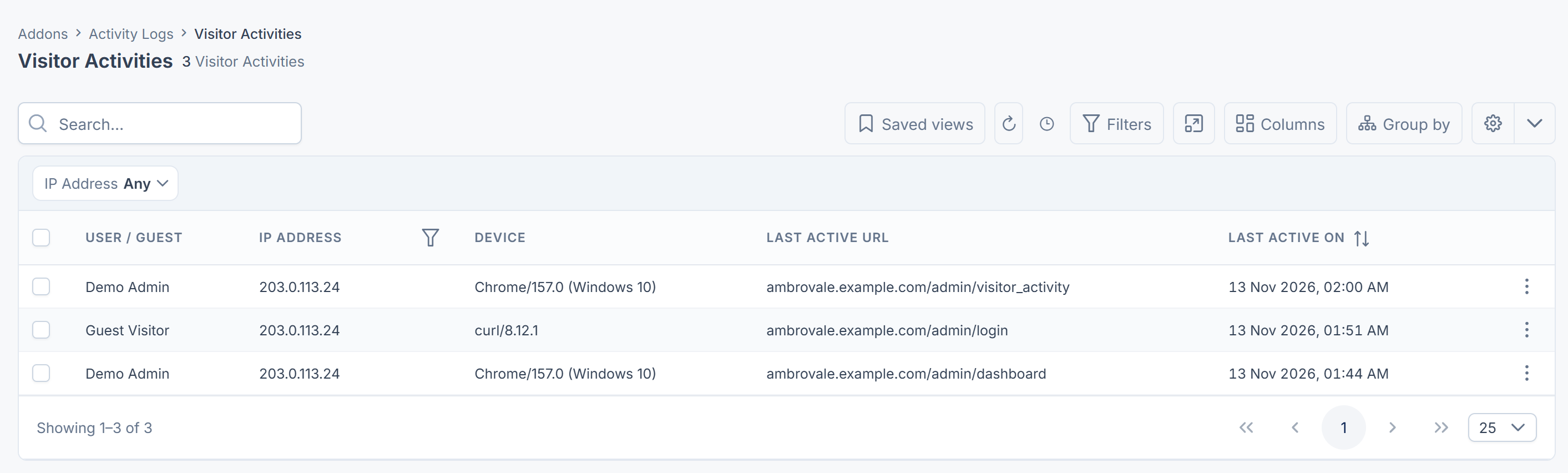
Open Activity Logs › Visitor Activities. The most recently active sessions are at the top.
-
Search by IP Address, or sort by Last Active On.
Each row is one open session. User / Guest shows the person's name, or Guest Visitor for someone who isn't signed in. Last Active URL is the last page the session opened. Sessions are cleared from the list some time after they end, so this list is about now, not history.
End sessions from Visitor Activities
- To end one session, open its row actions and select Terminate Session, then confirm.
- To end several, select them, select Delete Selected, and type
DELETEto confirm.
Ending a guest's session needs Delete Visitor Session (feature.), or Bulk Delete Visitor Sessions (feature.) for several. Ending a signed-in person's session needs Terminate Session. Sessions you may not end are skipped, and so is your own.
What happens next
- If someone shouldn't sign in again, deactivate their account first, then end their open sessions here. See Edit a user.
- To look at a person's devices that skip two-factor sign-in, see Review trusted devices.
Thanks. That helps us decide what to write next.
Thanks for telling us what was missing.
You already answered for this article today. Thanks.
We got a lot of answers from your network just now. Try again in a few minutes.
We couldn't send that. Check your connection and try again.
Links in this article
Printed from help.bsscn.com. The online article may have changed since.