A product is missing or unpriced in a quote
A catalogue product doesn't come up when you add a quote line, it's added with no price, or unexpected draft products appear in the catalogue. Find the cause and fix it.
- Applies to
- Product Catalog 1.3 and later
- Who can do this
- Platform owner, Administrator, Team member
- Permission
feature.pcat. product.list - Where
- Catalog › Products
On this page
Symptom
One of these:
- When you add a line to a CRM quote, a catalogue product doesn't come up in the search.
- A product is added to a quote with no price.
- Draft products you didn't create appear in Catalog › Products.
A product doesn't come up in the quote search
Check these, in order.
1. The product isn't published
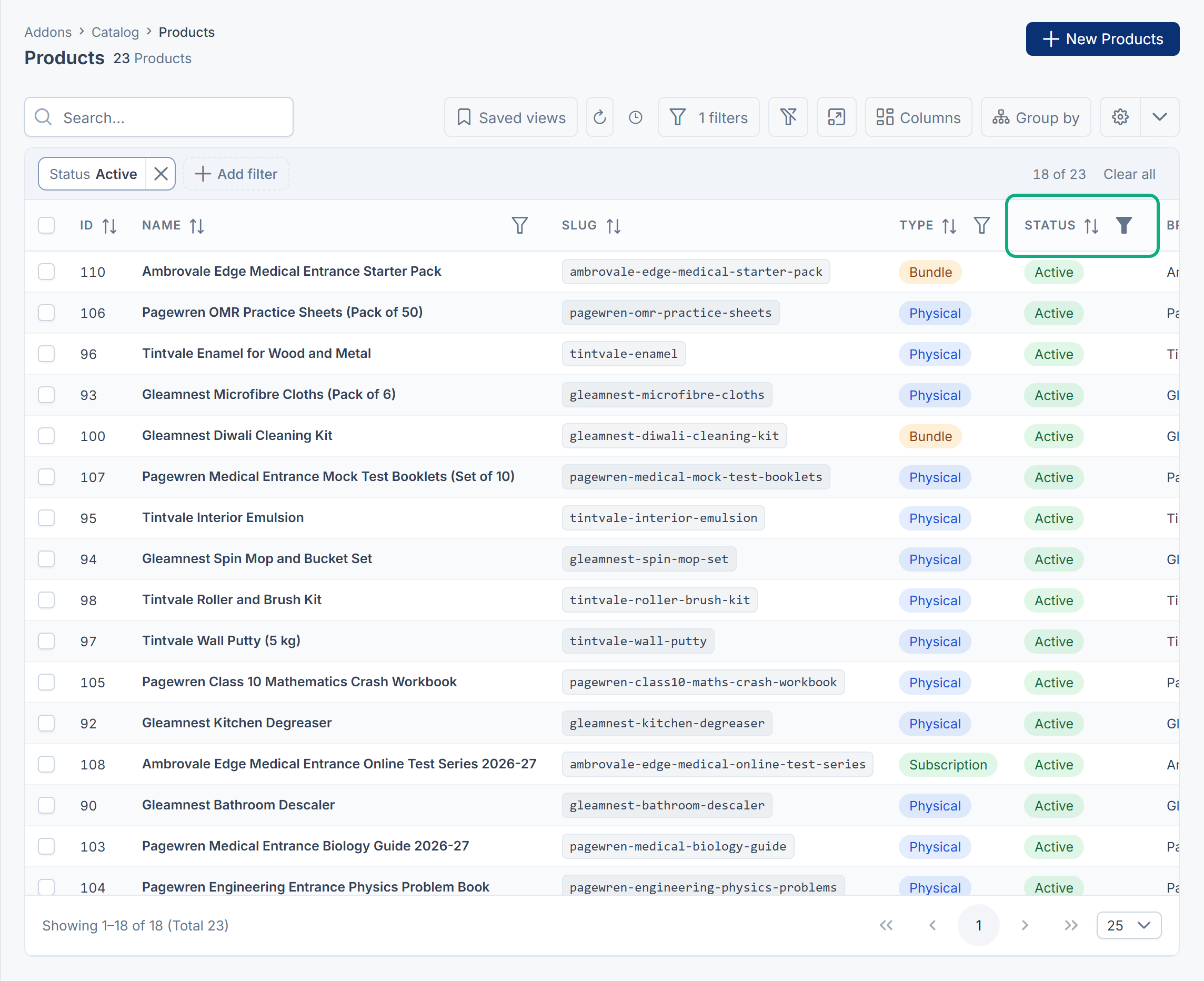
The quote search offers only Active products. Drafts and archived products never come up.
In Catalog › Products, filter Status by Active. If the product isn't there, it can't be offered yet: in Product Catalog 1.4.0 Publish on the list answers 1 processed but doesn't change the product, and there's no other way on screen to publish it. See Add and publish a product.
2. You're searching for the wrong words
The search looks at the product's Name and Slug. It doesn't look at descriptions, specifications, brands or SKUs. Search for part of the name.
3. The product is in the trash
A deleted product isn't offered. Open the list's Trashed view, and select Restore.
4. Product Catalog is turned off
While Product Catalog is turned off, quotes can't offer catalogue products. Existing quote lines are kept. See Disable or delete an add-on.
A product is added with no price
A quote line takes the product's List price in the quote's currency. The line is added unpriced, for you to fill in, when:
- The product has no List price. No screen in Product Catalog 1.4.0 sets prices, so every product created on screen is unpriced. Enter the price on the quote line, and ask your platform owner how prices should be loaded.
- The price is in another currency. Prices are never converted. A product priced only in
USDis unpriced on aEURquote. - The price isn't valid today. A price can have start and end dates. Outside them, it doesn't count.
A Cost or MSRP price is never used instead of a missing List price. A bundle is quoted at its own List price; its contents aren't added up.
Draft products you didn't create
Every day, your Laramin copies items that other add-ons sell into the catalogue as drafts, so you can describe and publish them. Today that's Monetization's plans and offerings, and your own active catalogue products. Add the Origin column to the product list to see where each draft came from: it shows the source, such as monetization.plan, and the item's id there.
- These drafts are created once and never overwritten. If you don't want one, delete it and leave it in the trash. A copy you delete forever is created again the next day.
- Each of your own active catalogue products gets one draft with the same name, a slug such as
catalog-and the Originproduct-… catalog.product. These drafts are never offered to quotes. Move them to the trash and leave them there, or they come back.
Still not working?
Raise a ticket from Support Center in your Laramin app. Include this page's link, the product's name and slug, its Status, and the quote's currency.
Thanks. That helps us decide what to write next.
Thanks for telling us what was missing.
You already answered for this article today. Thanks.
We got a lot of answers from your network just now. Try again in a few minutes.
We couldn't send that. Check your connection and try again.
Links in this article
Printed from help.bsscn.com. The online article may have changed since.