How payment gateways work
Payment Gateway keeps the ways your Laramin can take money: provider gateways such as Razorpay, and manual methods such as bank transfer. Billing uses them to take payments. Here's how the pieces fit.
- Applies to
- Payment Gateway 4.0 and later
- Who can do this
- Platform owner, Administrator
On this page
In short
Payment Gateway is where you set up how your Laramin takes payments. Each entry on its list is a gateway: either a payment provider, such as Razorpay, connected with the keys the provider gave you, or a manual method, such as bank transfer, where the payer follows your instructions.
Payment Gateway doesn't take payments or keep a record of them. The Billing add-on does that: it asks Payment Gateway which gateways it may offer, takes the payment through one of them, and keeps the payments list, refunds and tax rules.
How it works
Three kinds of gateway
The list's Gateway Type column says which kind each gateway is.
| Type | What it is | Where it comes from | Can you delete it? |
|---|---|---|---|
| Automatic | A payment provider. The payer pays on the provider's own checkout, and the provider tells your Laramin when the money has arrived. | Set up for you when Payment Gateway is installed. Each provider also needs its own add-on, for example Razorpay. | No |
| Manual | A method you describe yourself, such as a bank transfer or a cheque. You set the currency, the instructions the payer sees and the details the payer fills in. | You add it with New Payment Gateway. | Yes |
| Preloaded | A manual method that came with Payment Gateway, such as Bank Transfer. You change it the same way as a manual one. | Payment Gateway's setup | No |
Providers are separate add-ons
Each payment provider has its own add-on, which teaches your Laramin to talk to that provider. Today the only provider add-on is Razorpay. See Set up Razorpay.
Without its add-on, a provider's gateway stays on the list, keeps its saved keys, and shows Driver missing in the Availability column. Payers aren't offered it until the add-on is installed and turned on again.
You can't add a provider gateway from the list. Payment Gateway sets up a Razorpay gateway and a Bank Transfer method when it's installed, but only when your Laramin has exactly one active workspace at that moment. Payment Gateway 4.0.1 has no way to add a provider gateway later: Create makes only manual methods. So a workspace that didn't get one at install can't use Razorpay.
What a payer is offered
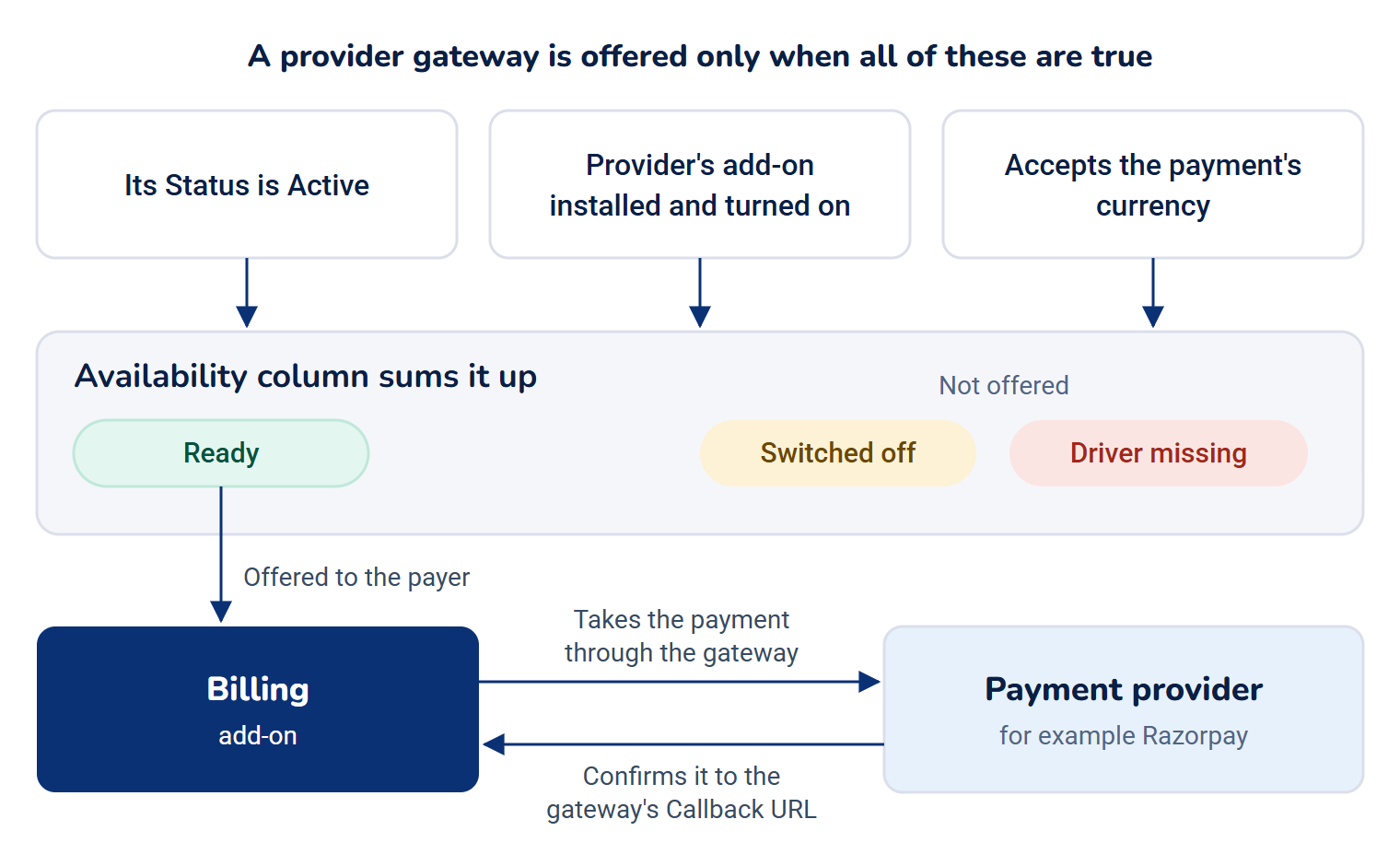
A provider gateway is offered to a payer only when all of these are true:
- Its Status is Active.
- Its provider's add-on is installed and turned on.
- It accepts the payment's currency. See Choose the currencies a gateway accepts.
The Availability column sums this up: Ready, Switched off or Driver missing.
Billing 2.0.0 and Payment Gateway 4.0.1 include no checkout page or public payment address for payers. A payment starts only when another add-on or your website's own code asks Billing for one.
In Payment Gateway 4.0.1 with Billing 2.0.0, Billing considers only provider gateways when it chooses one for a payment. Manual and preloaded methods show Ready, but they're never offered, so their instructions and payer details aren't shown to anyone.
Gateways belong to a workspace
Each gateway belongs to one workspace, the business whose merchant account it uses. You see and change only the gateways of the workspace you're in. In All Workspaces you can read every gateway you can reach, and the list shows a Business column, but you can't add or change one. Switch to a single workspace first. See Switch workspace.
The default gateway for a provider
When a workspace has more than one gateway for the same provider, mark one as the Default. New payments through that provider use the default gateway. Payments already taken keep the gateway they were made through, including for refunds. With a single gateway per provider, there's nothing to choose and the Default switch isn't shown on the form.
How it relates to
- Billing. Billing owns the payment record. The Payments list, refunds and Tax Rules are on Billing's screens, not here. They moved from Payment Gateway to Billing in Payment Gateway 3.0. Billing also receives the provider's confirmations through the callback URL each provider gateway shows. Without Billing, the gateways you set up here aren't used. See How Billing keeps your money records.
- Custom Fields. The details a manual method asks the payer for are custom fields. See Add a manual payment method.
- Permissions. One set of permissions covers every gateway screen. See Payment Gateway settings and permissions.
Next steps
Thanks. That helps us decide what to write next.
Thanks for telling us what was missing.
You already answered for this article today. Thanks.
We got a lot of answers from your network just now. Try again in a few minutes.
We couldn't send that. Check your connection and try again.
Links in this article
Printed from help.bsscn.com. The online article may have changed since.