You can't add or change a party
Why Organization won't let you add a party, change one, give it a role or save its business terms, and what to do about each case.
- Applies to
- Organization 3.1 and later
- Who can do this
- Administrator
- Permission
feature.org. party.edit
On this page
Symptom
You try to add or change a party, and Laramin won't let you. Find what you see:
| What you see | Go to |
|---|---|
| There's no New Party button, or Switch to a single business before adding or changing records here. | 1 |
| There's no Organization menu, or no Parties, Groups or Segments under it | 2 |
| A button is missing, or saving says you aren't allowed | 3 |
| The party isn't in the Parties list | 4 |
| The role role already has an assignment covering that period… | 5 |
| The Role, Type or Relationship list is empty | 6 |
| That person cannot work in this business. or That team belongs to another business. | 7 |
| A credit limit needs a currency, or nobody can act on the number. | 8 |
| You can't change the Type, a segment's Code, or a party's name | 9 |
| This record was merged into another party… | 10 |
Check these, in order
1. You're in All Workspaces
Adding a party, and changing its identity, roles or business terms, happens in one business at a time. In All Workspaces you can read parties but not change them. Fix: in the header's Workspace switcher, choose the business, then try again. See Switch workspace.
2. You can't reach Organization's screens
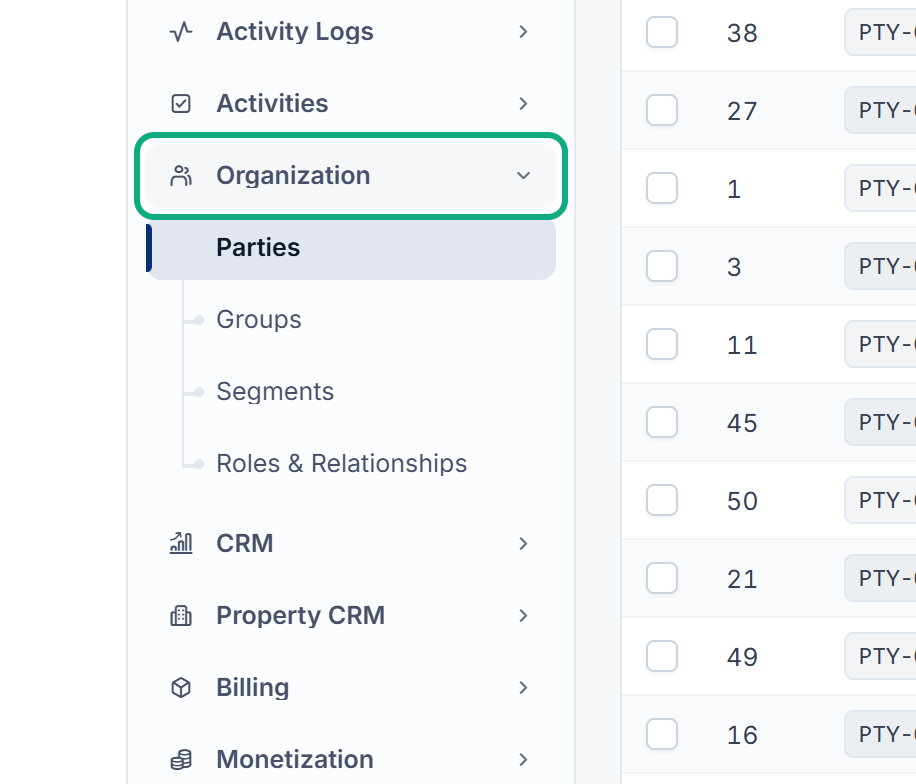
The Organization menu is in the Platform Administration experience, and each entry shows only if you hold its List permission, such as feature.. Fix: ask an administrator to give you the permissions, and entry to Platform Administration if you need it. See Choose which experiences a user can enter. The menu isn't in any other experience's sidebar.
3. You don't hold the permission
Each action has its own permission. The ones people miss most:
| To | You need |
|---|---|
| Add a party | feature. |
| Change a party or its Business Profile | feature., or feature. for relationships you own |
| Give a role | feature.. New Role also shows with feature., but saving then fails: saving a new role always needs Assign. |
| End a role | feature. |
| Merge | feature. |
Fix: ask someone who manages roles to add the permission. To see what you hold and why, see See why someone can do something. The full list is in Organization fields and options.
4. The party isn't one your business deals with
The Parties list shows only parties that take part in the businesses you can see.
- Your business ended its relationship with them. Ended relationships leave the list, and Organization's screens can't reopen them. Adding the person again through another add-on, such as a Property CRM client, does.
- They were merged into another record. Search for the record they were merged into.
- You searched by phone number or email. The list searches names and party numbers only.
- You hold only the own-records permission. With
feature., you see only parties whose relationship you own.org. party. list_own
5. The role's dates overlap
The party already held this role, in your business, for part of the dates you chose. Fix: on the party's Roles screen, check the earlier spell of the role. Change your dates so they don't overlap, or edit the earlier spell's Held until.
If the role is already held and ongoing, saving it again changes nothing. That isn't an error.
6. The list is empty
-
Role: only roles that fit the party's type are offered. No role fits a Group party unless an add-on adds one, and Employee and Contractor are for people only. A role whose add-on was removed is Retired and isn't offered.
-
Type on Identifiers, and Relationship on Relationships: nothing fills these lists in this version, so they're always empty.
7. The owner or team isn't in your business
The Relationship owner must be a member of the workspace you're in, and the Team must belong to it. Fix: choose someone from the list, or add the person to the workspace first. See Create a workspace and Create a team.
8. The credit limit has no currency
Fix: fill in Credit currency, such as INR, or clear Credit limit.
9. The field is locked
-
A party's Type can't change after it's saved. If it's wrong, add the party again with the right type. Two parties of different types can't be merged, so delete the wrong one only if no other business uses it. See Set your business's terms for a party, or end the relationship.
-
A segment's Code can't change after it's saved, because reports and exports refer to it.
-
A party marked Redacted had its personal data erased. Its name fields stay read-only.
10. The party was merged away
A merged record points to the one that was kept. Laramin won't restore it or delete it for good, because other records depend on it. Fix: work on the record it was merged into.
Still not working?
Raise a ticket from Support Center in your Laramin app. Include this page's link, the party number, the workspace you were in and the exact message. See Raise a ticket.
Thanks. That helps us decide what to write next.
Thanks for telling us what was missing.
You already answered for this article today. Thanks.
We got a lot of answers from your network just now. Try again in a few minutes.
We couldn't send that. Check your connection and try again.
Links in this article
Printed from help.bsscn.com. The online article may have changed since.