Organization fields and options
Every field on a party and its Business Profile, contact channels, addresses, identifiers, roles and relationships, with the choices each list offers and the permissions behind them.
- Applies to
- Organization 3.1 and later
- Who can do this
- Administrator
- Where
- Organization › Parties
On this page
Organization has no settings panel. This page lists what you fill in on its screens. Fields marked shared are seen and changed by every business that deals with the party. Organization's own number format and duplicate rules are set by your developer in its configuration file, not on screen.
Party
Open Organization › Parties, then New Party, or a party's row actions menu and Edit. All party fields are shared.
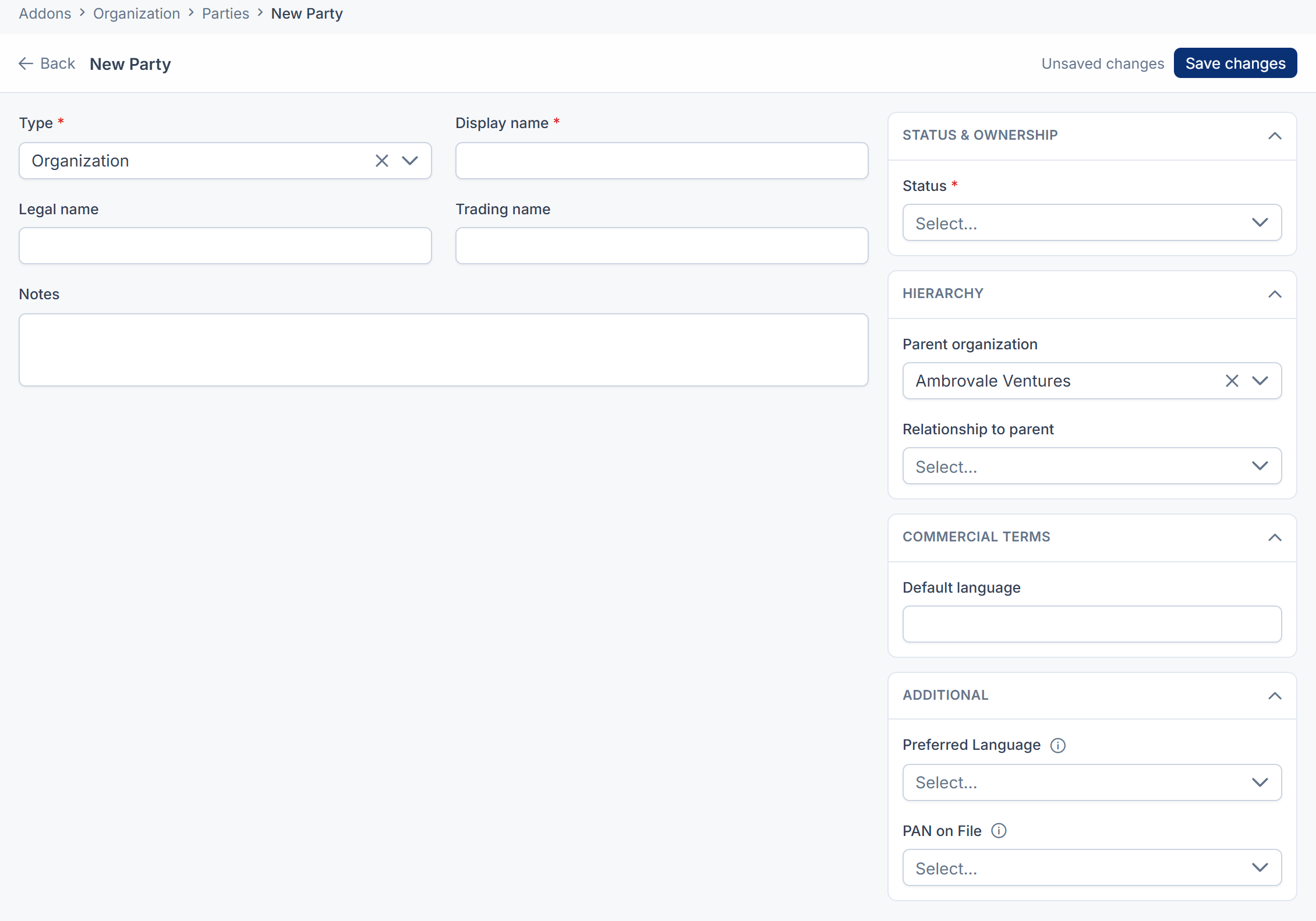
| Field | What it is | Notes |
|---|---|---|
| Party no. | The party's number, such as PTY-00042. | Given automatically. You can't type or change it. |
| Type | Person, Organization or Group. | Required. Can't be changed after saving. |
| Display name | The name shown in lists and pickers. | Required. Up to 255 characters. For an organization, defaults to the legal name. |
| Legal name | The name on invoices and contracts. | Organizations and groups only. |
| Trading name | The name the business trades under. | Organizations and groups only. |
| Salutation, First name, Middle name, Last name, Suffix | A person's name in parts. | People only. Left empty, they're filled from the display name. |
| Date of birth | People only. Must be before today. | |
| Gender | Free text. | People only. Up to 20 characters. |
| Status | Active, Inactive, Blocked or Archived. | Required. In Organization, a label for filtering: it doesn't stop anyone using the record. |
| Parent organization | The company this one belongs to. | Lists organizations your businesses deal with. People can't be parents. |
| Relationship to parent | Subsidiary, Branch, Site or Division. | Shows once a parent is chosen. |
| Default language | The language code the party prefers, such as en or hi. | Under Commercial terms. Up to 8 characters. |
| Notes | Anything worth knowing. | Up to 5,000 characters. |
| Additional | Your Laramin's custom fields for parties. |
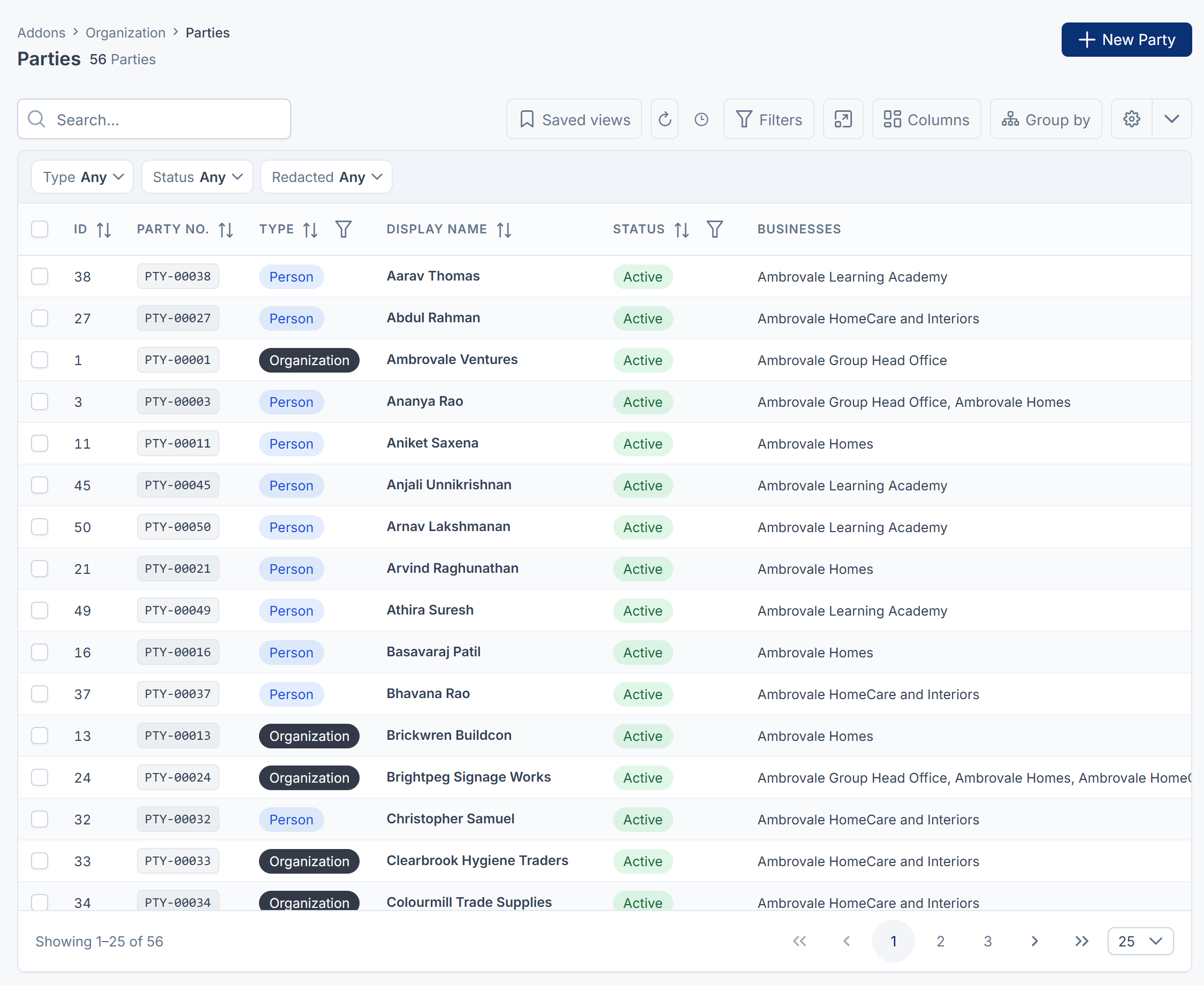
The Parties list can also show Businesses, the businesses each party deals with, when you're in All Workspaces, and Redacted, which marks a party whose personal data was erased. Its name fields are then read-only. Erasing a party's personal data isn't available on a screen in this version.
The list filters by Type, Status and Redacted, and searches party numbers and names.
Business Profile
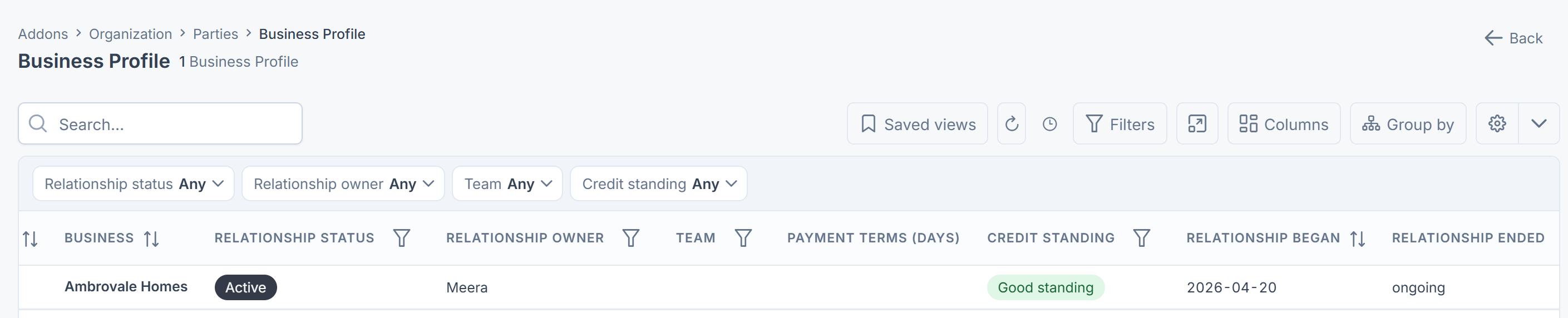
From a party's row actions menu, select Business Profile. These fields belong to one business. See Set your business's terms for a party.
| Field | What it is | Notes |
|---|---|---|
| Business | The workspace this relationship is with. | Set automatically. |
| Relationship status | Active or Ended. | Changed by End relationship. |
| Relationship owner | The person who looks after the party. | Members of your current workspace. Otherwise: That person cannot work in this business. |
| Team | The team that looks after the party. | Teams of your current workspace. Otherwise: That team belongs to another business. |
| Default currency | Three-letter currency code, such as INR. | |
| Payment terms (days) | 0 to 365. | |
| Credit standing | Good standing, Watch or On hold. | A label. It doesn't block anything. |
| Credit limit | The credit you extend. | A whole number in the currency's smallest unit, paise or cents: 5000000 is ₹50,000.00. It's stored and shown that way, and the form doesn't say so. Can't be negative. |
| Credit currency | Three-letter code for the credit limit. | Required with a limit: A credit limit needs a currency, or nobody can act on the number. |
| Relationship began, Relationship ended | When the relationship started and ended. | Set automatically. ongoing while active. |
| Relationship note | Up to 2,000 characters. |
Contact channels
From a party's row actions menu, select Contact channels. Shared.
| Field | What it is | Notes |
|---|---|---|
| Channel | Email, Phone, Mobile, WhatsApp, Fax or Website. | Required. |
| Value | The address, number or web address. | Required. Up to 255 characters. |
| Label | What the channel is for, such as work, home or accounts. | Up to 60 characters. |
| Primary | Primary or Secondary. | One primary per channel. |
| Verified | Verified or Unverified. | Shown only. Can't be set from the form. |
| Opted out | When the party asked not to be contacted this way. | Shown only. |
| Order | Sort position. |
Addresses
From a party's row actions menu, select Addresses. Shared.
| Field | What it is | Notes |
|---|---|---|
| Used for | Registered, Billing, Shipping, Site or Correspondence. | Required. |
| Label | A name for the address. | Up to 60 characters. |
| Attention | Who to send it to, if not the party. | Up to 120 characters. |
| Address line 1 | Required. | |
| Address line 2, Address line 3 | ||
| City, State, Postcode | State is typed, not chosen from a list. | |
| Country | Two-letter country code, such as IN. | Required. |
| Primary | Primary or Secondary. | One primary per use. |
| In use from, In use until | When the party was at this address. | |
| Latitude, Longitude | The map position. |
Identifiers
From a party's row actions menu, select Identifiers. Shared. In this version, the Type list is empty, so you can't add identifiers on screen.
| Field | What it is |
|---|---|
| Type | The kind of number, such as a tax registration. |
| Number | The number itself. |
| Country | The two-letter code of the country that issued it. |
| Issued by | The issuing body. |
| Valid from, Valid until | |
| Verification, Verified on | Unverified, Verified or Verification failed, and when. Shown only. |
Roles
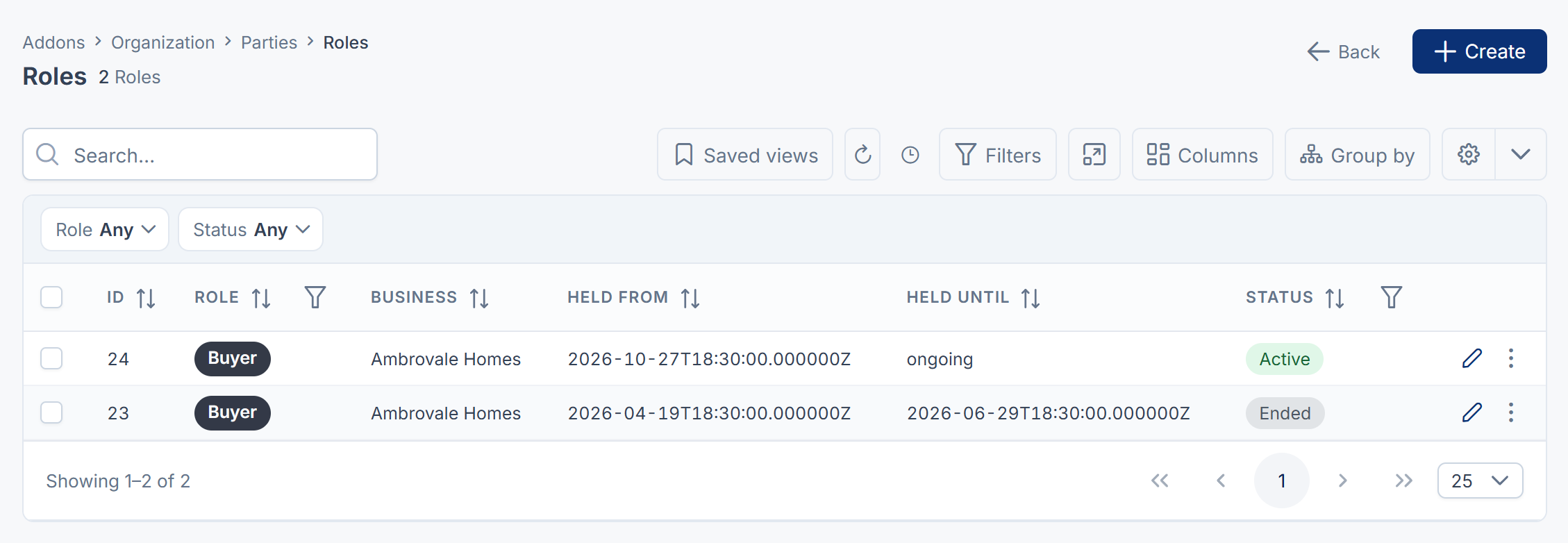
From a party's row actions menu, select Roles. Each role belongs to the business it was given in. See Give a party a role, or end one.
| Field | What it is | Notes |
|---|---|---|
| Role | What the party is to your business. | Required. Only roles that fit the party's type. |
| Held from | When the role started. | Required. |
| Held until | When it ended. | ongoing while empty. |
| Status | Active, Suspended or Ended. | A new role always starts Active. |
| Note | Up to 1,000 characters. Kept only when you edit a role. |
Relationships
From a party's row actions menu, select Relationships. Shared. In this version, the Relationship list is empty, so you can't add relationships on screen.
| Field | What it is |
|---|---|
| Relationship | The kind of link, such as "employee of". |
| With | The other party. |
| Seen from the other side | The same link read the other way, such as "employer of". Filled in automatically. |
| From, Until | When the link held. From is required. |
| Primary | Primary or Additional: which of several links of one kind to show first. |
Roles & Relationships
Organization › Roles & Relationships lists every party role your Laramin offers. It's read-only: roles come from Organization and the other add-ons you install.
| Column | What it shows |
|---|---|
| Slug | The role's key, such as customer. |
| Label | The name people see. |
| Registered by | The add-on that added the role. |
| Applies to | Person, Organization or both. |
| Assignable | Assignable, or Retired when its add-on was removed. Parties keep a retired role, but nobody can be given it. |
| Origin | Registered by a module or Created here. Hidden by default. |
| Order | Sort position. |
Organization's own roles:
| Role | Applies to |
|---|---|
| Customer, Prospect, Vendor, Supplier, Partner, Reseller, Distributor | Person, Organization |
| Employee, Contractor | Person |
No role applies to the Group type unless an add-on adds one.
Permissions
All keys start with feature.org.. In the role editor each resource is a row, such as Party or Party contact.
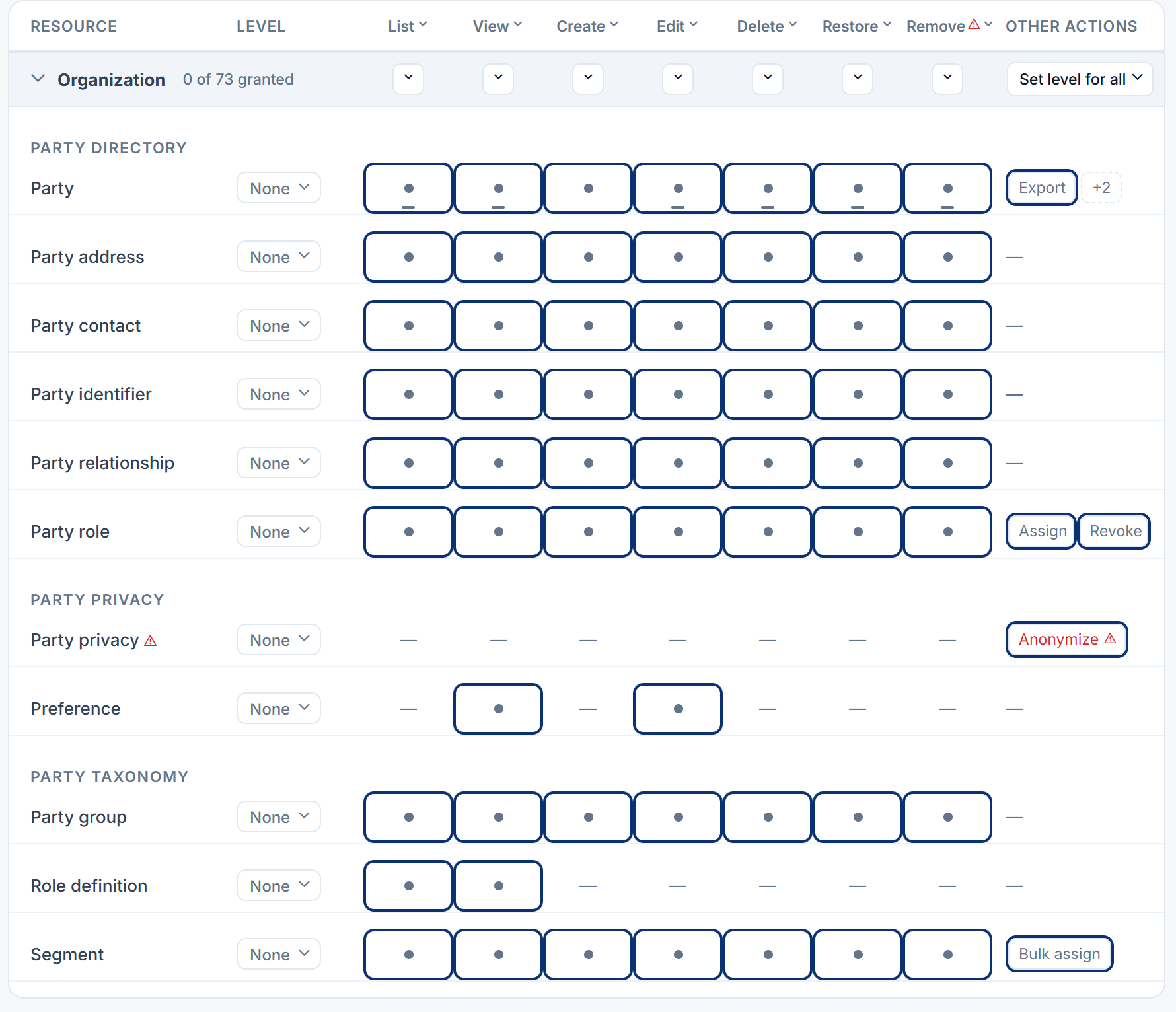
| Row | Key | Actions |
|---|---|---|
| Party | party | list, view, create, edit, delete, restore, remove, and merge, export, import. list, view, edit, delete, restore and remove also come in an own-records version (…_own), meaning parties whose relationship you own. |
| Party contact, Party address, Party identifier, Party relationship | party_contact, party_address, party_identifier, party_ | list, view, create, edit, delete, restore, remove |
| Party role | party_role | the same, plus assign (give a role) and revoke (end one) |
| Party group | party_group | list, view, create, edit, delete, restore, remove |
| Segment | segment | the same, plus bulk assign |
| Role definition | role_definition | list, view |
| Preference | preference | view, edit |
| Party privacy | party_privacy | anonymize |
Being a super admin skips these checks. The Administrator role doesn't include remove permissions. See Super admin vs Administrator.
Thanks. That helps us decide what to write next.
Thanks for telling us what was missing.
You already answered for this article today. Thanks.
We got a lot of answers from your network just now. Try again in a few minutes.
We couldn't send that. Check your connection and try again.
Links in this article
Printed from help.bsscn.com. The online article may have changed since.