Payment statuses and fields
Every column and panel on Billing › Payments, the sixteen payment statuses and how a payment moves between them, the channels, and what the background tasks do.
- Applies to
- Billing 2.0 and later
- Who can do this
- Administrator, Team member
- Where
- Billing › Payments
On this page
Billing › Payments lists every payment your business has taken through a gateway, newest first. You need feature. to open it and feature. to open a payment. Payments can't be added, edited or deleted on screen. The one action is Refund. See Refund a payment.
The list
| Column | Shows |
|---|---|
| Reference | The payment's permanent reference. Give this to support. Searchable. |
| Gateway | The gateway it went through. Searchable and filterable. |
| Amount | The amount and currency, such as 11800.00 INR. |
| Status | See Statuses below. Filterable. |
| Channel | Where it started: Admin, Website, Mobile app, API or Internal. Filterable. |
| Created | When it started. |
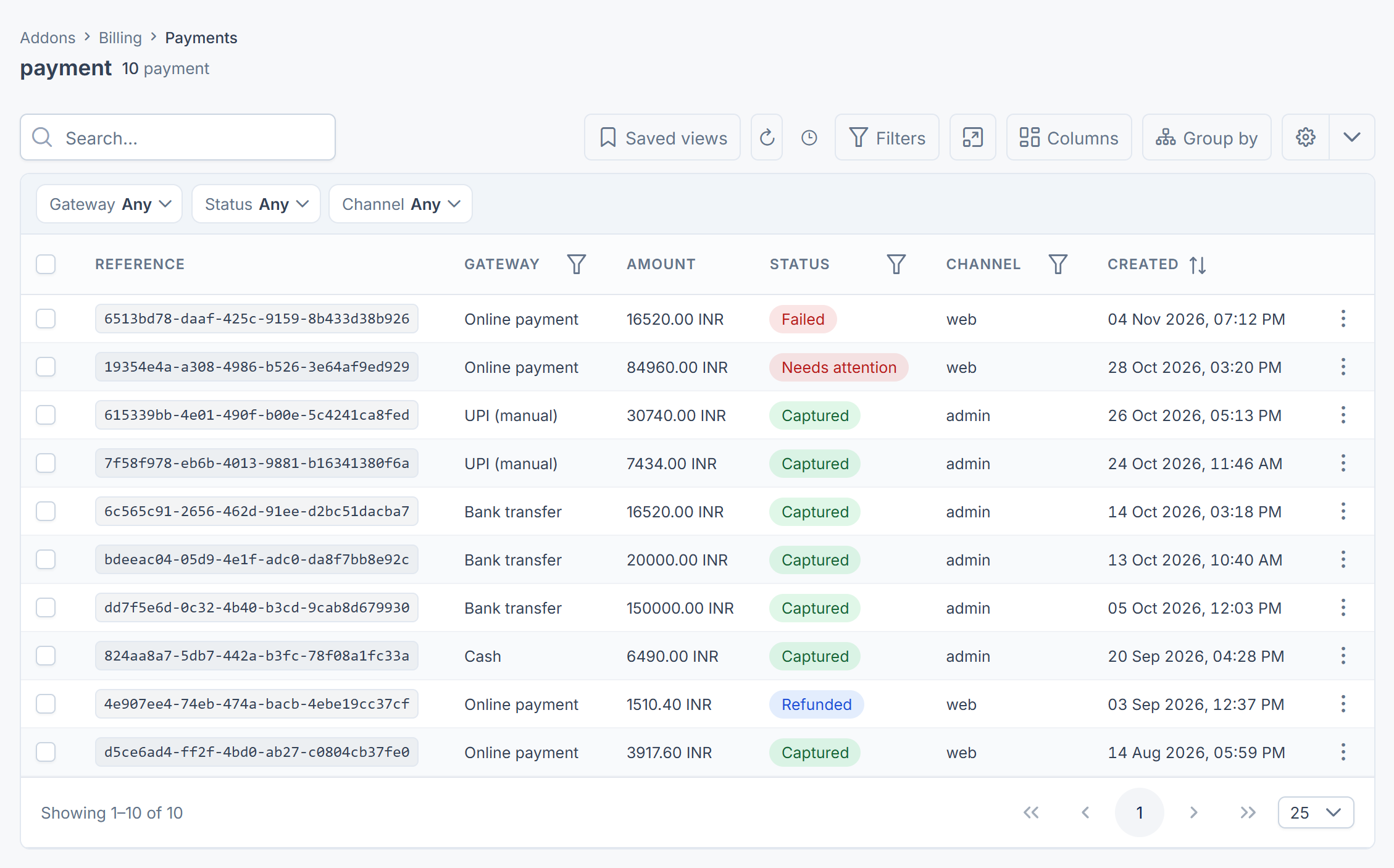
In All Workspaces a Business column shows whose payment it is.
A payment's page
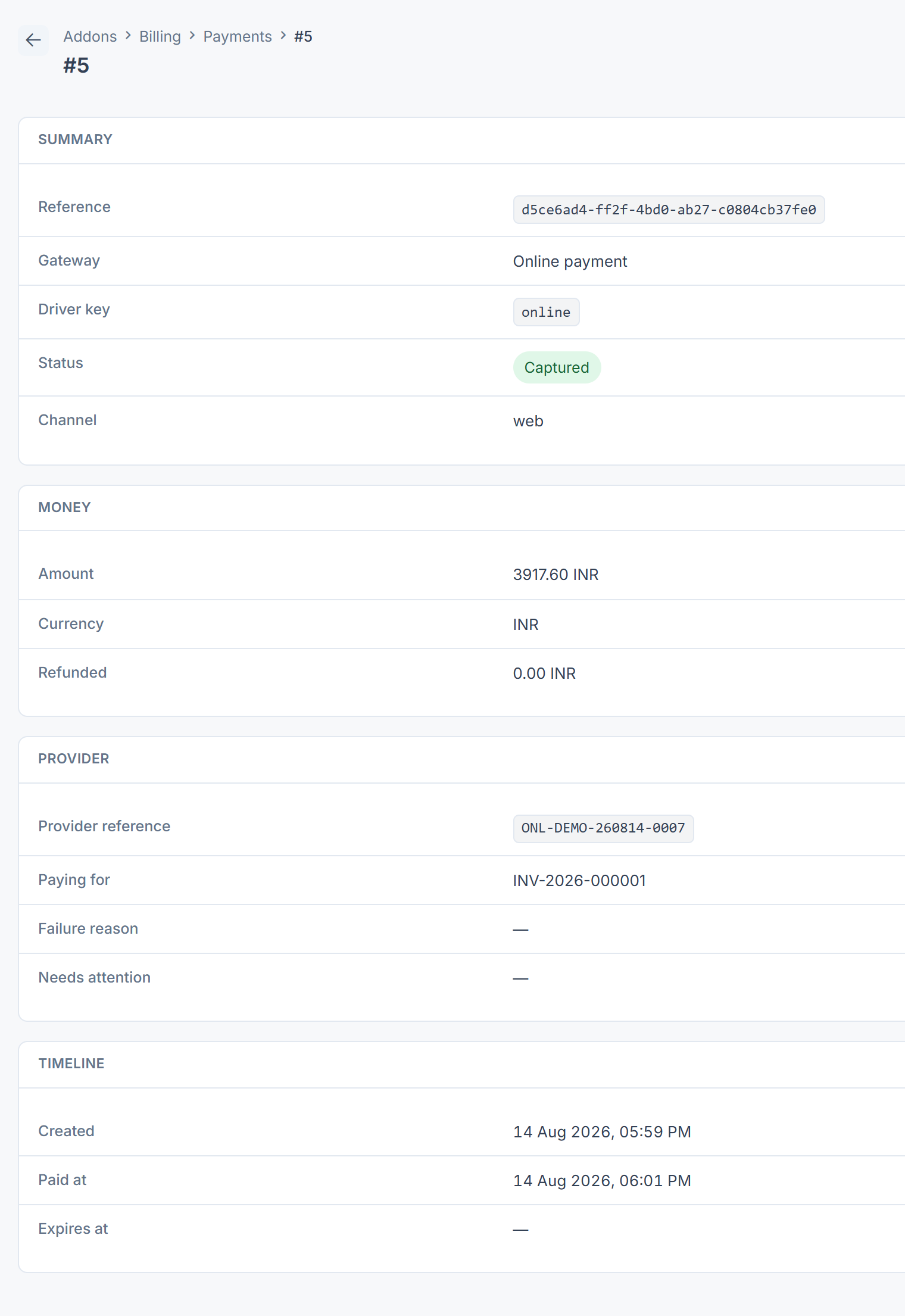
| Panel | Fields |
|---|---|
| Summary | Reference, Gateway, Driver key (the provider add-on's key, such as razorpay), Status, Channel |
| Money | Amount, Currency, Refunded (the total returned so far) |
| Provider | Provider reference (the provider's own id for the charge, to search for in their dashboard), Paying for (what the payment is for, such as an invoice), Failure reason, Needs attention (why Billing can't move it on by itself) |
| Timeline | Created, Paid at, Expires at (when an unfinished checkout closes) |
Statuses
Billing allows only the moves in the Next column, and refuses any other, such as from Failed back to Pending. Any payment that isn't final can also move to Needs attention.
| Status | Means | Next |
|---|---|---|
| Initiated | Recorded, but the provider hasn't been contacted yet. | Pending, Awaiting verification, Failed or Cancelled |
| Pending | With the provider. The customer is paying, or deciding. | Authorized, Captured, Cancelled, Failed or Expired |
| Authorized | The money is held but not taken yet. Only with providers that take payment in two steps. | Captured, Cancelled, Expired or Failed |
| Captured | The money has been taken. This is the status that means you've been paid. | Partially refunded, Refunded or Disputed |
| Failed | The provider or the customer's bank declined. Final. Failure reason says why. | |
| Cancelled | The customer chose not to continue. Final, and not a fault. | |
| Expired | Nobody finished the checkout before it closed. Final. | |
| Partially refunded | Part of the money has been returned. More can be refunded. | Refunded or Disputed |
| Refunded | All of it has been returned. | Disputed |
| Disputed | The customer disputed the charge with their bank. The money is held back for now. | Chargeback won or Chargeback lost |
| Chargeback won | The dispute went your way. Final. | |
| Chargeback lost | The dispute went against you. The money is gone, usually with a fee. Final. | |
| Awaiting verification | A customer says they paid offline, for example by bank transfer, and someone must check. | Verified or Rejected |
| Verified | Someone confirmed the offline payment. It counts as paid. | Partially refunded, Refunded or Disputed |
| Rejected | Someone rejected the offline payment claim. Final. | |
| Needs attention | Billing can't move the payment on by itself, usually because its gateway's add-on was removed or the provider's answer doesn't match. See A payment is stuck, or can't be refunded. | The status the provider later confirms |
[Confirm: Billing 2.0.0 has no button to verify or reject an offline payment. The Awaiting verification branch can only be moved by an add-on or integration. A Verified payment also has no Refund action, which is offered on Captured and Partially refunded payments only.]
When a payment for an invoice is Captured, Billing applies it to the invoice: the invoice's Paid goes up, its status becomes Partially Paid or Paid, and a Payment Received entry is added to the ledger. A payment for an invoice that's still a draft, already closed or in another currency isn't applied, and a warning is written to the server log.
Background tasks
Three scheduled tasks keep payments and invoices moving. They need your Laramin's scheduler to be running.
| Task | Runs | Does |
|---|---|---|
| Reconcile payments | Every 15 minutes | Asks the provider what happened to payments that stopped moving, in case its notification never arrived, and applies the answer. |
| Expire payments | Hourly | Marks payments whose checkout window (Expires at) has passed as Expired, recording The checkout window passed without a payment. |
| Mark invoices overdue | Daily | Marks unpaid invoices past their due date as Overdue. |
When a gateway's notification can't be matched to a payment yet, because it arrived before the provider's reference was saved, Billing keeps it and tries again for a while rather than dropping it.
Thanks. That helps us decide what to write next.
Thanks for telling us what was missing.
You already answered for this article today. Thanks.
We got a lot of answers from your network just now. Try again in a few minutes.
We couldn't send that. Check your connection and try again.
Links in this article
Printed from help.bsscn.com. The online article may have changed since.