Billing permissions and server settings
Every Billing permission and what it allows, the server settings that decide currency, numbering, rounding, due dates and seller details, the scheduled tasks, and what the health check reports.
- Applies to
- Billing 2.0 and later
- Who can do this
- Administrator, Platform owner
On this page
Billing has no settings panel. What a person can do comes from their permissions, and how documents are numbered, rounded and dated comes from your Laramin's server configuration.
Permissions
All keys start with feature.bill.. In the role editor they're in three groups. Give them with a role. See Give someone a role.
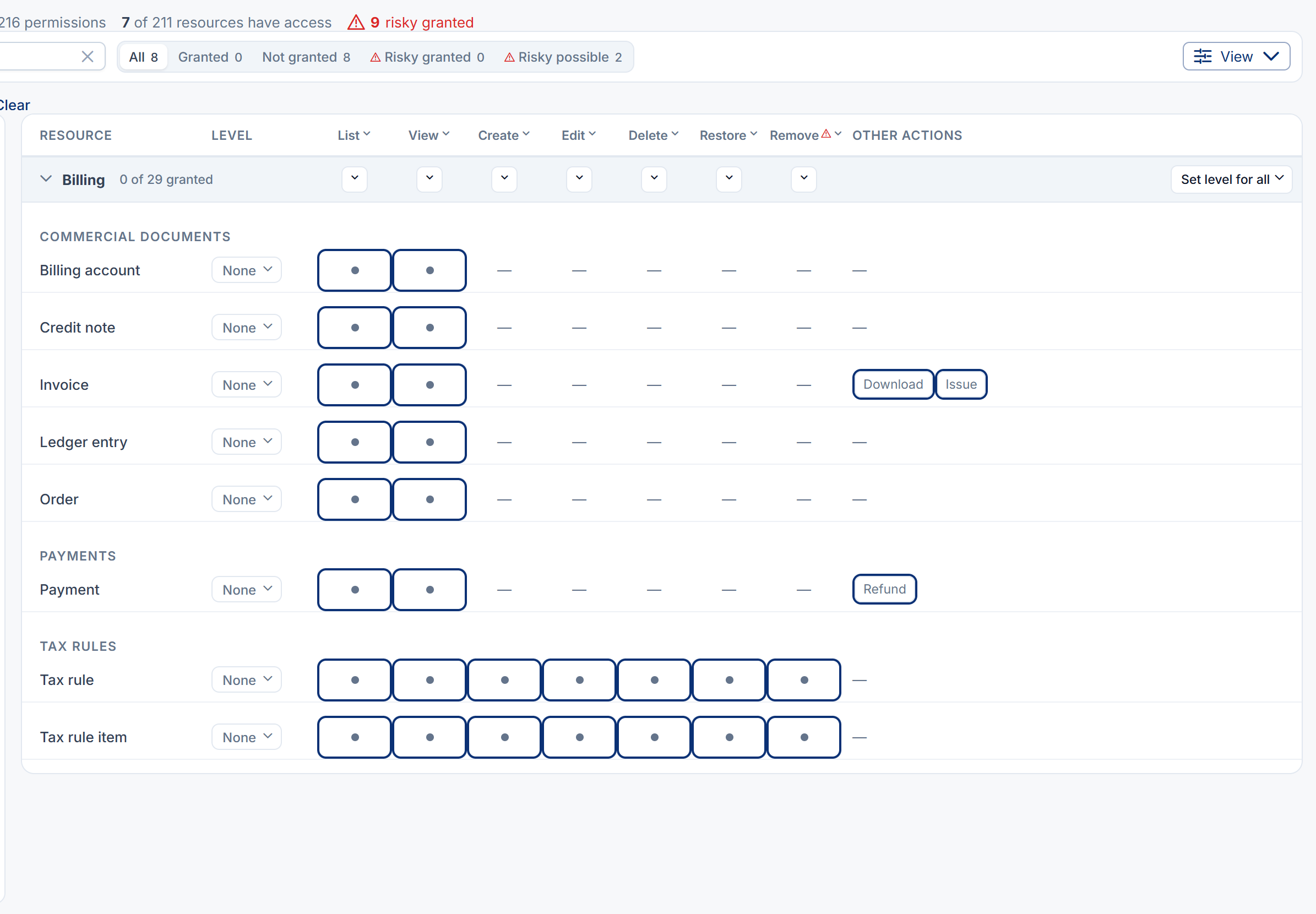
Commercial Documents
| Resource | Actions | Allows |
|---|---|---|
billing_account | list, view | Billing Accounts: the list and each account's page. |
order | list, view | Orders. |
invoice | list, view | Invoices. |
invoice | issue | The Issue action on a draft invoice. |
invoice | download | Downloading an issued invoice as a PDF. Kept apart from view because a PDF leaves your Laramin. |
credit_note | list, view | Credit Notes. |
ledger_entry | list, view | Ledger. |
There's no permission to create, edit or delete any of these, because no one can. See How Billing keeps your money records.
In Billing 2.0.0 the Invoices screen has no Download PDF button. Someone with invoice.download opens the PDF through its address, /admin/, using the invoice's Reference.
Payments
| Resource | Actions | Allows |
|---|---|---|
payment | list, view | Payments: the list and each payment's page. |
payment | refund | The Refund action. |
Payments can't be created, edited or deleted on screen with any permission.
Tax Rules
| Resource | Actions | Allows |
|---|---|---|
tax_rule | list, view, create, edit, delete, restore, remove | Tax Rules: adding, changing, deleting, restoring and removing rules for good. |
tax_rule_item | list, view, create, edit, delete, restore, remove | Tax Rule Items under a rule. |
If you upgraded from a Payment Gateway version that still had tax rules or payments, the old feature., feature. and feature. permissions were renamed to these, so every role keeps what it had.
Roles
Billing brings no roles. Create one for your finance team and give it the permissions above. See Create a role.
Server settings
These are set in your Laramin's server configuration (its .env file) by whoever hosts it. They apply to every business. A change applies to documents created from then on: amounts already stored are never recalculated.
| Setting | What it does | Default |
|---|---|---|
BILLING_ | The currency of a billing account created without one. Add-ons that know the customer's currency pass it instead. | USD |
BILLING_ | The start of every invoice number. | INV, as in INV-2026-000001 |
BILLING_ | The start of every credit note number. | CN |
BILLING_ | How many digits the counter has, for invoices and credit notes. Widening it later continues the series. | 6 |
BILLING_ | The due date of an issued invoice, in days after the issue date, when the add-on that raised it set none. 0 means due on receipt. null means invoices have no due date and never become overdue. | 30 |
BILLING_ | Extra days after the due date before an invoice is marked Overdue. The printed due date doesn't change. | 0 |
BILLING_ | How a half is rounded in Billing: half_up or half_even. Unset, Billing follows your Laramin's money setting. | Unset |
BILLING_ | line rounds each line's tax and adds them up. document applies each rate once to the whole document and spreads the result across the lines. The two can differ by a paisa or a cent. | line |
Seller details
What an invoice says it's from. Each one left empty falls back to the Company Settings field shown, if there is one. See System and company settings.
| Setting | Printed as | Falls back to |
|---|---|---|
BILLING_ | The seller's name under Bill From | Company Name |
BILLING_ | "trading as" after the name | Nothing |
BILLING_ | Tax ID, for example your GSTIN | Nothing |
BILLING_ | Reg. No. | Nothing |
BILLING_ | The address | Business Address |
BILLING_ | The postcode | The company postcode |
BILLING_ | The email | Business Email |
BILLING_ | Kept with the invoice, not printed on the PDF | The company phone |
BILLING_ | Kept with the invoice, not printed on the PDF | Nothing |
BILLING_ | The country code | Nothing |
An invoice keeps the details it was issued with. Without a legal name or an address, the invoice still issues and a warning is written to the server log. Without a legal name, its PDF shows Seller details are not configured. under Bill From.
Careful: If you're registered for GST or VAT, set BILLING_ before you issue your first invoice. An issued invoice can't be changed to add it.
Invoice PDFs
PDFs are produced in English. Billing's screens are translated into more languages, but the PDF engine can only draw Latin, Greek and Cyrillic letters, so a PDF asked for in another language comes out in English.
Scheduled tasks
Billing adds three tasks to your Laramin's scheduled jobs. They run only while scheduled jobs run. Developer Tools › Scheduler shows when each job last ran. If they don't run, see Scheduled jobs don't run.
| Task | Runs | Does |
|---|---|---|
bill:reconcile- | Every 15 minutes | Asks each provider what happened to payments that stopped moving, in case a gateway's notification never arrived. |
bill:expire- | Hourly | Closes checkouts whose window has passed as Expired. |
bill:mark- | Daily | Marks issued and partly paid invoices whose due date, plus any grace days, has passed as Overdue. |
Health check
Laramin checks every enabled add-on every five minutes, and Addon Management shows Billing as Unhealthy when one of these is true. See Add-on statuses.
| Message starts with | Means |
|---|---|
| Billing is enabled but its tables do not exist | Billing's database changes haven't run. |
| The PaymentProcessor port is unbound, or Another module has bound PaymentProcessor | Payments can't be taken, or another add-on is trying to record them. Contact your Laramin provider. |
| … provider reference(s) are shared by more than one payment | Two payments carry the same provider reference, so the gateway's notifications for them can't be applied. |
| … callback(s) arrived on the legacy driver-only URL | A gateway still sends notifications to its old address and you have more than one merchant account for it. Give the provider the account's own callback address from its Payment Gateway screen. |
| … payment(s) have been pending for over 24 hours | The 15-minute task isn't resolving them. See A payment is stuck, or can't be refunded. |
| … payment(s) need attention | A payment can't move on by itself, most often because its gateway's add-on was removed. |
Thanks. That helps us decide what to write next.
Thanks for telling us what was missing.
You already answered for this article today. Thanks.
We got a lot of answers from your network just now. Try again in a few minutes.
We couldn't send that. Check your connection and try again.
Links in this article
Printed from help.bsscn.com. The online article may have changed since.