How matching works
Property CRM matches requirements and properties with the same purpose and category, then scores each pair out of 100 on budget, location, type, BHK, area and locality. Here's how the score and the Strong, Good and Fair bands are worked out.
Why this step
Matching keeps only pairs that could work, then scores them. Knowing how lets you trust a Strong Match: A property that could suit a requirement, scored out of 100. and question a Fair one.
Today you only need:
- Applies to
- Property CRM 5.0 and later
- Who can do this
- Administrator, Team member
In short
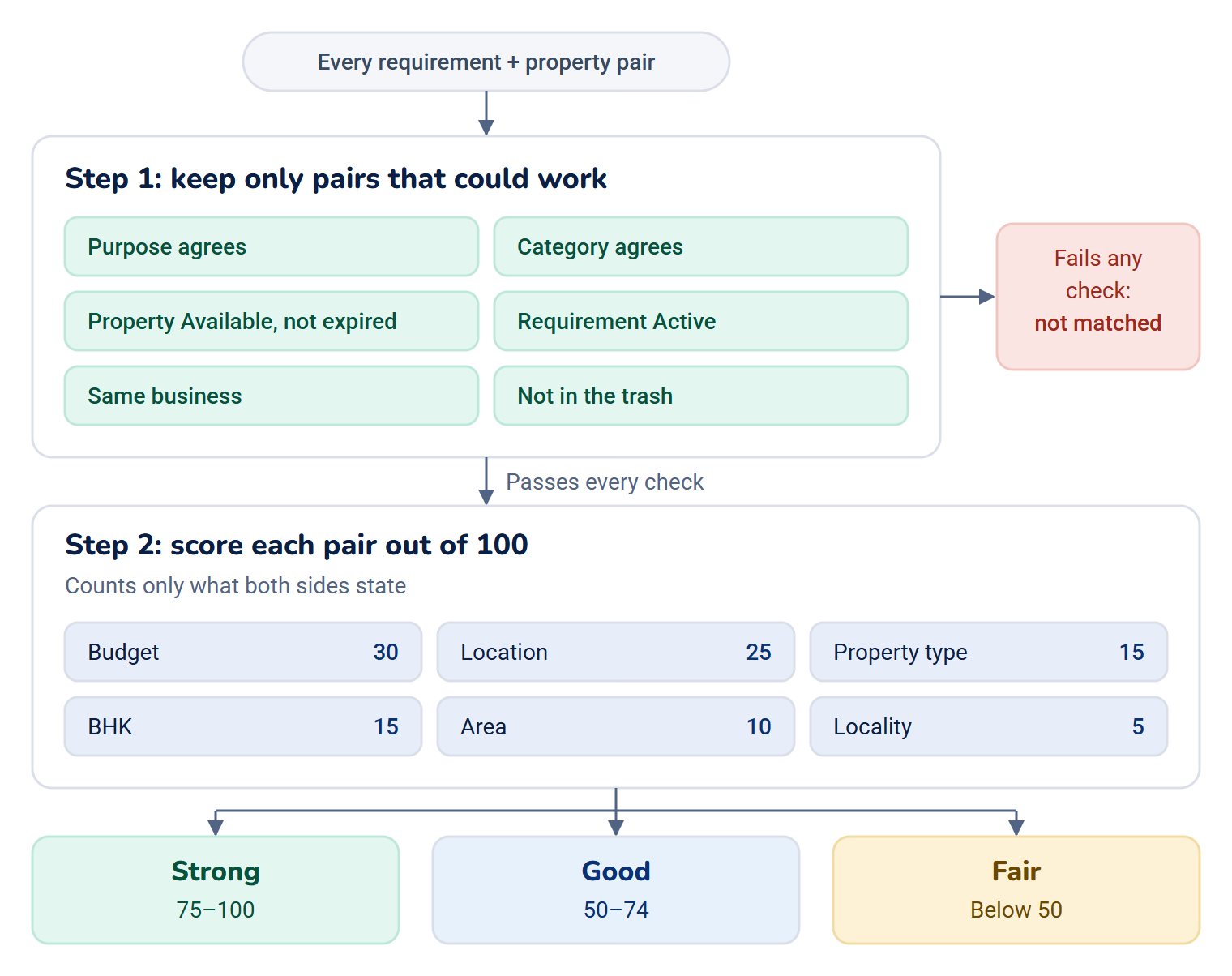
Matching compares what a buyer asked for with the properties you have. First it keeps only the pairs that could ever work: same purpose, same category, a property on the market and a buyer still looking. Then it scores each pair out of 100 on six things, best first. A score of 75 or more is Strong, 50 to 74 is Good, and below 50 is Fair.
How it works
Where you see matches
| On | The Matches card lists | You also need |
|---|---|---|
| A requirement | The properties that could suit this buyer. | feature. |
| A property | The requirements this property could suit. | feature. |
Without the second permission, the card isn't shown. Every Property CRM role has both.
Matches are worked out each time the card loads. Nothing is stored, so a new property or a changed budget shows up the next time you open the record, or when you select Refresh on the card or Find More Matches on the requirement.
Step 1: only pairs that could work
A pair is considered only if all of these are true:
- The purpose agrees. A Buying requirement matches Sale properties. Rent, Lease and Joint Venture match the same purpose.
- The category agrees: Residential, Land / Plot or Commercial.
- The property is on the market: its Status is Available, and its Listing Expires On date is empty or hasn't passed. Under Offer, Sold, Rented and Withdrawn properties aren't matched.
- The requirement is still active, when you look from a property: only requirements with Status Active are listed there.
- Both belong to the same business, and neither is in the trash.
Show on website, Featured Listing and Verified Listing don't decide whether a property matches.
Step 2: the score
Each of the six things below counts only if the requirement says something about it, so a blank in the requirement is never held against a property. Budget, BHK and Area also need the property's value: without it, they don't count. Location, Property type and Locality count anyway, and a blank on the property scores like a mismatch, so fill those in. The score is worked out over the things that count. If the requirement gives nothing beyond purpose and category, every property scores 100.
| What | Weight | Full marks | Half marks or less | Nothing |
|---|---|---|---|---|
| Budget | 30 | The Price is within Budget (min) and Budget (max). | Half: the price is up to 10% over Budget (max), or below Budget (min). | More than 10% over Budget (max). |
| Location | 25 | The City is the same. Capitals don't matter. | 40%: a different city in the same State. | A different state. |
| Property type | 15 | The Property Type is the same. | A different type. | |
| BHK | 15 | The property's BHK is one the buyer ticked. | Any other BHK. | |
| Area | 10 | Built-up Area (sq.ft) is within Area (min, sq.ft) and Area (max, sq.ft). | Half: up to 10% outside the range. | Further outside. |
| Locality | 5 | The property's Area / Locality contains the buyer's, or the Pincode is the same. | Neither. |
Some things to know:
- Budget counts only when the requirement has a Budget (max), and the property has a price and isn't Price on Request. A requirement with only Budget (min) isn't scored on budget.
- Property type always counts, because every requirement has one.
- Location counts when the requirement has a City or a State.
- Area compares built-up area. Plots don't have one, so plots aren't scored on area.
- BHK counts only for homes, where both sides have a BHK.
An example
A buyer wants a 2 BHK apartment in Chennai for up to 60 lakh, and gave no area or locality. A 2 BHK apartment in Chennai at 64 lakh scores:
| What | Counts? | Marks | Weighted |
|---|---|---|---|
| Budget | Yes, 30 | Half: under 10% over | 15 |
| Location | Yes, 25 | Full | 25 |
| Property type | Yes, 15 | Full | 15 |
| BHK | Yes, 15 | Full | 15 |
| Area, locality | No: the buyer didn't say |
That's 70 out of the 85 that counted, which is 82: a Strong match.
Bands, chips and order
| Band | Score |
|---|---|
| Strong | 75 to 100 |
| Good | 50 to 74 |
| Fair | Below 50 |
Under each match, chips say what fits: the city, the property type, the BHK and the locality by name, or Within budget and Area match. A chip shows for anything that scored half marks or more, so Within budget also appears when the price is up to 10% over Budget (max) or below Budget (min), and Area match when the area is up to 10% outside the range. Check the price and area yourself before you call a match a fit.

Matches are listed by score. Between equal scores, a requirement lists featured properties first, then the newest. A property lists higher-priority requirements first, then the newest.
The card shows the best 50. When there are more, it says, for example, Showing 50 of 64. In a very large business, only the 500 most promising candidates are scored: featured and newest properties first on a requirement, newest requirements first on a property.
How it relates to
- Requirements: the fields that feed matching are on the requirement form. See Record a client requirement.
- Property attributes: which properties have a BHK or a built-up area depends on their type. See Property attributes by type.
Next steps
Links in this article
Printed from help.bsscn.com. The online article may have changed since.