How roles and permissions work
A role is a named set of permissions, defined once for your whole Laramin. Who holds it, and where, is decided separately: everywhere, in one workspace or in one team. Access only ever adds up.
- Applies to
- Roles & Permissions 1.2 and later
- Who can do this
- Platform owner, Administrator
On this page
In short
A permission lets someone do one thing, such as Create User. A role is a named set of permissions, such as "Sales Manager". You define each role once, for your whole Laramin. Then you decide who holds it and where: everywhere, in one workspace, or in one team. What a person can do is everything their roles and direct permissions add up to in the place they're working. Nothing ever takes a permission away.
How it works
Roles are defined once
There's one "Sales Manager" role for your whole Laramin, not a copy per workspace or team. Change its permissions and the change reaches everyone who holds it, everywhere. If one business needs a different set, make a different role, such as "Regional Sales Manager".
You create and change roles on Roles and Permissions › Roles. See Create a role and assign permissions.
Assignments say where a role applies
Each time you give someone a role, you choose a scope:
| Scope | The role applies | Who can be given it |
|---|---|---|
| Global | Everywhere, in every workspace and team | Anyone |
| A workspace, shown by its name | Only while the person works in that workspace | Active members of the workspace |
| A team, shown by its name | Only while the person works in that team | Active members of the team and of its workspace |
For example, Ravi holds Sales Manager in the Chennai Sales team, Kumar holds it in Bangalore Sales, and Anand holds it globally. You give roles on Roles and Permissions › Access Assignments. See Give someone a role.
The Roles field on the Users form sets the same global roles. See Create a user.
Access only adds up
While someone works in a workspace and team, Laramin adds together:
- their global roles,
- their roles in that workspace,
- their roles in that team,
- and any permissions granted to them directly in those places.
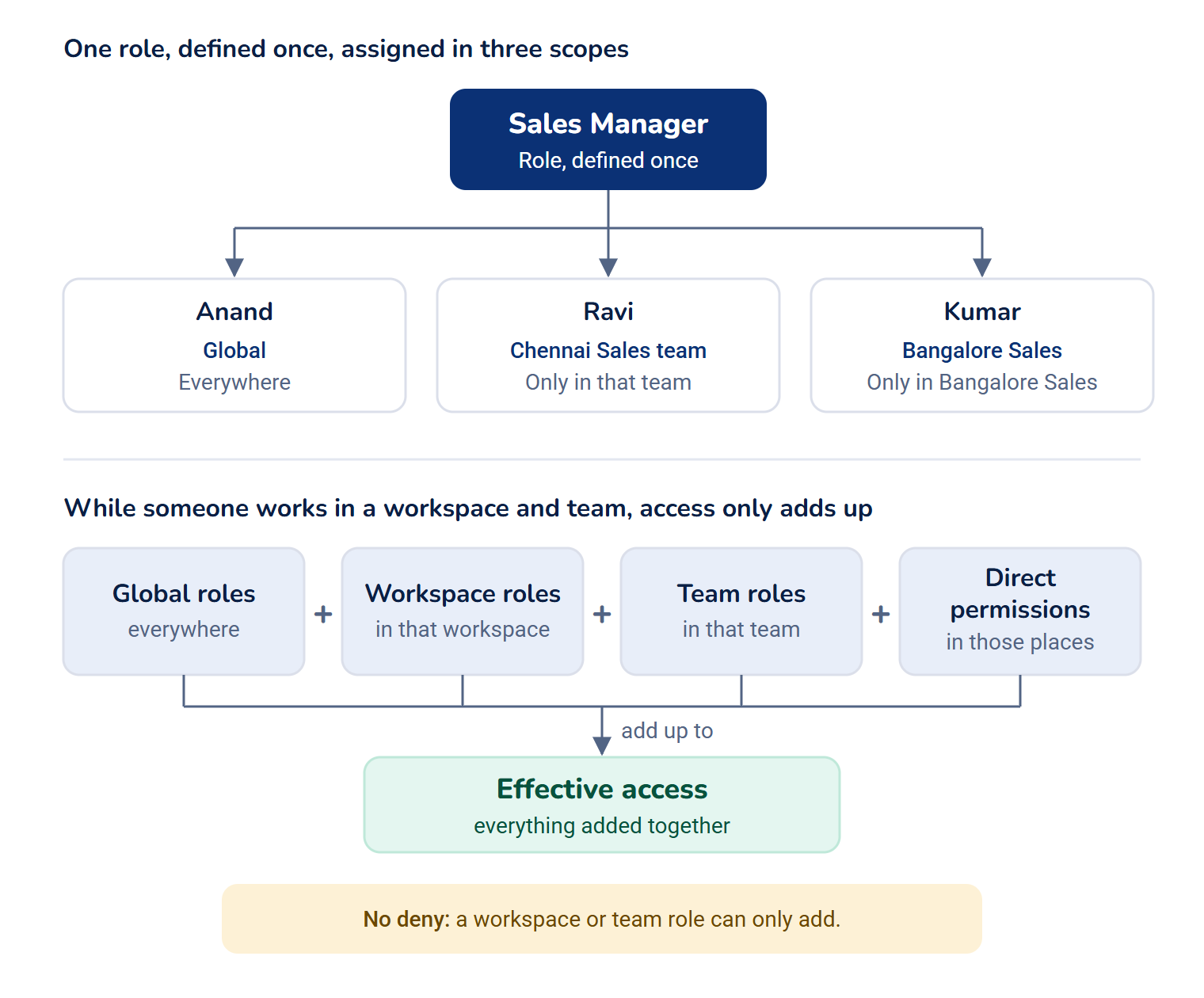
There's no "deny". A workspace or team role can only add to what someone can already do. To take something away, remove the role or permission that gives it, in the scope where it was given. The Effective access panel shows where each permission comes from. See See why someone can do something.
When the header's Workspace switcher is on All Workspaces, no single workspace is in force, so only global roles and global direct permissions apply.
Direct permissions are for exceptions
You can also give one person a single permission without a role. Use it for exceptional access. If several people need the same combination, create or change a role instead. See Grant a permission directly.
You can only hand out what you hold
- Changing a role's permissions: you can only grant or revoke permissions that you hold globally, because a role applies everywhere. Cells you can't change are shown locked.
- Granting a permission directly: you can only grant permissions you hold in that scope.
- Giving a role: you can only give a role if you hold every permission it carries in that scope, because giving it grants all of them at once. Roles you can't give are listed, but can't be chosen.
Super admins pass every check, so none of these limits applies to them. Being a super admin is a switch on the user account, not a role. See Super admin vs Administrator.
Who can use Roles & Permissions
The module's own permissions decide who can open its screens:
| Permission | Key | Lets you |
|---|---|---|
| List Role | feature. | See the Roles list |
| Create Role | feature. | Create roles |
| Edit Role | feature. | Rename roles and change their permissions |
| Delete Role | feature. | Delete roles |
| List Assignment | feature. | See who holds what, and Effective access |
| Edit Assignment | feature. | Give and remove roles |
| Grant Permissions Directly | feature. | Give single permissions to one person |
| List Permission, List Permission Group | feature., feature. | Read the Permissions and Permission Groups lists |
The Administrator role includes none of them. Out of the box, only super admins can use Roles & Permissions. The screens are in the Platform Administration experience, under Roles and Permissions.
Creating, renaming and deleting roles, and changing their permissions, needs these permissions globally. Holding them only in one team or workspace isn't enough.
Permissions come from Laramin and its modules
Core and every module bring their own permissions, and add them when they're installed. You don't create permissions yourself. The Permissions and Permission Groups lists are for reading; only a super admin can change them. Keys follow one pattern, such as feature.. See Permission key reference.
When changes take effect
Saved changes to a role or to someone's assignments apply from that person's next request, usually their next click. They don't need to sign out.
How it relates to
- Workspaces, teams and experiences decide where someone works and what they see. Roles decide what they can do there. See Workspaces, teams and experiences explained.
- The reserved roles, such as Administrator, belong to Core. See Super admin vs Administrator.
Next steps
Thanks. That helps us decide what to write next.
Thanks for telling us what was missing.
You already answered for this article today. Thanks.
We got a lot of answers from your network just now. Try again in a few minutes.
We couldn't send that. Check your connection and try again.
Links in this article
Printed from help.bsscn.com. The online article may have changed since.