Question Bank fields and permissions
Every field on the exam board, topic, sub topic, exam, question, paper queue and mock test forms, the columns of each list, the notifications, and the permissions behind each screen and action.
- Applies to
- Question Bank 3.5 and later
- Who can do this
- Platform owner, Administrator
- Where
- Question Bank
On this page
Exam board, topic and sub topic
Question Bank › Exam Boards, Topics and Sub Topics. See Set up exam boards, topics and exams.
| Screen | Field | Rules and notes |
|---|---|---|
| Exam board | Name | Required. Up to 500 characters. Unique. |
| Slug | Made from the name if left empty. Can't be changed after creation. | |
| Topic | Name | Required. Up to 500 characters. Unique within its board. |
| Exam Board | Required. | |
| Slug | Made from the name if left empty. Unique within the board. Can't be changed after creation. | |
| Sub topic | Name | Required. Up to 500 characters. Unique within its topic. |
| Topic | Required. | |
| Slug | Made from the name if left empty. Can't be changed after creation. |
Each list also counts what's filed under a record (Exams, Topics, Sub Topics or Questions), and shows Created At and Updated At with who did it. Any custom fields you add appear on these forms too.
Exam
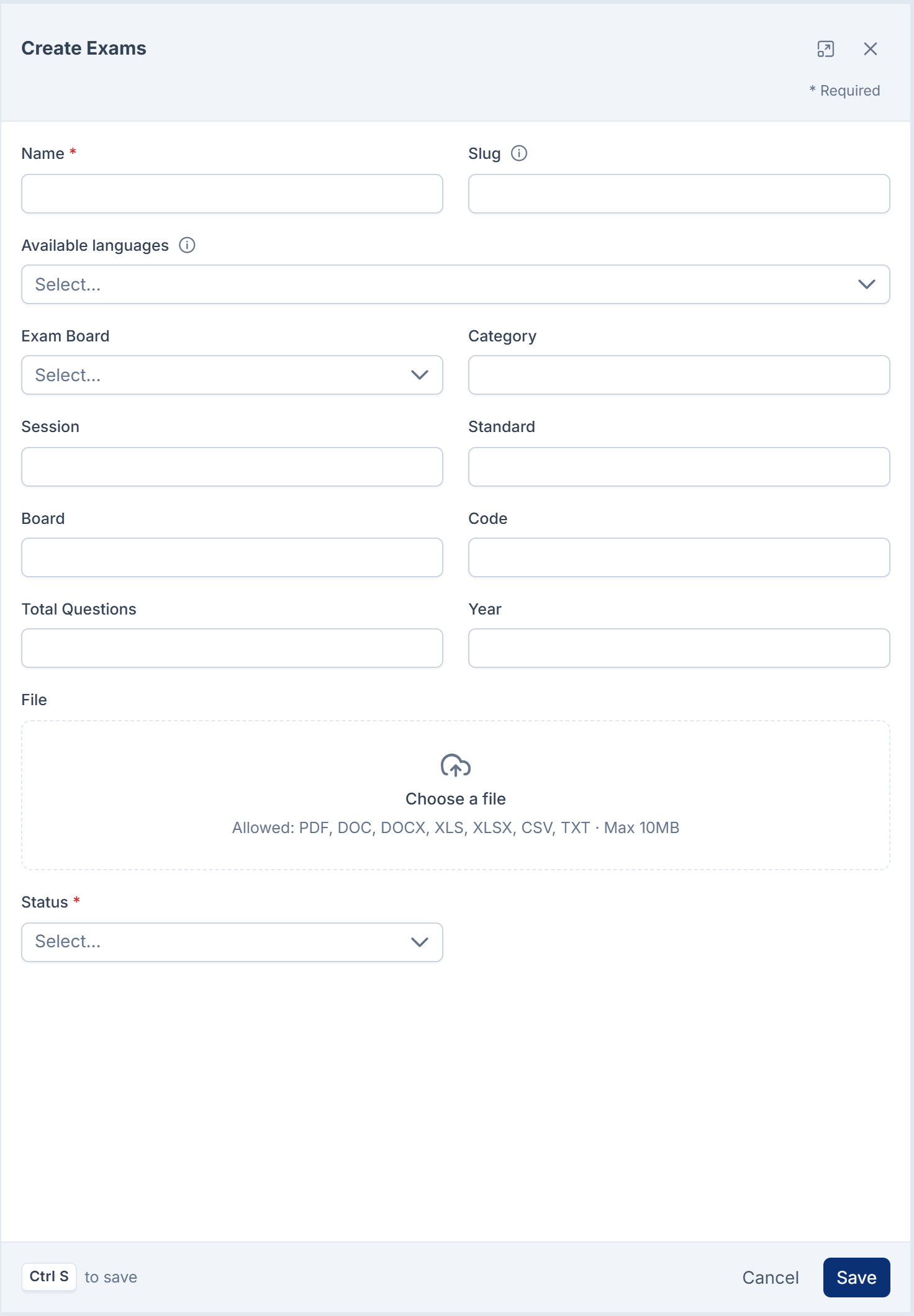
Question Bank › Exams.
| Field | Rules and notes |
|---|---|
| Name | Required. Per language. |
| Slug | Up to 255 characters. Made from the name if left empty. Can't be changed after creation: imported papers find their exam by it. |
| Available languages | The languages the paper is published in. Empty means every language your Laramin runs, shown as All languages. |
| Exam Board | Optional. One of your boards. |
| Category, Session, Standard, Board, Code | Optional text, up to 255 characters each. Board is free text, separate from Exam Board. |
| Total Questions | Optional. The number of questions the paper has. |
| Year | Optional. Four digits. |
| File | Optional. A document, such as a PDF of the paper. |
| Status | Active or Inactive. |
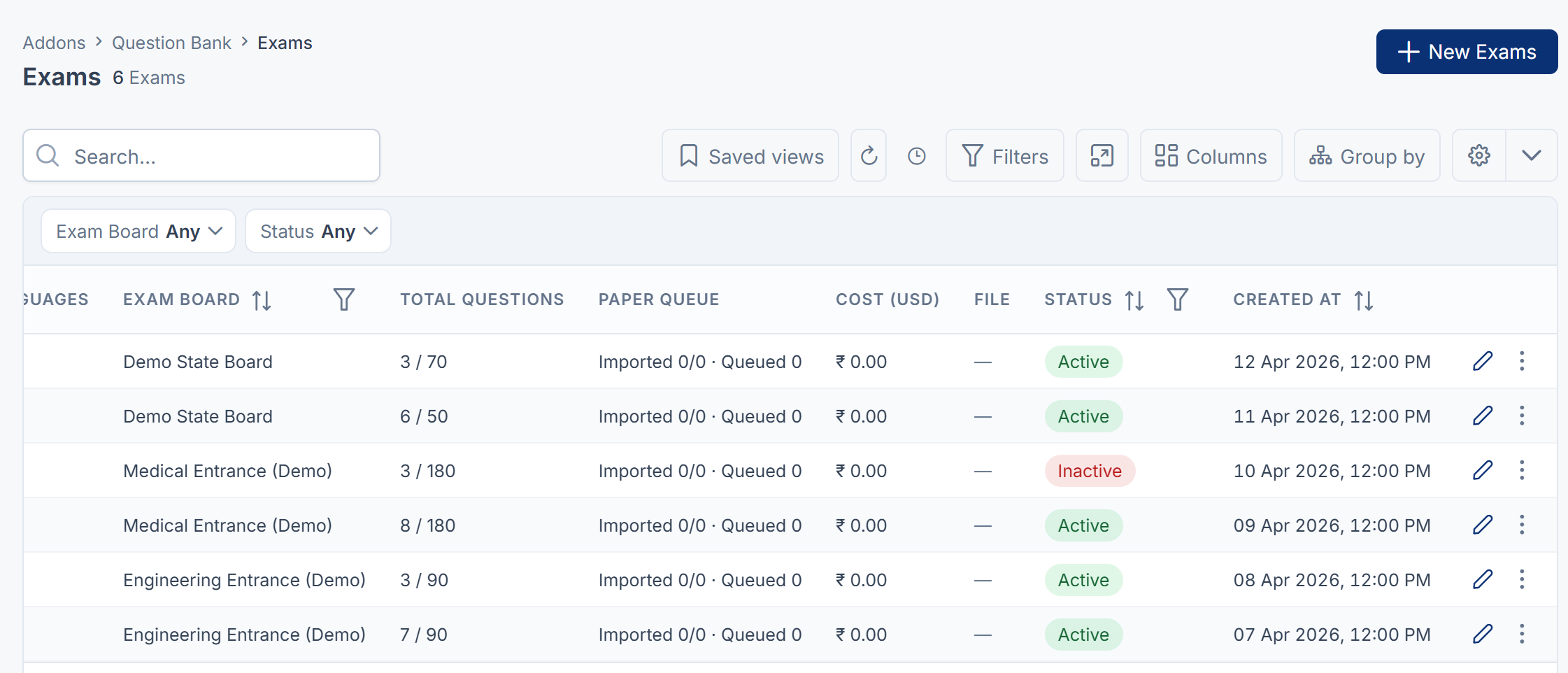
The list also shows Total Questions as questions added against the paper's total (42 / 100), Paper Queue as imported against extracted questions and the number of queued pages, and Cost (USD) as the AI cost of reading its pages. Despite its name, Cost (USD) shows the amount in rupees, converted at a fixed rate, for example ₹ 0.41.
Question
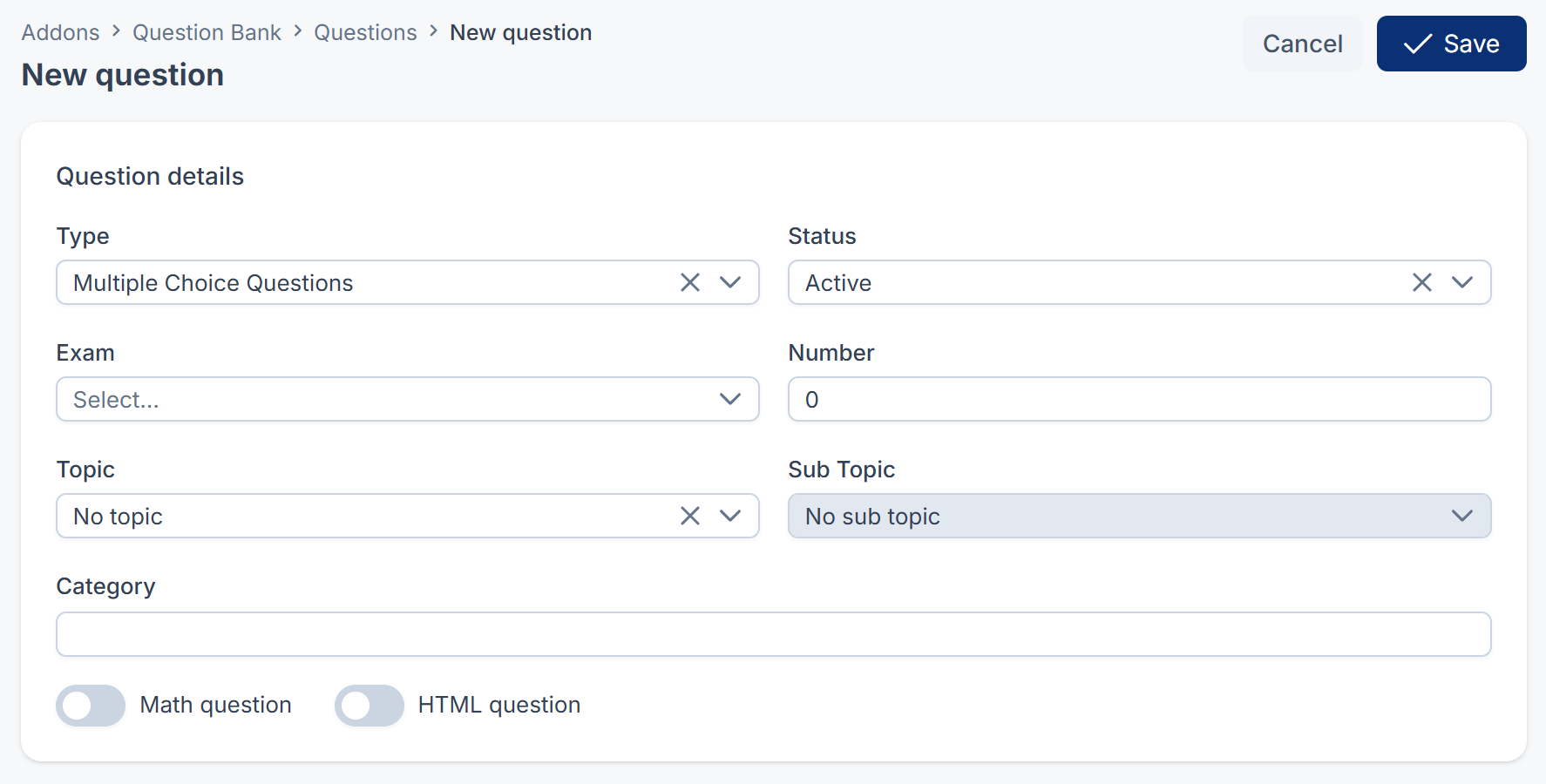
Question Bank › Questions. New Questions and each row's Update Question open the question builder. See Write a question in the question builder.
| Builder field | Rules and notes |
|---|---|
| Type | Required. One of the seven question types. |
| Status | Active or Inactive. Only Active questions go into mock tests, and they need at least two answer choices with one marked correct. |
| Exam | Optional. The exam the question belongs to. Its Available languages decide the language tabs. |
| Number | Optional. The question's number in the paper. |
| Topic, Sub Topic | Optional. The sub topic must belong to the topic. |
| Category | Optional text, up to 255 characters. Mock test rules can match on it. |
| Math question | Turns the text boxes into math editors. |
| HTML question | Adds an HTML content box for formatted content, such as a table. |
| Question, Sub text | Per language. |
| Answer rows | Per type: see the builder article. Each row has a Label and Text, per language. |
The row's Edit form also has Image, Difficulty (Easy, Medium, Hard) and Keywords, which the builder doesn't show.
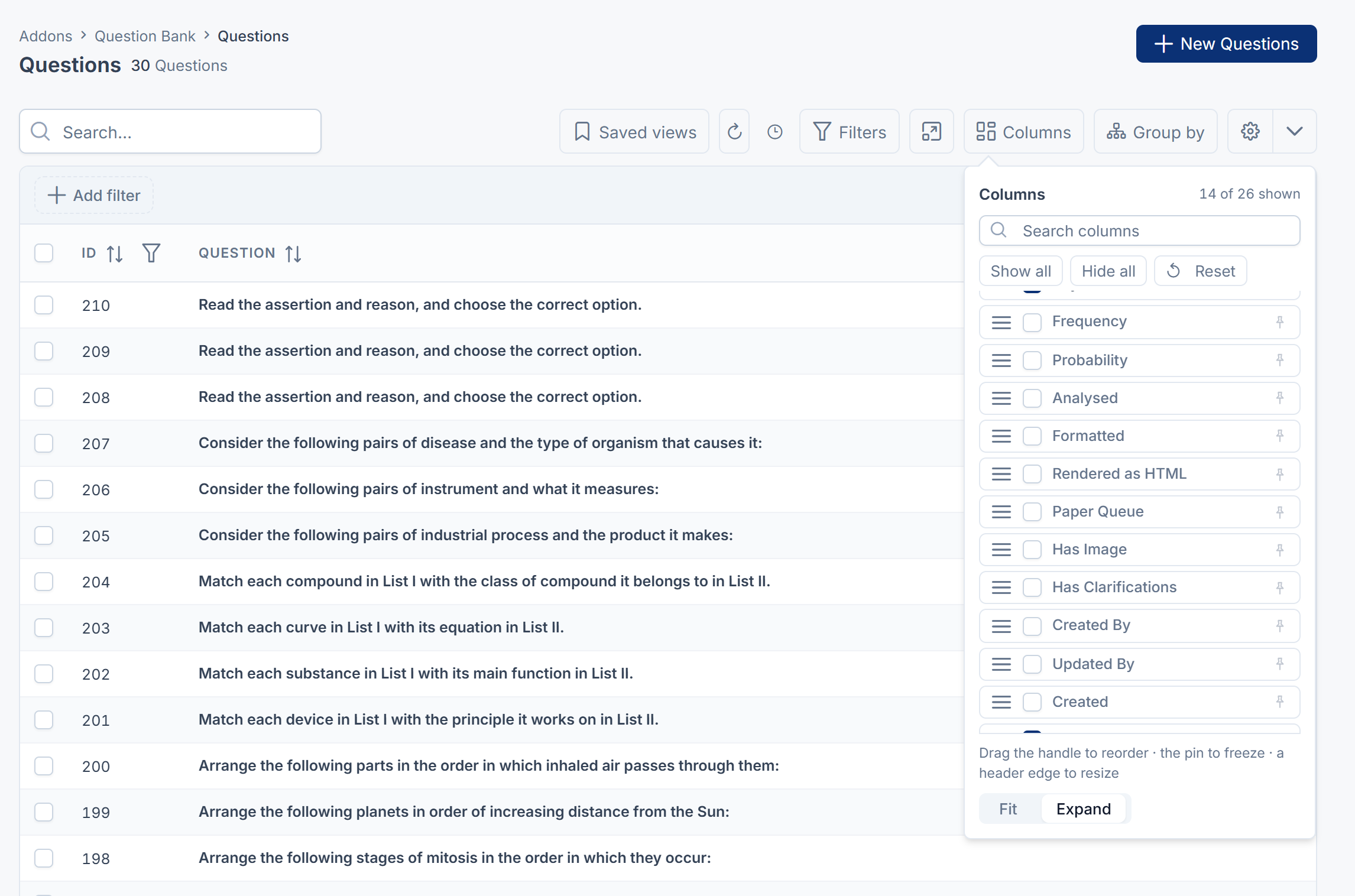
The list can show, and filter by, every column: ID, Question, Type, Exam, Number, Category, Is Math?, Is HTML?, Status, Difficulty, Topic, Sub Topic, Keywords and Updated. More are in the columns menu: Frequency, Probability, Analysed, Formatted, Rendered as HTML, Paper Queue, Has Image, Has Clarifications, Created By, Updated By, Created and Clarified. Dates filter by Today, Last 7 days, Last 30 days, This month, This year or Older than a year.
Bulk actions: Add to test, Export to HTML, OMR answer sheet and Set Topic.
Paper queue
Question Bank › Paper Queue. See Import questions from an exam paper.
| Field | Rules and notes |
|---|---|
| Title | Up to 255 characters. |
| Exam | Required. Imported questions are attached to it. |
| Source Type | Image Source, HTML Source or JSON Source. |
| Image | For an image source: a picture of the page. |
| HTML Source | For an HTML source: the page's markup. |
| JSON Source | For a JSON source: questions as a JSON array. Checked on save. |
| Order | The page's place in the paper. |
| Status | Starts at Created. |
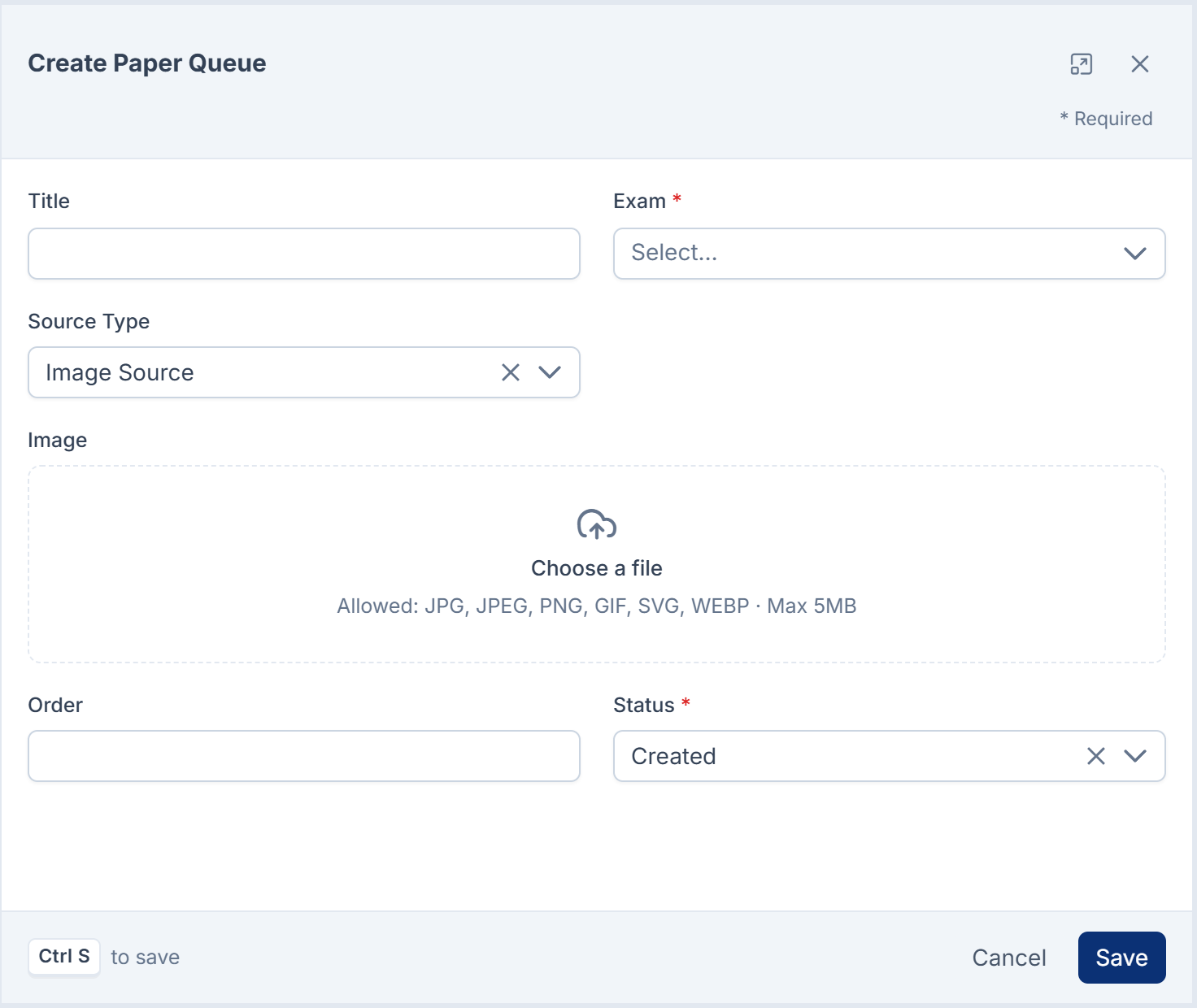
The list also shows Progress (imported against extracted questions), Cost (USD) (in rupees, as for exams), the question Type and Is Math? found in the extract, and Created At.
Paper statuses
| Status | Meaning |
|---|---|
| Created | Added, waiting to be read. |
| Processing | Being read by AI. |
| Extracted | Read; questions are ready to check. |
| Re-Queued | Sent back to be read again. |
| Imported | Every extracted question is in the bank. |
| Partial Inserted | Some extracted questions are in the bank. |
| Skipped (no AI) | No AI provider was available, so nothing was read or charged. |
| Failed | Reading failed after three tries. |
| Pending, Partial Extract, Updated, Review Pending, Completed, Cancelled | Set by people during review, to track where a page stands. |
Mock test
Question Bank › Mock Tests. See Create a mock test.
| Tab | Field | Rules and notes |
|---|---|---|
| Test Details | Title | Required. Up to 255 characters. |
| Slug | Required. Up to 255 characters. Unique. Can't be changed after creation. | |
| Status | Active or Inactive. Only Active tests count as open to learners, although in this version learners can't see or take any test. | |
| No. of Revisions | The most attempts a learner can make, counting the first. 0 or empty means unlimited. | |
| Revision Interval (in Days) | Days a learner must wait after starting one attempt before the next. 0 means no wait. | |
| Expose Answer | Includes the correct answers in a learner's result. Learners can't open their results in this version, so it has no visible effect for them. | |
| Questions | Exams | Only questions from these exams. Empty means any exam. |
| Questions | The question types to include. Empty means every type. | |
| Category | Only questions whose Category contains this text. | |
| Math Filter | All Questions, Math Questions or Non-Math Questions. | |
| No. of Questions | How many matching questions to take: a number, -1 for all, or a range such as 0-50. Empty or 0 takes none. |
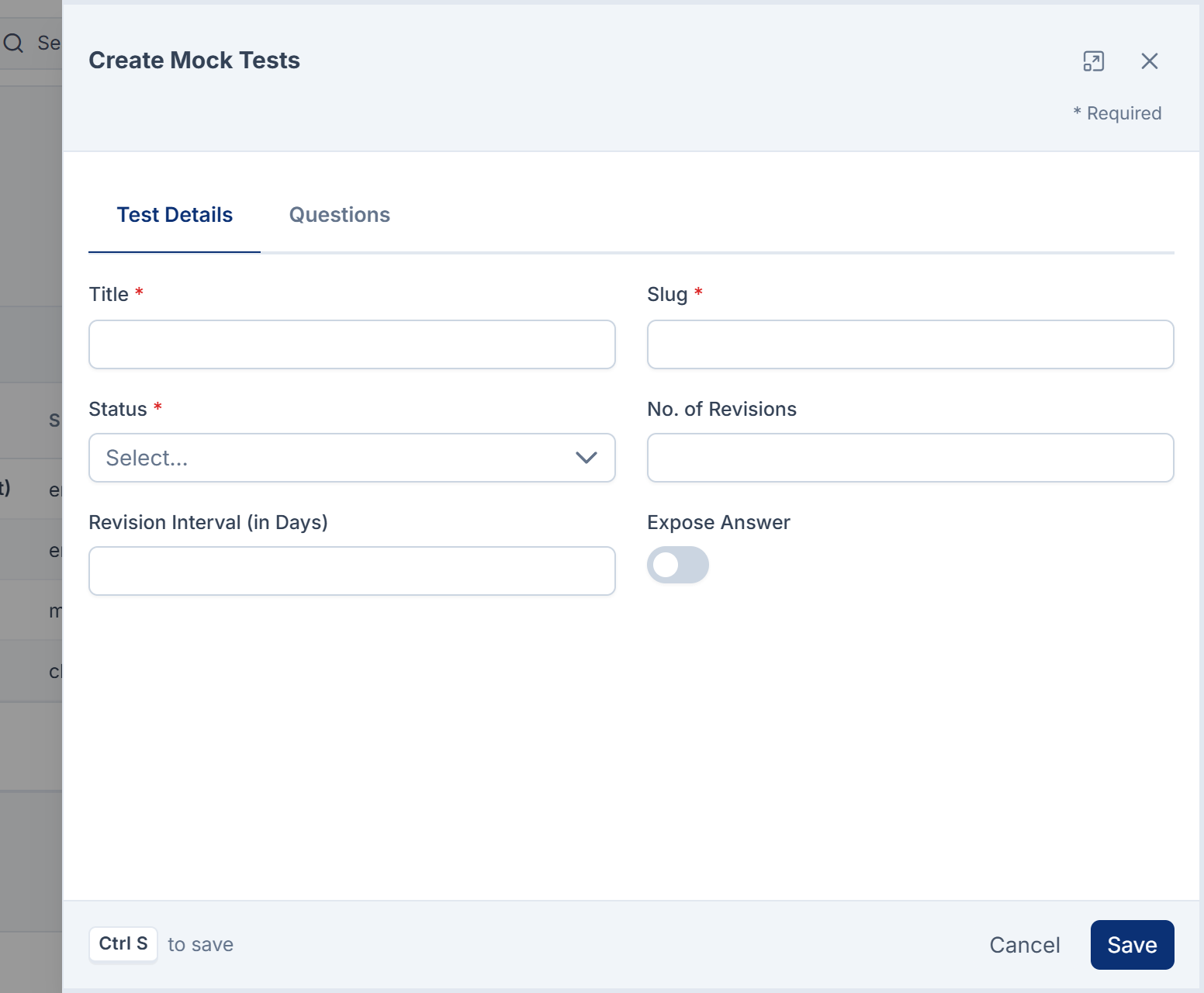
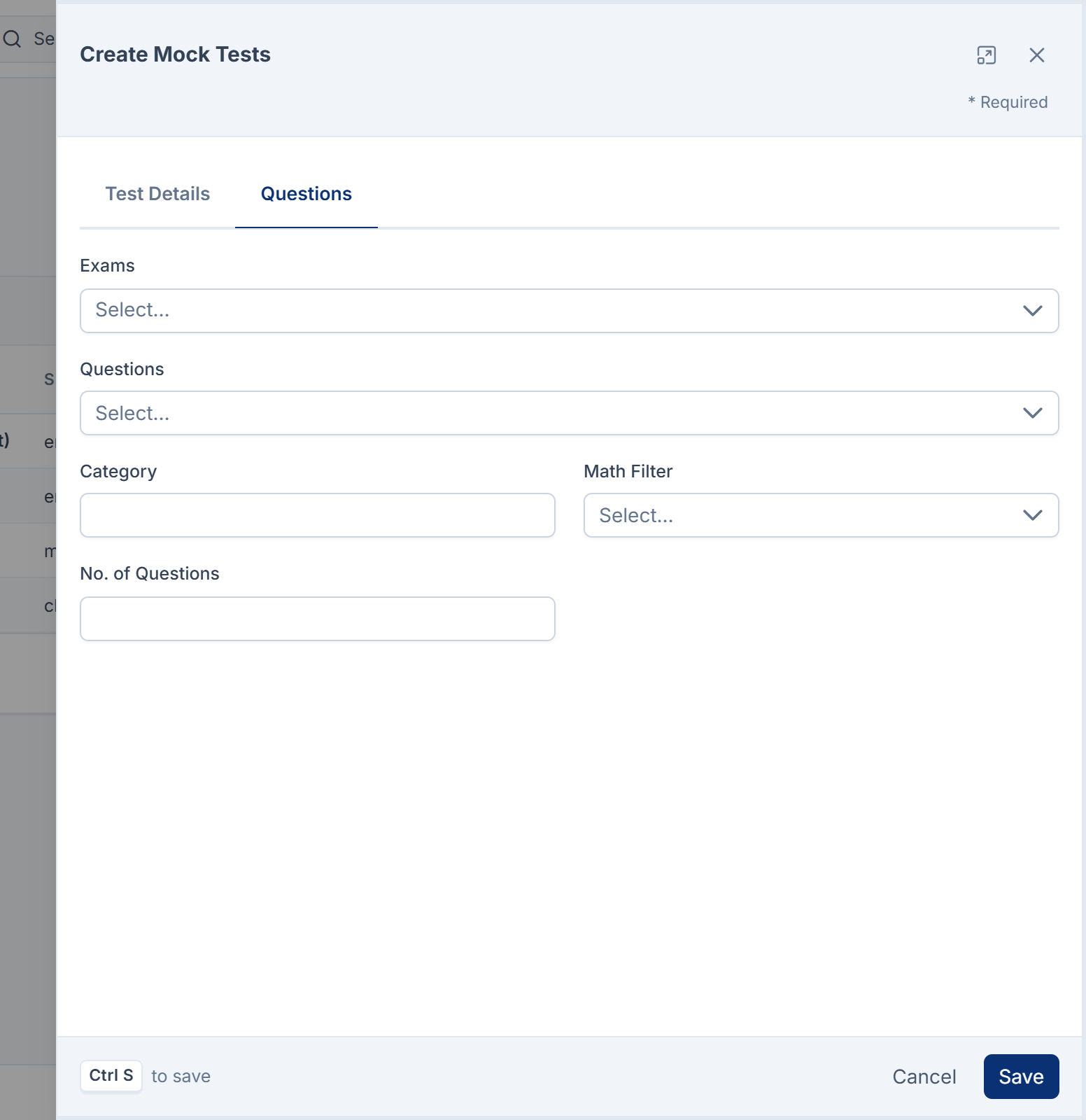
The Questions tab is hidden once anyone has sat the test. The list shows Title, Slug, Status, Questions (how many), Revise Interval (attempts and days), Created At and Updated At, and each row has Print.
Test submission
Question Bank › Test Submissions is read-only. Columns: ID, Mock Test, Status (Completed, In Progress, Cancelled), Revision (the attempt number, such as Rev 2), Started (the learner and when), Test Result (attempted, correct, wrong, accuracy, time and time per question), Created At and Updated At. Each row has Analytics and Delete. See Review test submissions and analytics.
Notifications
| Notification | Sent | Default channels |
|---|---|---|
| Mock Test Assigned | To a learner when they start a new attempt. | In-app and email |
| Mock Test Completed | To a learner when they finish an attempt. | In-app and email |
| Question Added to Exam | To the person who creates a question, in the builder or the Edit form. | In-app |
In 3.5.2 no attempt can be started or finished, so the two mock test notifications are never sent. Question Added to Exam is described as sent "when new questions are loaded into an assigned exam", but it goes to whoever created the question, and reads "new questions have been added to your assigned exam". Turn them on or off in Notification Manager. See Turn a notification on or off.
Permissions
Give these through a role. See Give someone a role. Learners need none of them to open My Tests.
| Group | Permissions | Notes |
|---|---|---|
| Exam Boards, Topics, Sub Topics | feature. list, view, create, edit, delete, restore, remove | Shared reference data: no Own versions. delete moves to the trash; remove deletes forever. |
| Exams | feature.: the seven above, plus list_own, view_own, edit_own, delete_own, restore_own, remove_own | Own versions limit a person to exams they created. |
| Questions | feature.: the seven plus their Own versions, and: | |
add_to_test (Add Questions to Mock Test) | The Add to test bulk action. | |
bulk_export (Bulk Export Questions) | Export to HTML, OMR answer sheet, and a mock test's Print. | |
bulk_soft_delete, bulk_restore, bulk_delete | Kept for compatibility. The list's bulk delete and restore use the per-question permissions. | |
| Paper Queues | feature.: the seven plus their Own versions, and: | |
review (View Paper Queue Review) | Shows the Status action on the review screen. Saving a status also needs edit (or edit_own for your own pages). | |
requeue (View Paper Queue Requeue) | ReQueue the Paper on the review screen. edit_own also allows it on your own pages. | |
extract (View Paper Queue Extraction) | Open a page's source document. view_own also allows it on your own pages. | |
bulk_import (Bulk Import Paper Queues) | The Import action. | |
bulk_soft_delete, bulk_restore, bulk_delete | Bulk trash, restore and delete forever. | |
| Mock Tests | feature.: the seven plus their Own versions | |
| Test Submissions | feature.: the seven plus their Own versions | create and edit grant nothing: no screen creates or edits a submission. |
New Question Bank permissions are never added to roles automatically, except for super admins. Grant them to each role that needs them.
Thanks. That helps us decide what to write next.
Thanks for telling us what was missing.
You already answered for this article today. Thanks.
We got a lot of answers from your network just now. Try again in a few minutes.
We couldn't send that. Check your connection and try again.
Links in this article
Printed from help.bsscn.com. The online article may have changed since.