A property or requirement won't save
Saving a property or a requirement is refused with a message about the owner, the buyer, the budget, the areas or a deal in progress. Find what each message means and how to fix it.
- Applies to
- Property CRM 5.1 and later
- Who can do this
- Team member
- Permission
feature.pcrm. property.edit - Where
- Property CRM › Properties
On this page
Symptom
You select Save on a property or a requirement, and the form stays open with a message. A message about one field shows under that field, and the top of the form says how many fields need attention. Find the message below:
| Message | Go to |
|---|---|
| The owner must be a client who holds the Seller role. | 1 |
| The buyer must be a client who holds the Buyer role. | 1 |
| The maximum budget must be greater than or equal to the minimum. | 2 |
| The maximum area must be greater than or equal to the minimum. | 2 |
| Carpet area can't exceed the built-up area., or another area or floor message | 3 |
| A message that starts This listing is part of a transaction or This requirement is part of a transaction | 4 |
| That status is set by the under-offer or completion action, not by editing. | 4 |
| Choose a business before making this change. | 5 |
Check these, in order
1. The owner or buyer doesn't hold the right deal role
A property's Owner must be a client with the Seller role, and a requirement's Buyer a client with the Buyer role. This also catches records saved before someone took the role away from that client: they can't be saved again until it's fixed.
Fix: do one of these:
- On the client, tick the role in Acting as and select Save. See Add a client.
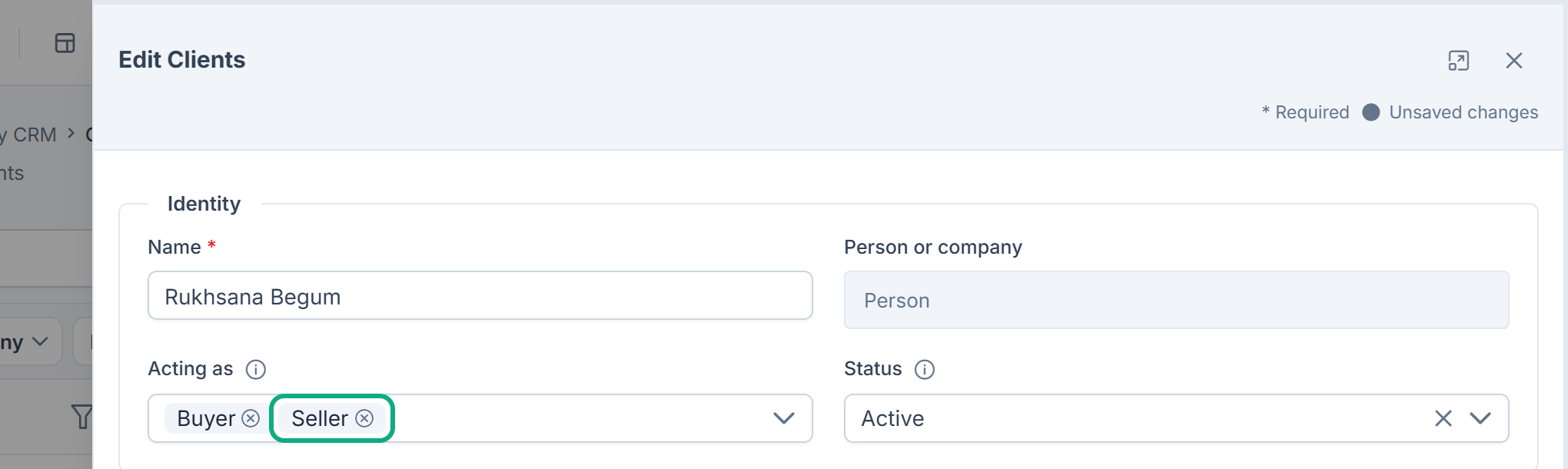
- In the form, choose another owner or buyer who holds the role.
- Use New owner or New buyer in the form. If the mobile number belongs to someone already on record, Laramin links them and adds the role.
See Deal roles: buyer, seller, tenant, landlord and more.
2. A maximum has no minimum, or is below it
On a requirement, Budget (max) must be at least Budget (min), and Area (max, sq.ft) at least Area (min, sq.ft). A maximum with the minimum left empty is refused too.
Fix: enter the minimum. If the buyer has no minimum, enter 0. Or check that the maximum isn't lower than the minimum.
3. The areas or floors disagree
A property's areas must step up: Carpet Area (sq.ft) no bigger than Built-up Area (sq.ft), and Built-up Area (sq.ft) no bigger than Super Built-up Area (sq.ft). Floor Number can't be higher than Total Floors.
Fix: correct the figures on the Property Details step. See Property attributes by type.
4. The record is part of a deal
While a property is Under Offer, Sold or Rented, some fields are locked, on the property and on the requirement it's linked to:
| Message | Locked field |
|---|---|
| This listing is part of a transaction; its purpose cannot be changed here. | The property's Purpose |
| This listing is part of a transaction; its counterparty cannot be changed here. | The buyer recorded on the property |
| This requirement is part of a transaction; its status is set by the workflow. | The requirement's Status |
| This requirement is part of a transaction; its purpose cannot be changed here. | The requirement's Purpose |
| This requirement is part of a transaction; its buyer cannot be changed here. | The requirement's Buyer |
The property's own Status is read-only while it's Under Offer, Sold or Rented. On other properties, Status still lists Under Offer, Sold and Rented, but choosing one is refused with That status is set by the under-offer or completion action, not by editing.
Fix: save without changing those fields. To change them on a property that's Under Offer, select Release offer on the property first. A Sold or Rented property stays locked. See You can't mark a property Under Offer, Sold or Rented.
5. You're in All Workspaces, or the record is in another business
Records can only be added or changed while you work in one business. Fix: switch to the record's business. See Someone can't see or change Property CRM records.
Still not working?
Raise a ticket from Support Center in your Laramin app. Include this page's link, the record's code, and the exact message.
Thanks. That helps us decide what to write next.
Thanks for telling us what was missing.
You already answered for this article today. Thanks.
We got a lot of answers from your network just now. Try again in a few minutes.
We couldn't send that. Check your connection and try again.
Links in this article
Printed from help.bsscn.com. The online article may have changed since.