A backup or restore is stuck or failed
A backup stays in Processing or shows Failed or Partial, scheduled backups don't appear, a destination won't connect, or a restore is Pending, Failed or Rolled Back. Find the cause and fix it.
- Applies to
- Backup 1.1 and later
- Who can do this
- Platform owner
- Permission
feature.backup. backup.list
On this page
Symptom
One of these:
- On Backups › Backups History, a backup stays Processing, and you see Jobs are queued but not processing. Ensure the queue worker is running (php artisan queue:work).
- A backup shows Failed.
- A backup shows Partial.
- Scheduled backups never appear in the list.
- Test S3, Test SFTP or Test FTP says Connection failed:.
- On Backups › Restore Logs, a restore stays Pending, or shows Failed, Rolled Back or Dry Run Failed.
Find your symptom below.
Check these, in order
1. A backup stays in Processing, or a restore in Pending
Backups you start by hand, and real restores, run as background jobs. If no queue worker is running, the job waits forever. After about 20 seconds, Backups History warns Jobs are queued but not processing. Ensure the queue worker is running (php artisan queue:work).
Open Extra Utilities and look at Pending under Queue & Worker Status. A count that keeps growing means no worker is running.
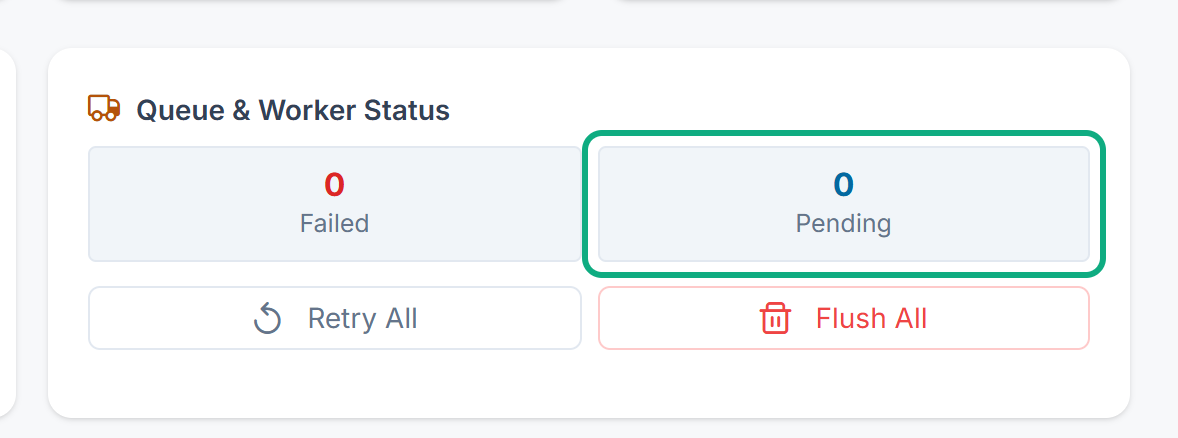
Fix: Ask whoever manages your server to start the queue worker. The waiting job then runs by itself, and the status changes. If a backup still shows Processing long after the worker started, delete that row and start a new backup. A backup can run for up to an hour before it's stopped.
If your server has no separate queue worker, the queue is worked through by your Laramin's scheduled jobs, once a minute. When those don't run, the queue stops too. See Scheduled jobs don't run.
2. A backup shows Failed
Laramin tries a backup you started by hand a second time, a minute later, before it gives up. The Problem column on Backups History says why it failed. Common causes are a full disk, a folder Laramin can't write to, and, in CLI mode, missing mysqldump on the server.
Fix: Read the Problem column. Ask whoever manages your server to check the free disk space, and the application log if you need more detail. In Write Permissions on Extra Utilities, check that Storage is writable. If you use CLI Binaries (Requires mysqldump/mysql CLI), try PDO Fallback (Default — Highly Portable) in Backup settings. Then start a new backup.
3. Scheduled backups don't appear
Schedules run from the scheduler, not from the queue.
- Open Developer Tools › Scheduler. If every Last Run says Never run, or all of them are old, scheduled jobs aren't running, and the cause isn't always the cron job. See Scheduled jobs don't run.
- On Backups › Schedules, check that the schedule's Status is Active, and that you selected Save changes.
- Remember when schedules run: Daily at midnight, Weekly at midnight on Sunday, Monthly at midnight on the first of the month.
4. A destination won't connect, or a backup shows Partial
| Message | What to do |
|---|---|
| Missing required credentials for S3. Save them first. | Fill in the required fields on the destination's tab and select Save changes. The test only uses saved details. |
| Connection failed: and a reason | Check the host, port, user name, password, bucket and region. Check that your server may connect out to that address, and that the user may write to the bucket or the Root Path. For an S3-compatible service, check Endpoint (optional) and Use Path-Style Endpoint. |
| Cannot activate S3 backups — enter its required credentials first (or use Test Connection to verify them). | You tried to turn on a destination before its required details were saved. Fill them in first. |
A copy to a destination that fails during a backup doesn't make the backup fail. The backup shows Partial, and the archive is safe on your Laramin's server. The Problem column says which copy failed, for example Copy to S3 failed: and the reason. If the reason is its required credentials are missing in Backup Settings., fill them in and save. If it's the destination refused the file, check the credentials, the bucket or folder, and that the user may write there. Then test the destination and start a new backup.
5. A restore failed or was rolled back
On Backups › Restore Logs, open the row actions menu and select View Process Log. The log shows each step, and the Error that stopped it.
| What you see | What it means | What to do |
|---|---|---|
| Rolled Back | The restore failed partway, and Laramin put back what it had replaced. Nothing changed. | Fix the cause in the error, then run a dry run and restore again. |
| Failed, and the log says Nothing was changed: the restore stopped before applying any data. | The restore found a problem with the archive before it changed anything. | Fix the cause in the error, then run a dry run and restore again. |
| Failed, and the log doesn't say Nothing was changed | The restore failed partway, and Laramin couldn't put everything back. | Restore the Full backup you made before you started. If you can't, raise a ticket from Support Center. |
| Backup file not found on disk | The archive is no longer on your Laramin's server. It may have been deleted by the retention policy, or by hand. | Laramin can't restore from cloud storage. Ask whoever manages your server to copy the archive back into place from your cloud copy or download. |
| Backup file checksum mismatch! | The archive changed after it was made, or is damaged. | Use another backup. |
| Orphaned incremental backup! Unable to find parent full backup. | The full or files backup that this incremental one builds on was deleted. | Restore a Full or Files backup instead. |
| This archive is encrypted, but no Archive Password is set in Backup Settings. | The backup was made with an Archive Password, and none is saved now. | Enter the password the backup was made with in Backup settings, then restore again. |
| This archive is encrypted, and the Archive Password in Backup Settings does not open it. | The password was changed after the backup was made. | Put back the password the backup was made with, then restore again. |
| The archive holds no database dump, so the database cannot be restored from it. | A Full or Database backup holds no database dump. | Use another backup. |
| The archive holds no files that can be restored to the uploads or public storage folders. | A Files backup holds none of your uploaded files. | Use another backup. |
| A message that ends The archive may be damaged. | Part of the archive doesn't read back intact. | Use another backup. |
| Failed to restore file (check permissions / file lock) | Laramin couldn't overwrite an uploaded file. | Ask whoever manages your server to check the folder permissions, then try again. |
Still not working?
Raise a ticket from Support Center in your Laramin app. Include this page's link, the backup's name, its type, its status and the exact message you see. For a restore, copy the process log into the ticket.
Thanks. That helps us decide what to write next.
Thanks for telling us what was missing.
You already answered for this article today. Thanks.
We got a lot of answers from your network just now. Try again in a few minutes.
We couldn't send that. Check your connection and try again.
Links in this article
Printed from help.bsscn.com. The online article may have changed since.